LinkedIn outreach campaigns – Most LinkedIn outreach fails before the prospect even finishes reading the first sentence.
Not because the product is wrong. Not because the timing is off. Because the message sounds exactly like every other pitch sitting in their inbox – generic, rushed, and clearly not written with them in mind.
The good news? The bar is genuinely low. Most people doing LinkedIn outreach are doing it badly. That means if you get the fundamentals right, you stand out without trying very hard.
This guide walks you through exactly how to build LinkedIn outreach campaigns that get real replies from optimizing your profile and identifying the right prospects, all the way to writing messages, building follow-up sequences, and tracking what actually moves the needle.
No filler. No recycled theory. Just what works.
Why LinkedIn Outreach Works Differently Than Cold Email
Before getting into the steps, it helps to understand what LinkedIn actually is as a sales channel.
LinkedIn is a professional network, not an inbox. People are on it to learn, hire, stay visible, and connect with peers in their field. Outreach that respects that context gets a response. Outreach that treats it like a bulk email list gets ignored or reported.
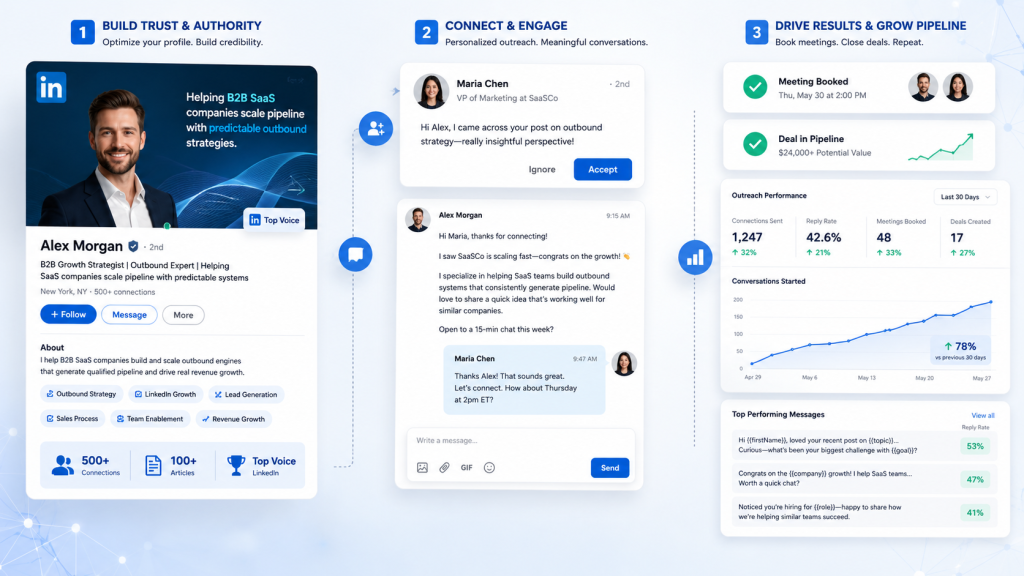
The data backs this up. According to Expandi’s Q1 2025 benchmark report analyzing over 70,000 real LinkedIn outreach campaigns, the platform-wide average connection acceptance rate sits at 28.5%, with a message reply rate of around 10–11%. A separate Belkins study of B2B LinkedIn outreach found that personalized messages see response rates nearly double those of generic ones.
That’s not a small difference. At scale, it’s the difference between a pipeline and a ghost town.
The biggest mistake sales teams make is copying their cold email playbook onto LinkedIn. The channel has its own rules:
- Message length: Shorter wins. Messages under 400 characters see 2x higher response rates than longer ones. Write for mobile, where most of LinkedIn’s traffic happens.
- Tone: Less formal than email, more direct than a social DM. Think: how you’d talk to someone at an industry event.
- Timing: The connection request is a separate touchpoint from your first message. Treat it that way.
- Warmth signals: LinkedIn surfaces mutual connections, shared groups, and recent activity. These are free personalization hooks most people ignore entirely.
The platform has also crossed 1 billion members, giving B2B teams access to a pool of decision-makers no other channel comes close to matching.
The opportunity is real. The question is whether your campaign is built to take advantage of it.
Step 1: Get Your LinkedIn Profile Ready Before You Reach Out
Most people skip this step and go straight to messaging. That’s a mistake.
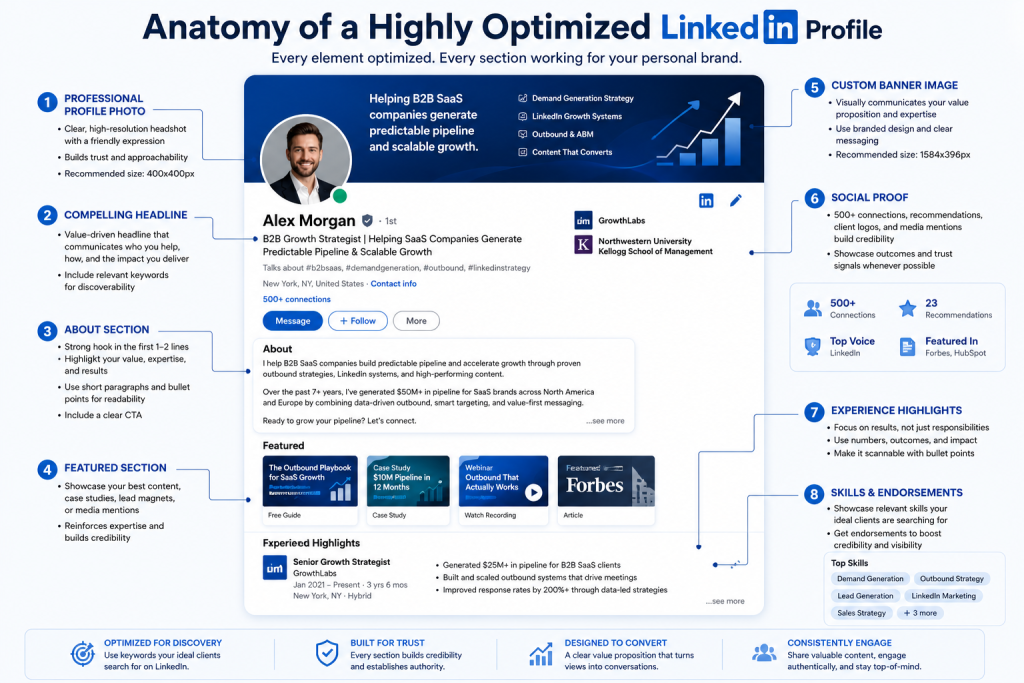
When a prospect receives your connection request or message, their first move is to check your profile. Your profile is your landing page. If it doesn’t immediately communicate who you are, who you help, and why you’re credible, they won’t reply, no matter how good your message is.
Here’s what a profile built for outreach actually needs:
A headline that leads with value, not just a title: Instead of “Account Executive at XYZ,” try something like “Helping SaaS sales teams book more qualified meetings through LinkedIn outreach.”
A clean, professional photo: Profiles with photos get far more profile views and connection acceptances than those without.
A short, direct About section: Write for your target audience. Speak to their problems. Explain how you solve them. Skip the career summary.
A banner image that reinforces your positioning: Use this space to highlight what makes you different or who you work with
Visible social proof: Recent activity on the platform – posts, comments, and reposts signals you’re a real person with a real perspective. Prospects notice.
Also worth monitoring: your LinkedIn Social Selling Index (SSI). It measures how effectively you build your professional brand, find the right people, engage with insights, and develop relationships. A stronger SSI tends to correlate with better visibility in search results and more outreach success.
Step 2: Define Your ICP and Segment Your Audience Precisely
Vague targeting is one of the most common reasons LinkedIn outreach campaigns fail.
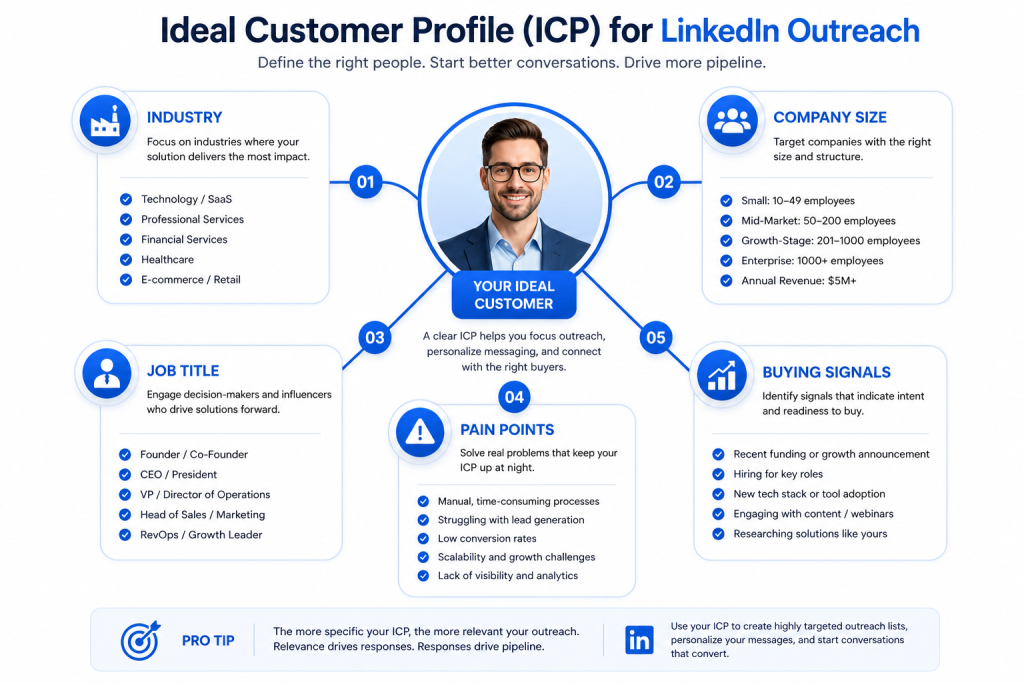
“Marketing professionals” is too broad. “VP of Marketing at B2B SaaS companies with 50-200 employees, actively hiring SDRs, based in the US” is an audience you can actually write for.
Start by defining your Ideal Customer Profile, the firmographic and demographic filters that describe your best-fit customers. Think industry, company size, tech stack, growth stage, geography, and team structure.
Then layer on your buyer persona. What are the specific pain points of this person? What language do they use to describe their challenges? Who influences their buying decisions? What content do they engage with?
Once that’s locked in, use LinkedIn Sales Navigator to filter by those exact criteria and build a targeted lead list. The tighter the audience, the more relevant your outreach and the higher your acceptance and reply rates.
One more thing: don’t treat all segments the same. A message to a solo consultant should read nothing like a message to a VP at a 500-person company. Segment your audience, then write specifically for each group.
Step 3: Pick the Right Outreach Method for Your Campaign
How to build LinkedIn outreach campaigns that work also depends on choosing the right message type for the right situation. Here’s a breakdown of your four main options:
Connection Requests: Your first contact with someone you’re not yet connected with. You can send a short note with your request (up to 300 characters). Personalized connection request notes have a reply rate of around 9.36%, compared to 5.44% for requests without a note. Keep it short, specific, and relevant, not a pitch.
Direct Messages (DMs): Once someone accepts your connection request, you can message them freely with no character limit. This is where the real conversation happens. Your follow-up message after acceptance is your most important touchpoint.
InMails: InMails lets you message people you’re not connected with, useful for high-priority prospects. However, LinkedIn now significantly limits Open InMail sends, so use them selectively. InMails generally see strong open rates, but every credit counts.
Engagement-First Approach: Like and leave a genuine comment on your prospect’s posts before you send a message. When your name shows up in their notifications a couple of times before your outreach arrives, you’re no longer a cold contact. Response rates improve noticeably with this approach.
For most campaigns, a combination of all four works best: engage first, then send a connection request, then follow up with a DM sequence.
Step 4: Write Connection Requests That Get Accepted
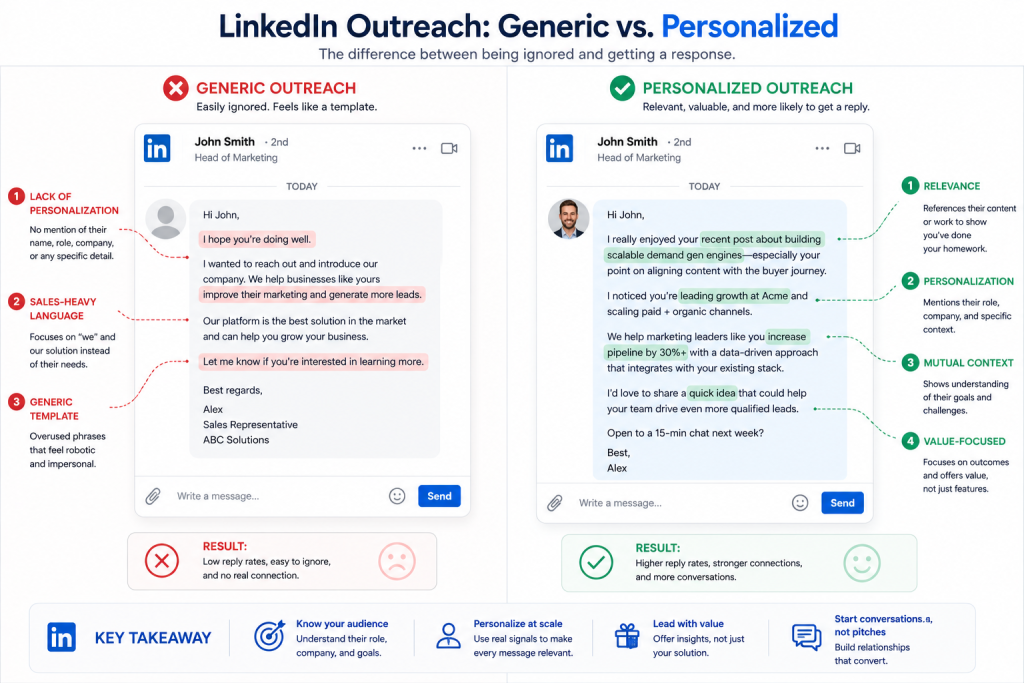
Your connection request is an introduction, not a pitch.
LinkedIn gives you 300 characters for a note. Use them to establish context and earn the connection, nothing more.
What works:
- A specific, genuine reason for connecting (“Been following your content on outbound sales – would love to connect”)
- Mutual context (“We share a connection in [Name] / both in [Group]”)
- A light professional hook (“Building something for [their industry] teams and thought it’d be worth connecting”)
What doesn’t work:
- Opening with “I” (LinkedIn’s data shows this drops acceptance rates)
- Pitching anything in the connection note
- Vague lines like “I’d love to connect with professionals like yourself”
- Anything that reads like it was sent to 500 people today
Short, human, and specific. That’s the bar. Get them to say yes to connecting first — everything follows from there.
LinkedIn Connection Requests has more on building multi-touch cadences across LinkedIn.
Step 5: Build a Message Sequence That Moves Conversations Forward
Once someone accepts your connection request, you have a warm lead. Now you need a sequence that nudges the conversation without feeling like an automated drip campaign.
Research shows that 3–4 touchpoints over 2–3 weeks produce a 40% higher response rate compared to single-touch outreach. Here’s a structure that works for most B2B scenarios:
Message 1: The Opener (1–2 days after connection)
This is not a pitch. It’s the start of a conversation.
A strong opener does one of three things: references something specific from their profile or content, offers something of value upfront, or opens with a question about a problem you know they’re likely dealing with.
Keep it under 400 characters. Aim for 2–3 short sentences. End with a question that invites a reply.
Example structure:
“Hey [Name], saw your recent post on [topic]. [One-sentence genuine reaction]. Curious whether you’re running into [specific challenge] on your end?”
No pitch. No “I’d love to show you what we do.” Just a relevant question from someone who’s clearly looked at their work.
Message 2: The Follow-Up (4–5 days after Message 1, if no reply)
Most people don’t reply to the first message because they missed it, not because they’re uninterested. A follow-up is expected. Just don’t be passive-aggressive about it.
Reference the first message, restate the value briefly, and keep it short.
“Hey [Name], just circling back on my last note. [One-line restatement of the value or question]. Happy to share more if it’s relevant to what you’re working on.”
Message 3: The Break-Up (5–7 days after Message 2)
The last message in the sequence. Close the loop cleanly – this one often gets the highest reply rate of all three.
“Hey [Name], I’ll leave it here so I’m not clogging your inbox. If [specific pain point] becomes a priority down the road, happy to reconnect. Either way, good luck with [something specific from their profile].”
No guilt. No pressure. Just a genuine close that leaves the door open.
Step 6: Personalize at Scale Without Burning Out Your Team
Everyone agrees that personalization matters. The problem is doing it at volume without killing your team’s time.
Tier your personalization by account priority:
- Tier 1 High-value targets: Full research, fully custom messages at every touchpoint
- Tier 2 Medium-value targets: Template-based with 1–2 personalized lines per message
- Tier 3 Broad reach: Merge field personalization (name, company, title, industry)
Use LinkedIn’s native signals as your fastest personalization hooks:
- Recent posts (takes 20 seconds, highest signal)
- Career changes in the last 90 days (strong timing trigger)
- Company news showing up in their activity feed
- Shared connections or groups
Build modular templates, not monolithic ones. Instead of one long fixed template, build interchangeable blocks, openers, value props, CTAs, and follow-up lines. Mix and match based on the prospect’s profile. You get consistency plus the flexibility to actually sound human.
Want to skip the manual research? See how SendCopy.ai surfaces prospect signals automatically →
Step 7: Write CTAs That Ask for the Right Thing at the Right Time
One of the fastest ways to tank a LinkedIn campaign is asking for too much too soon.
“Would you be open to a 30-minute call this week?” is a big ask from a stranger. It requires checking a calendar, deciding if you’re worth their time, and committing to something with someone they’ve never spoken to.
Ask for less friction first. The goal of the first message is a reply. The reply earns the conversation. The conversation earns the call.
Low-friction CTAs that work:
- “Would it be helpful if I sent over [specific resource]?”
- “Does [specific challenge] sound like something your team is dealing with?”
- “Happy to share [relevant framework/data] if useful – just let me know.”
- “Worth a quick 10-minute call to see if there’s a fit?”
Match the ask to the stage. Don’t skip steps.
Step 8: Track the Metrics That Actually Matter
If you’re not tracking, you’re guessing. Here are the numbers to watch benchmarked against current platform data:
| Metric | What It Tells You | 2025–2026 Benchmark |
| Connection acceptance rate | Targeting quality + profile appeal | 28–35% average; 40%+ is strong |
| Message reply rate (opener) | Personalization + message quality | 10–11% average; 20%+ is strong |
| Positive reply rate | How well your value prop resonates | 25–35% of all replies |
| Meetings booked | Pipeline impact | Depends on ACV and close rate |
One important note on benchmarks: platform averages hide enormous variation. According to Expandi’s 2026 analysis of 13.3 million outreach attempts, SaaS and software accounts specifically land in the lower half on reply rates – 8.8% message reply – partly due to outreach saturation among software buyers. If you’re in SaaS, expect a harder baseline and plan your personalization accordingly.
Track metrics by campaign segment, not just in aggregate. Break them down by job title, industry, and message variant. That’s where you find what’s actually working.
A/B test one variable at a time. Opener A versus opener B. Then CTA A versus CTA B. Changing everything at once means you’ll never know what moved the needle.
This blog covers how to run split tests on outreach sequences without muddying your data.
Step 9: Stay Inside LinkedIn’s Limits
LinkedIn actively limits outreach volume, and it’s been tightening enforcement. Pushing past those limits can result in account restrictions.
Current safe thresholds:
- Connection requests: 20–25 per day for standard accounts; up to 100 per week on Sales Navigator
- Direct messages: No hard cap, but high send volume with low engagement triggers platform flags
- InMail: Limited by monthly credits; use for prospects you can’t reach through connection requests
Avoid automation tools that simulate browser clicks or send at robotic fixed intervals. LinkedIn’s detection has improved significantly. The safest approach: use tools for list building, CRM sync, and sequence management, but keep message delivery within LinkedIn’s approved rate limits.
If you’re running high-volume prospecting, use a dedicated sales rep account rather than the founder’s personal profile. Protect the accounts that matter most.
LinkedIn Outreach Campaign Do’s and Don’ts
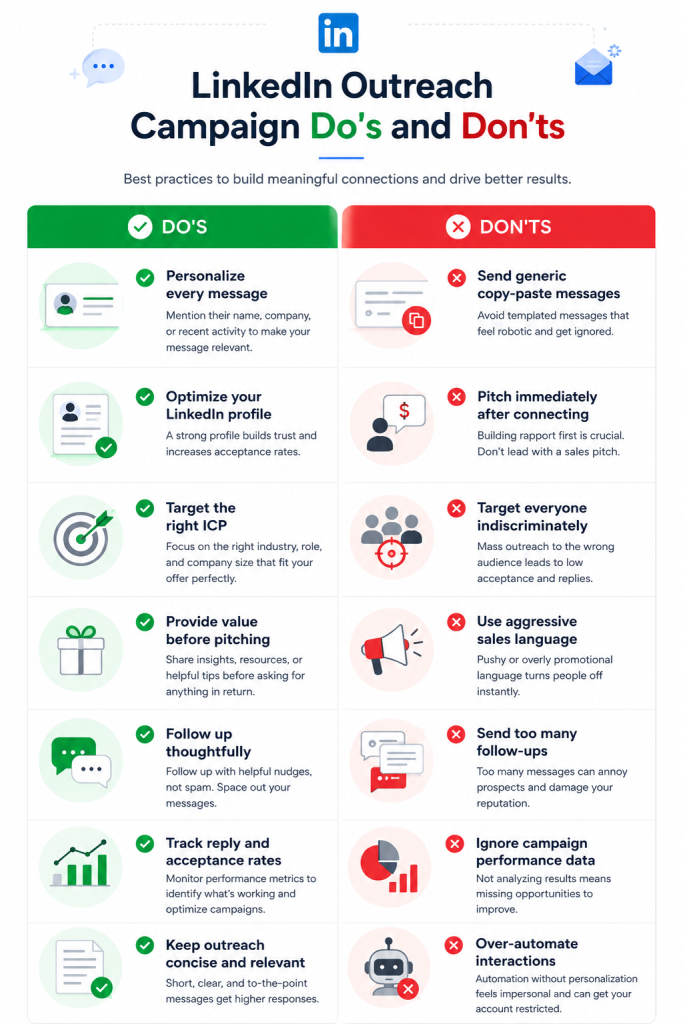
Do:
- Engage with your prospect’s posts or content before sending your first message
- Filter for prospects who have been active on LinkedIn recently — they’re more likely to see and reply
- Keep every message short, specific, and written for that person
- Follow up consistently with fresh content each time
- Track every metric and adjust based on what the data tells you
- Use a platform like SendCopy.ai to manage sequences, replies, and analytics without letting anything slip through the cracks
Don’t:
- Send the same generic pitch to hundreds of leads
- Open your first message by talking about your product or company
- Treat LinkedIn as a pure numbers game – quality conversations beat volume every time
- Burn through InMail credits on untargeted prospects
- Skip the follow-up after one unanswered message
- Neglect your profile – a weak profile kills strong messages
Frequently Asked Questions About How to Build LinkedIn Outreach Campaigns
What is a LinkedIn outreach campaign?
A LinkedIn outreach campaign is a structured sequence of message connection requests, follow-up DMs, or InMails sent to a targeted list of prospects with the goal of starting business conversations that lead to meetings, demos, or deals.
How many LinkedIn connection requests can I send per day?
For standard LinkedIn accounts, 20–25 per day is a safe range. Sales Navigator users can send up to 100 per week without triggering restrictions. Stay within these thresholds and prioritize quality over volume.
Should I always include a note with a connection request?
It depends. Short, genuine notes improve acceptance rates with cold prospects, particularly when they reference something specific about the person. For warmer leads or people you’ve met, a note adds useful context. Blank requests work fine when your profile is clear about who you are and who you help.
How many follow-ups should I send?
Two to three is the sweet spot for most campaigns. Multi-step sequences with 2-3 follow-ups consistently achieve response rates of 20-30% or higher. Space them 3-7 days apart and make each one different.
What’s the ideal length for a LinkedIn outreach message?
Keep your opener under 400 characters, ideally 2–3 short sentences. Messages under 400 characters see roughly 2x the response rate of longer ones. People read LinkedIn on mobile; walls of text get closed without reading.
How long should a LinkedIn outreach sequence be?
Three messages are the standard: an opener, one follow-up, and a break-up message. For longer sales cycles or higher-ACV deals, a fourth touchpoint can make sense. Beyond that, you’re likely generating more friction than you’re recovering.
Is LinkedIn outreach better than cold email?
For B2B, LinkedIn typically outperforms cold email on reply rates, averaging 10–11% versus around 3–4% for email. The channel also adds social proof: prospects can see your profile, mutual connections, and content before they decide whether to engage. The two channels work best in combination, not in competition.
How do I personalize at scale without the research eating all my time?
Tier your approach. Spend real research time on your highest-value targets. For mid-tier prospects, build modular templates and use LinkedIn’s native signals (recent posts, career changes, company news) as quick personalization hooks. For broad reach, merge field personalization is better than nothing.
How do I scale LinkedIn outreach without getting my account restricted?
Use a platform built with account safety in mind. SendCopy.ai was specifically built after seeing too many LinkedIn accounts get restricted by aggressive automation. Safety, relevance, and timing are built into every campaign by default.
Ready to Build LinkedIn Outreach Campaigns That Actually Convert?
You now have the full picture of profile optimization, audience targeting, message writing, follow-up sequences, timing strategy, and performance tracking.
The difference between a LinkedIn outreach campaign that gets ignored and one that books meetings consistently isn’t luck. It’s a structured process, genuine personalization, and a tool that helps you run it without cutting corners on safety or quality. If you’re building outreach campaigns for clients or your own pipeline, Sendcopy.ai handles the sequencing, follow-ups, and tracking so your team stays focused on replies, not admin. Start your free trial → Or if you’d rather see it in action first: Book a 15-minute walkthrough →