You sent 80 connection requests this week. Half of them were accepted. Now 40 new conversations are sitting across two separate LinkedIn inboxes – your standard profile and Sales Navigator, while your team’s other three senders have their own threads running in completely different tabs. By the time you get to the third tab, the first conversation has already gone cold.
This is the inbox problem every serious LinkedIn outreach team eventually hits. And it’s exactly what a LinkedIn unified inbox is built to fix. This guide walks you through what it is, why the native inbox breaks down at scale, what a proper unified inbox does, how to set one up, and how SendCopy.ai handles it with Unibox, all backed by real data.
What Is a LinkedIn Unified Inbox?
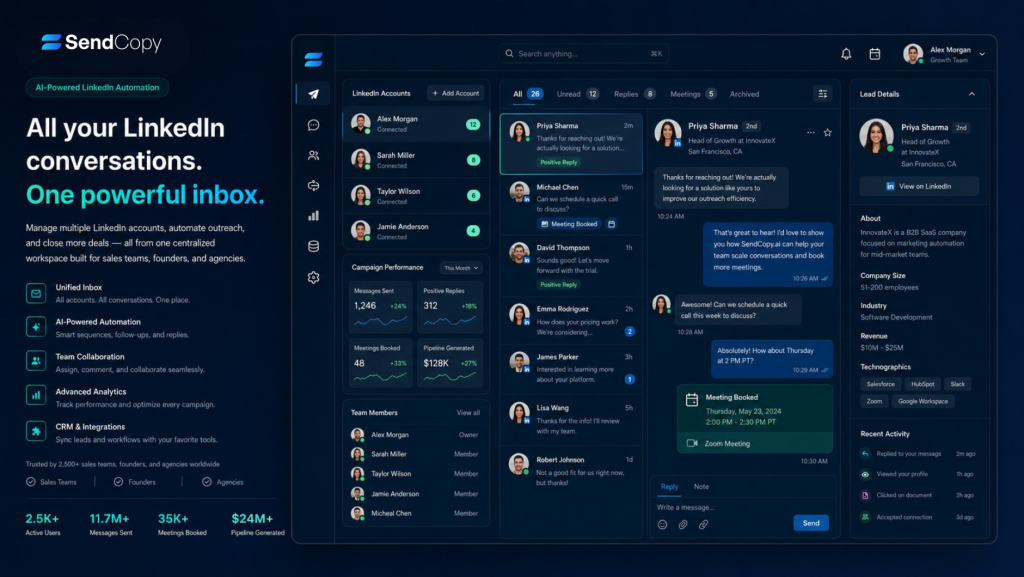
A LinkedIn unified inbox pulls every message thread from every connected profile into a single, organized view. Instead of bouncing between your standard LinkedIn inbox, your Sales Navigator conversations, and separate logins for each sender your team manages, you get one dashboard where everything lives.
The concept is familiar. Email tools like Gmail and Outlook have offered multi-account inboxes for years. The difference with LinkedIn is the complexity: you have connection requests, InMail threads, message requests from people outside your network, and Sales Navigator conversations all operating as separate streams. A proper LinkedIn unified inbox treats all of them as one.
For solo founders doing their own outreach, that might mean two or three inboxes in one place. For agencies and sales teams running multi-sender campaigns, it could mean managing dozens of active accounts from a single screen, with zero tab-switching and no missed replies.
The concept is straightforward. The execution is where most tools fall short.
Why LinkedIn’s Native Inbox Falls Short
LinkedIn’s built-in inbox was designed for social networking, not B2B sales pipelines. That distinction matters more than most people realize. The platform started as a professional networking site, the inbox was built for individuals, not coordinated sales teams running multi-account outreach campaigns.
Here’s what breaks down once volume increases:
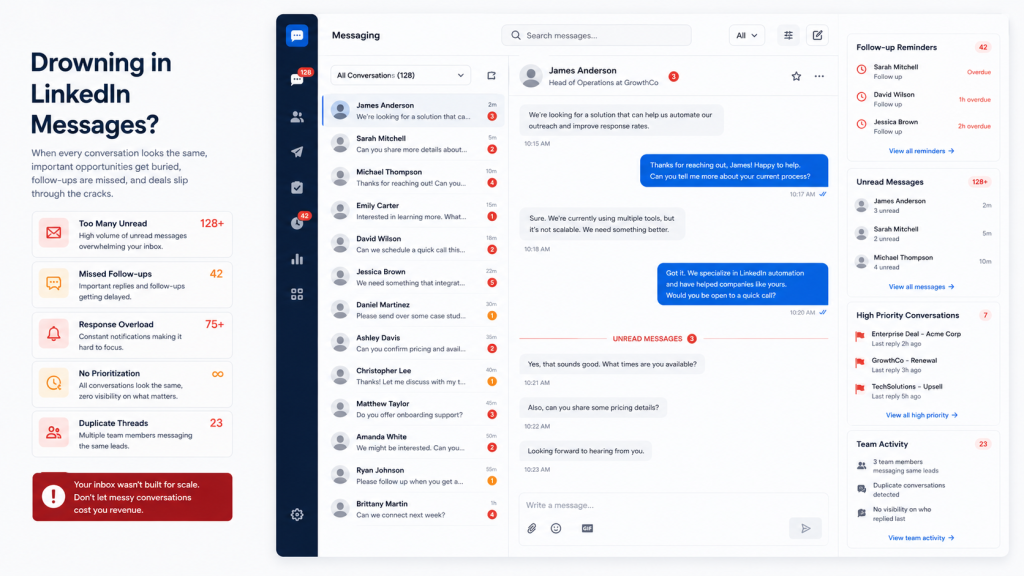
No cross-account visibility: When each LinkedIn account lives in its own inbox, the only way to stay on top of replies is to check them one by one. Open account A, scan for new messages, switch to account B, repeat. Logging in and out of accounts adds friction, replies get missed because the rep is logged into the wrong sender, and the team loses track of which campaign produced the reply. Multiply that across five accounts, and you start to understand why things fall through the cracks.
No labeling or tagging: A “Hot Lead who replied positively” looks identical to “someone who said not interested.” You have to remember which is which, or scroll back through every thread every time.
No follow-up reminders: If you don’t reply to a message today, it disappears down the list. There’s no way to snooze it and bring it back when the timing is better.
No CRM sync: Every piece of data you capture from a LinkedIn conversation has to be manually entered into your CRM. At scale, that adds up to hours of non-selling work every week.
No team visibility: When one SDR handles a conversation and then goes on leave, no one else can easily pick up where they left off. There’s no shared view, no assignment system, no handoff. LinkedIn reply rates can reach 50%, significantly higher than email typically yields. That performance advantage disappears fast when your inbox turns into a disorganized scroll.
The Real Cost of Inbox Chaos
This isn’t a minor inconvenience. The productivity loss from a disorganized inbox is measurable.
According to research cited by HBR, the average professional spends over 3 hours per day managing work-related messages — losing roughly 28% of their working week to inbox activity. For sales teams running outreach across multiple accounts, that number gets worse. Spending 1–2 hours daily on inbox chaos costs a $100K professional somewhere between $20,000 and $40,000 in lost productivity annually. Losing just one $50K deal because it got buried in the wrong tab pays for a proper inbox management tool for years.
On top of that, teams running outreach from three or more sender accounts hit a specific breaking point: each rep is no longer just managing their own conversations; they’re checking inboxes that belong to someone else, and replies slip. Every warm reply that goes unanswered for 24+ hours is a lead cooling down. At scale, that’s not an inconvenience; it’s a pipeline problem.
How a LinkedIn Unified Inbox Actually Works
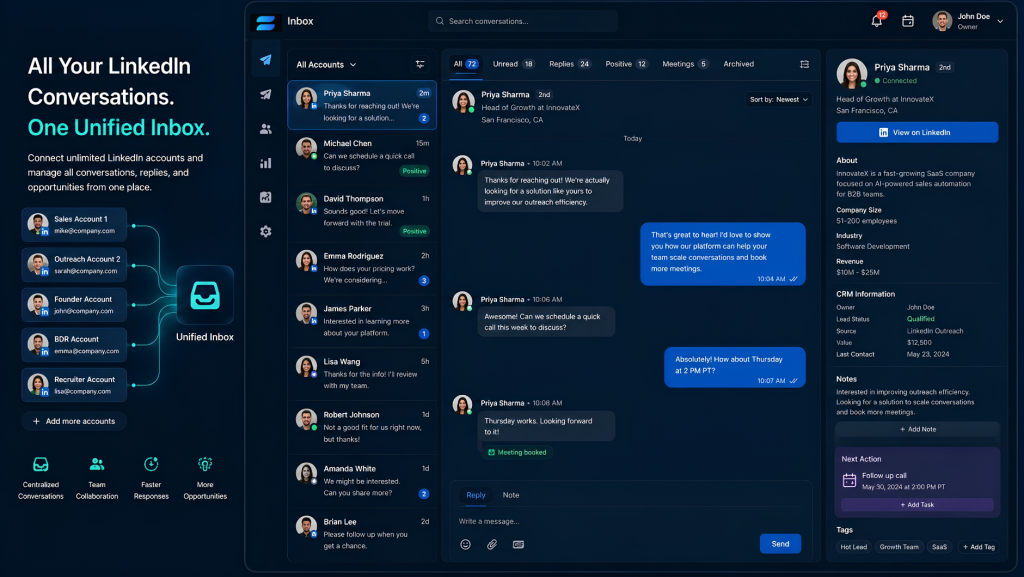
A good LinkedIn unified inbox does more than combine messages. Here’s what it actually gives you:
Step 1 – Account connection: You connect your LinkedIn profiles (or multiple sender profiles) to the platform, typically through secure session authentication. Once connected, each account stays active in the dashboard without requiring repeated logins.
Step 2 – Message aggregation: The platform pulls in all conversations across every connected account and inbox type, standard DMs, InMail threads, Sales Navigator conversations, and connection requests with notes. Everything lands in one feed.
Step 3 – Organization layer: This is where strong tools separate from basic ones. A solid labeling system allows you to categorize conversations with custom labels like “Hot Lead,” “Candidate,” or “Client.” This instantly transforms your one-dimensional inbox into a multi-dimensional command center, with the ability to view conversations in separate, prioritized inboxes so you can focus exclusively on hot leads when in sales mode.
Step 4 – Sender-specific replies: When you reply from a unified inbox, your response goes back as the original sender. Not a generic admin account. The same LinkedIn profile that started the conversation. From the prospect’s view, the conversation looks completely normal.
Step 5 – Real-time sync: Messages sync automatically. The whole point of a unified inbox is speed, and delayed syncing removes the main advantage. Every reply lands in the shared queue the moment it arrives.
Step 6 – CRM sync (advanced): The best tools push conversation data automatically to systems like HubSpot or Salesforce, removing the manual data entry that turns sales reps into data clerks. Connect your CRM on day one, not after three months of backlog has built up.
Who Needs a LinkedIn Unified Inbox
Sales Development Reps
SDRs running high-volume sequences need inbox speed above everything else. When a reply comes in, response time matters. A follow-up that arrives within minutes converts at a different rate than one that shows up the next morning after the prospect has moved on.
Sales development reps and demand generation specialists often use multiple accounts to tailor outreach campaigns to different target personas or industries. Once you’re managing three or more sender accounts, a unified inbox stops being optional.
Agencies Managing Multiple Client Accounts
This is where a unified inbox stops being convenient and starts being operationally necessary. An agency running LinkedIn outreach for ten clients across two or three senders per client is managing twenty or thirty active profiles. Without a centralized inbox, that’s thirty separate logins, thirty message streams, and thirty chances to send a duplicate message or miss a reply.
One inbox manager can handle all thirty from a single dashboard, and that’s exactly how teams scale outreach without scaling headcount at the same rate.
Founders Running Lean Outreach Operations
Founders doing outreach themselves or with a small team often don’t have time to log into multiple accounts daily. A unified inbox compresses all of that into one daily review, removing the context-switching that kills focus.
SDR Teams With Shared Inbox Management
As outreach scales, coordination becomes just as important as messaging. Without structure, multiple reps can reach out to the same lead, miss follow-ups, or respond inconsistently. A unified inbox gives managers full visibility without requiring them to log into every rep’s account individually.
Key Features to Look For
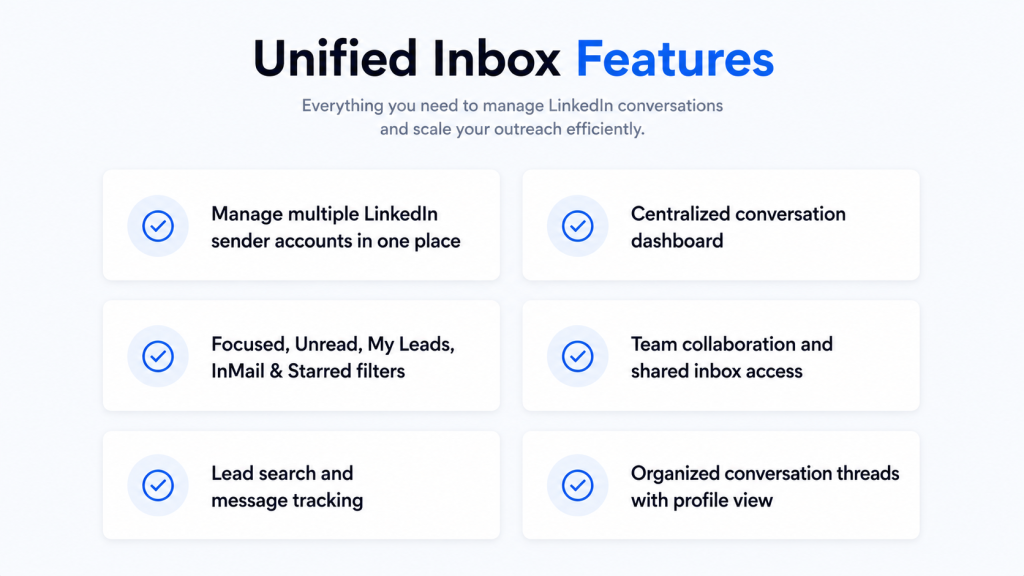
Not every tool calling itself a “unified inbox” is built the same. These are the features worth paying attention to before committing to one:
Custom labels and split inboxes: The ability to tag conversations and filter to see only that tag. “Hot Lead” should be one click away from “Follow-Up Needed.” Without this, you’re just looking at all your messages in a slightly different interface.
Reminders and snooze: If you can’t flag a conversation to reappear in three days, you will forget to follow up. Non-negotiable for any serious outreach workflow.
Message templates: Saved, personalizable responses you can insert in seconds. Essential once you’re handling more than 20 conversations a day.
Sender-specific replies: When you reply from a unified inbox, the response should go back as the original sender, not a generic account, not the admin. The same LinkedIn profile that started the conversation.
Multi-account support: Real multi-account management means all profiles stay active and switchable, not just theoretically visible. Every account should sync in real time.
Sales Navigator integration: Sales Navigator runs a completely separate inbox from your standard LinkedIn profile. A proper unified inbox brings both into the same view; otherwise, you’re still tab-switching.
CRM sync: Automatic data push to HubSpot, Salesforce, or Pipedrive removes manual entry from the equation. Set it up on day one.
Cloud-based architecture: Tools that run through a browser extension are fragile; they require your browser to stay open, break when LinkedIn updates its UI, and carry a higher account restriction risk. LinkedIn flagged over 15 million accounts for bot-related activity in 2025. Cloud-based platforms carry significantly lower detection risk and don’t depend on your local machine staying online.
Analytics and oversight: You should be able to track response times, message volumes, engagement rates, and conversion rates to evaluate what’s working and where replies are getting lost.
Get started for free with SendCopy.ai and run your LinkedIn outreach the way it should be run.
Native LinkedIn Inbox vs. LinkedIn Unified Inbox
| Feature | Native LinkedIn Inbox | LinkedIn Unified Inbox (Unibox) |
| Multi-account view | No | Yes |
| Reply as original sender | No | Yes |
| Real-time sync | Limited | Yes |
| Conversation tagging | No | Yes |
| Team collaboration | No | Yes |
| Campaign-level filtering | No | Yes |
| One manager for multiple reps | No | Yes |
| Analytics and oversight | Minimal | Full dashboard |
| Account safety features | N/A | Built-in |
LinkedIn’s native inbox works well for individual use. It was never designed for teams running coordinated, high-volume outreach. Once multiple reps or accounts get involved, messages scatter, visibility drops, and follow-ups slip. The gap between the two isn’t a minor difference in interface; it’s a functional one.
SendCopy’s Unibox: Built for Outreach Teams
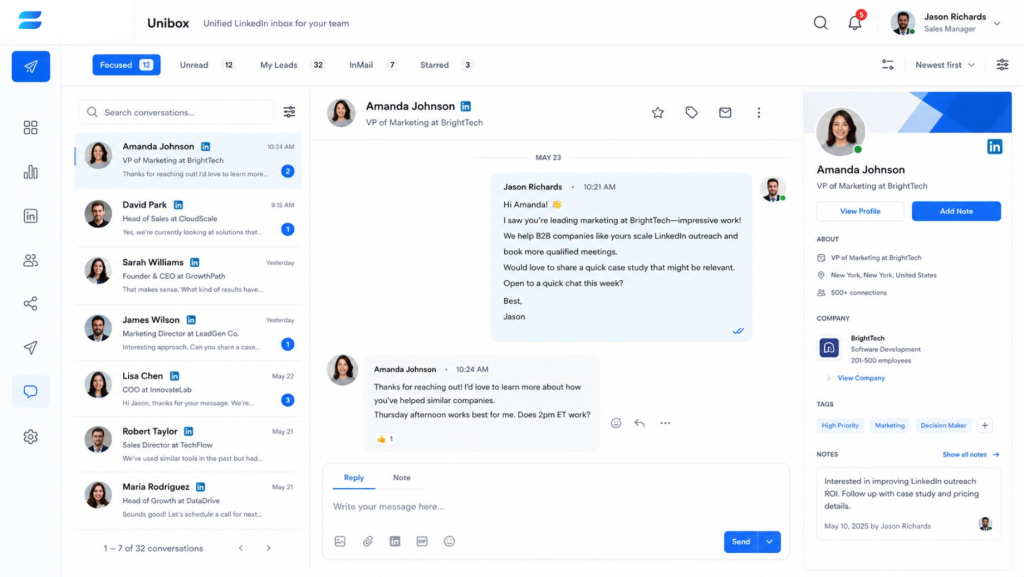
SendCopy.ai is a LinkedIn outreach platform built for sales teams, agencies, and founders who want real conversations, not just volume. Safety, relevance, and timing are built into every campaign by design.
Unibox is SendCopy.ai’s LinkedIn unified inbox. It’s built specifically for teams managing outreach across multiple LinkedIn sender accounts, and it’s the operational center of the entire platform.
One inbox for every sender. Whether you’re running one account or managing 50 senders across an agency, every conversation appears in a single view. An inbox manager handling nine sales reps’ conversations, which would otherwise mean nine separate LinkedIn logins, can run the entire operation from one screen.
As one SendCopy customer, Mehboob, founder of E-Warmup LLC, puts it: “We’ve got one inbox manager taking care of inbox replies for 9 of our sales reps. SendCopy’s Unibox is a game-changer! It has everything we need to stay organized and on top of our game.”
Connected to your full outreach workflow. Unibox doesn’t sit in isolation. It connects directly with SendCopy’s campaign automation, lead generation, AI personalization, and analytics dashboard. When a lead replies to a sequence, that conversation lands in the Unibox immediately, and your CRM syncs automatically, so nothing requires manual entry.
Built-in account protection. SendCopy’s outreach engine uses human-like timing and sender rotation to keep LinkedIn profiles safe. That same safety-first design carries through to the Unibox, with no patterns that trigger LinkedIn’s detection systems.
GDPR-friendly. For teams operating in the UK, EU, Australia, or anywhere data compliance matters, SendCopy is built with GDPR in mind from the start.
Scales with your team.
- Growth — $79/month: 1 sender seat, full Unibox access, unlimited campaigns, AI sequence builder, advanced analytics
- HyperGrowth — $399/month: 10 sender seats, premium support, AI tools, dedicated Discord channel
- Agency — $999/month: 50 sender seats, white labeling, dedicated customer success manager, priority support, DFY migration
Ready to see it in action? Get started for free with SendCopy.ai and set up your first unified LinkedIn inbox today.
Common Mistakes When Setting Up a LinkedIn Unified Inbox
Getting the tool is only half the job. Here are the setup mistakes that undo the benefits:
- Skipping the labeling system: Connecting accounts without building a label structure first means you end up with one big pile of messages, just in a slightly different interface. Set up your label categories before the first messages start coming in.
- Using browser extensions for core workflow: Some automation tools directly violate LinkedIn’s Terms of Service, and users have reported account restrictions. Extensions that depend on your browser staying open are also fragile. A crash, a LinkedIn UI update, or a server issue breaks the whole setup. Cloud-based tools are far more reliable at scale.
- Not connecting your CRM from day one: The longer you wait to set up CRM sync, the larger the backlog of manually entered data you create. Connect it during setup, not after three months.
- Managing volume without managing quality: LinkedIn wants you to make quality connections, not just reach out to as many random people as possible. Instead of maximizing the number of connection requests you send, be strategic, personalize your connections, and target your ICPs so that more people accept them. A unified inbox makes it easy to handle more volume, but the platform still rewards relevance over quantity.
Treating every conversation the same: Not every reply needs the same urgency. A prospect asking about pricing and a general networking message are not the same. Build filters and labels that reflect your actual pipeline stages so high-value conversations get the attention they need.
Best Practices for Managing Your LinkedIn Inbox
Respond within the same business day
About 65% of all LinkedIn replies come within 24 hours, and 90% arrive within a week. If you’re not matching that pace, you’re losing warm conversations to faster competitors.
Time your outreach to match reply windows
Tuesday has the highest LinkedIn reply rate at 6.90%, followed closely by Monday at 6.85%. Sending outreach early in the week means replies land during your working hours, not overnight or over the weekend.
Prioritize based on campaign and lead quality
Not every reply needs the same urgency. Use tags and filters to separate hot leads from general replies. A prospect asking about pricing deserves a faster response than someone asking a general question.
Use templates for repeatable replies, but personalize every time
Automation saves time by filtering, tagging, and archiving messages automatically. Templates let you spend more time connecting with people instead of retyping the same message structure from scratch.
Assign conversations to specific team members
Everyone should be able to see message histories, assign follow-ups, and monitor progress without confusion. This reduces overlap and helps maintain an organized inbox even at high volumes.
Track reply time as a KPI
Measure response times, message volumes, engagement rates, and conversion rates regularly. This tells you whether your inbox management system is actually working or just looking organized on the surface.
Setting Up Your LinkedIn Unified Inbox: First-Week Checklist
The inbox itself is only as useful as the system you build around it.
Build your label taxonomy before messages arrive. Decide on 5–7 categories before conversations start coming in. A starting framework: Hot Lead, Needs Follow-Up, Qualified Call Booked, Not Interested, Long-Term Nurture. Add role-specific labels as needed.
Connect your CRM on day one. The longer you wait, the larger the backlog of manually entered data you create. Map your LinkedIn fields to contact records in HubSpot, Salesforce, or Pipedrive before any messages are sent.
Create your five core snippets. Your opener, your follow-up after no response, your reply to a positive signal, your meeting-booking message, and your graceful close for people who aren’t interested. Five templates cover roughly 80% of what you’ll send.
Process to inbox zero every day. Treat every message as a task label it, reply, snooze it for a follow-up date, or archive it. Nothing should sit without an action. This discipline turns a unified inbox from a slightly better pile of messages into an actual pipeline management tool.
Assign ownership within the team. If multiple people share access to the Unibox, decide in advance who handles which accounts or conversation types. Shared visibility is only an advantage when everyone knows their lane.
Stop Letting Warm Replies Go Cold
Your team is wasting hours jumping between accounts, chasing replies, and losing track of who responded to what. That’s not a people problem. That’s a systems problem.
A LinkedIn unified inbox fixes the structure so the people can focus on the conversations that actually matter.
SendCopy.ai’s Unibox brings every LinkedIn conversation from every sender account into one clean dashboard. One inbox manager. Full visibility. No switching. No missed replies. No warm leads cooling down while someone hunts for the right tab.
Want to build the campaigns that fill that inbox in the first place? Head over to the SendCopy.ai blog for more guides on LinkedIn outreach strategy, lead generation, and B2B sales sequencing.
Ready to find the right plan for your team size? Check out our pricing options and get set up today.