LinkedIn InMail vs. connection request: there’s a real answer in 2026, and it’s more nuanced than “just use whichever.” LinkedIn tightened its rules, buyers got pickier, and the gap between a good outreach strategy and a mediocre one now shows up directly in your booked meetings.
Most sales reps pick one or the other based on habit, not data. They either blast InMails until the credits run out, or they send connection requests and hope for the best. Both approaches leave replies on the table.
Here’s what the data says: which tactics win and how to use them together without burning your account.
What Is LinkedIn InMail? Cost, Credits & Reply Rates
LinkedIn InMail is a paid messaging feature that lets you contact any LinkedIn member, even people outside your network. You don’t need to be connected first.
LinkedIn InMails land in a dedicated “InMail” tab inside the recipient’s inbox, separate from regular messages. The recipient can accept or decline. If they decline, LinkedIn returns the credit to your account. If they reply within 90 days, you also get the credit back.
LinkedIn InMail cost in 2026:
| Plan | Monthly Cost | InMail Credits |
| LinkedIn Premium Business | $59.99/mo | 15 credits |
| Sales Navigator Core | $119.99/mo ($89.99/mo annually) | 50 credits |
| Sales Navigator Advanced | $159.99/mo ($139.99/mo annually) | 50 credits |
| Extra credits (add-on) | ~$10 per credit | Varies |
Sales Navigator gives you 50 credits per month. According to the official LinkedIn Sales Navigator documentation, unused credits roll over but cap at 150 total (three months’ worth).
One thing worth noting: in late 2025, LinkedIn reduced the Open InMail limit from roughly 800 per month down to under 100 for most accounts. Volume-based blasting with InMail is no longer viable – and the risks of that kind of aggressive outreach now go beyond wasted credits.
What Is a LinkedIn Connection Request?
A connection request is a free invitation to join someone’s LinkedIn network. You can attach a note of up to 300 characters, or send a blank request. Once the person accepts, you can message them for free with no credit limits and no character cap.
Connection request limits in 2026:
LinkedIn enforces weekly limits, and the exact number depends on your account health and Social Selling Index (SSI). Most accounts can safely send 80 to 100 requests per week. Accounts with a high SSI score (65+) and strong acceptance rates may go up to 200. Restricted accounts can drop to as few as 50.
The key difference from InMail is that a connection request opens a relationship. After acceptance, you can follow up as many times as you want, your posts appear in their feed, and every future message is free.
LinkedIn InMail Reply Rate vs Connection Request Acceptance Rate (2026 Data)
Let’s look at the actual numbers, because this is where most guides miss the point.
LinkedIn InMail reply rates:
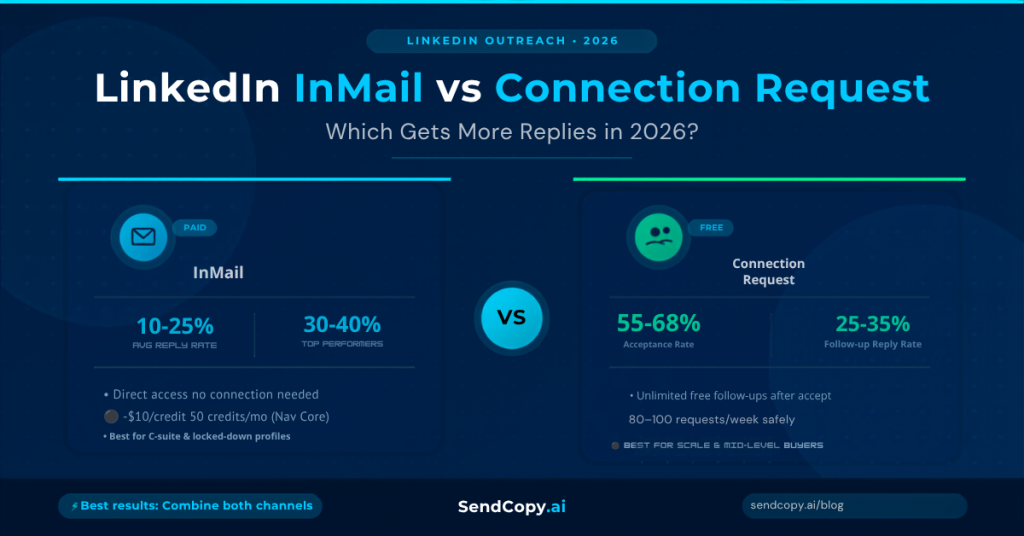
- The average LinkedIn InMail reply rate in 2026 ranges from 10% to 25%.
- Top performers: 30-40%
- Poorly executed campaigns: under 10%
- InMails sent on Saturdays: 13% slower response times
- Best day: Tuesday (6.90% reply rate)
- Subject line sweet spot: 16-27 characters (3-5 words)
LinkedIn connection request acceptance rate and reply rate benchmarks:
- The average LinkedIn connection request acceptance rate varies by industry, profile quality, and personalization level.
- LinkedIn Acceptance rate (blank request): 55-68% (blank requests outperform templated notes in raw acceptance rate)
- Follow-up reply rate after acceptance: 25-35%
- Connection request with no note, follow-up reply rate: 5.44%
- Connection request with a personalized note, follow-up reply rate: 9.36%
Here’s the math that most people skip. InMail gives you one shot at a reply. Connection requests give you an acceptance rate times a follow-up reply rate. When you run that calculation:
- InMail: 18-25% reply rate (on one message)
- Connection request + follow-up: 40% acceptance x 30% reply rate = 12% net, but with unlimited future touchpoints, free messaging, and feed presence
The connection request “wins” in terms of relationship value. InMail wins on direct access to prospects who won’t accept random connection requests.
Outreach tied to a trigger event (a promotion, a funding round, a job change) boosts response rates by 32% regardless of which channel you use. People who changed jobs in the last 90 days are three times more likely to respond to any outreach.
When to Use LinkedIn InMail
InMail makes sense in specific situations. Outside of them, it’s often an expensive way to get ignored.
Use InMail when:
- Your prospect guards their network: C-suite executives and senior decision-makers at enterprise companies receive too many connection requests to review them all. InMail signals a more deliberate outreach attempt.
- You’re working a high-value, single-touch prospect: When the deal size justifies spending a credit for direct access, the cost per reply makes sense.
- You have a strong trigger event: Referencing something specific (a funding round, a recent post, a job change) with InMail can outperform a generic connection request because the message lands with more context.
- You’re targeting prospects outside your reachable network: If you have no mutual connections and the person’s profile is locked down, InMail is your only direct path.
- Industry is favorable: Tech and SaaS recipients tend to reply at 22-28% average InMail rates. Legal and professional services reply at around 10%. Know your ICP.
When to Use a Connection Request Instead
For most B2B outreach scenarios, a connection request followed by a message sequence is the stronger play.
Use a connection request when:
- You’re building a relationship, not just chasing a meeting: Connection requests feel more natural. There’s no “InMail” label flagging it as a sales message before the recipient even opens it.
- Your prospect is mid-level (manager to director range): These buyers are active networkers. They accept reasonable connection requests and respond well to follow-up messages.
- You want multi-touch capability: InMail gives you one shot, maybe two. After connecting, you can follow up as many times as the situation warrants, test different angles, and show up in their feed.
- You’re prospecting at volume: InMail credits are finite. Connection requests are free. For SDR teams working a large ICP list, connection requests scale in ways InMail cannot. Before you can send either, though, you need the right people to target – here’s our guide to building a targeted B2B prospect list on LinkedIn.
- You’re earlier in the awareness stage: When a prospect doesn’t know your company yet, a connection request feels less aggressive than a cold InMail pitch.
LinkedIn InMail Best Practices for Higher Reply Rates
If you’re going to spend a credit, make it count.
1. Keep subject lines to 3-5 words
The highest open rates (11.6-15.2%) come from subject lines of 16-27 characters. Front-load the hook. “Quick question about Q4 hiring” beats “Following up on a potential partnership opportunity.”
2. Reference a real trigger event
Check if the prospect changed jobs recently, posted publicly, got a mention in the news, or had a funding event. Messages tied to a specific event get 32% better responses than generic outreach.
3. Stay under 200 words
Messages under 200 words consistently get higher reply rates. Your InMail is not a pitch deck. State your relevance in one sentence, your ask in one sentence, and leave space for them to respond.
4. Send between Tuesday and Thursday, 8-10 AM or 5-6 PM
Saturday sends see 13% slower response times. Weekday mornings and commute windows are when professionals check LinkedIn most actively.
5. View their profile before sending
Recipients are 78% more likely to accept an InMail from someone who viewed their profile in the last 30 days. Take 10 seconds and visit the profile first.
6. Track your credit recovery rate
If you’re getting your credits back because people are replying, you’re writing relevant messages. If you’re burning through credits with no refunds, the problem is the copy, not the channel.
Running multi-sender LinkedIn sequences without getting your account flagged? SendCopy.ai’s Auto-Rotate Senders and LinkedIn Account Protection features keep your outreach running at scale while protecting every seat on your team. Start your 3-day free trial
Connection Request Best Practices That Actually Work
1. Test blank requests against personalized notes
This seems counterintuitive, but blank requests get 55-68% acceptance rates vs 30% for templated notes. The note only helps when it’s genuinely personalized, not when it’s a copy-paste. If you can’t write something specific, skip the note.
2. Use 300 characters to spark curiosity, not pitch
The note is not a sales message. You have one goal: get them to accept. “Saw your post on SDR onboarding last week, and it matched something we’ve been working through. Wanted to connect.” That’s it.
3. Warm them up before sending
Engage with their content before sending the request. Like a post. Leave a thoughtful comment. When your request arrives, your name is already familiar. This is sometimes called “social warming,” and it meaningfully lifts acceptance rates.
4. Follow up within 24-48 hours of acceptance
Most people accept connection requests and move on. Your follow-up message is what starts the conversation. Send it quickly while your name is still fresh.
5. Space follow-ups 2-5 business days apart
Sequenced follow-ups spaced this way improve conversions by 49% over one-off messages. Most replies come from follow-ups, but 48% of reps never send a second message. That’s an easy win you’re leaving unclaimed.
6. Keep your profile sharp
Recipients, check your profile before replying. A weak headline, no recent activity, or a thin work history all reduce response rates before you type a single word.
The Real Winner: Running Both in Sequence
The highest-performing outreach teams in 2026 don’t debate LinkedIn InMail vs connection request. They combine them.
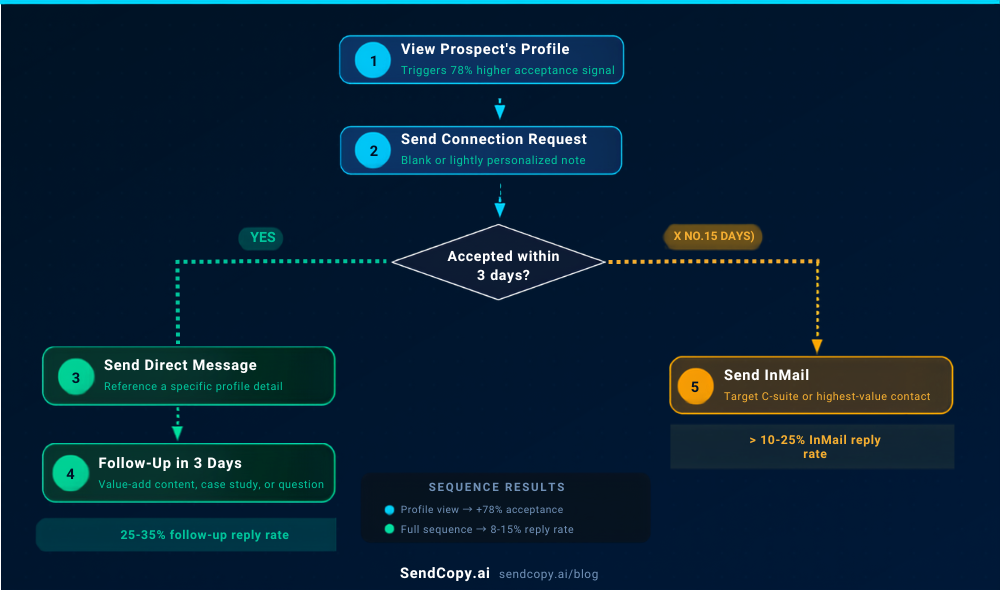
A practical sequence that works:
- View the prospect’s profile (triggers the “78% more likely to accept” signal)
- Send a blank or lightly personalized connection request
- If they accept within 3 days, send a direct message referencing a specific detail from their profile or recent activity
- Follow up 3 business days later with a value-add (a relevant piece of content, a case study, a question)
- If no acceptance after 5 days, send an InMail to the C-suite contact or the highest-value target in that account
Multi-channel sequences that combine LinkedIn touchpoints with email consistently lift total reply rates to 8-15% across the full sequence, with higher meeting conversion rates than either channel alone.
Signal-driven outreach (triggered by job changes, funding rounds, hiring spikes) running through this kind of sequence achieves 15-25% response rates, compared to 1-2% for generic templates.
The key constraint here is account safety. Running sequences at scale from a single LinkedIn account is one of the fastest ways to get flagged. LinkedIn’s enforcement has intensified significantly since 2025, which means teams doing serious outreach need either multiple sender accounts or a platform that rotates senders and monitors account health automatically.
Want to run multi-sender LinkedIn sequences without the manual work? SendCopy.ai handles sender rotation, account protection, and automated follow-ups in one platform. Your accounts stay safe while your pipeline grows. Start your free trial or book a demo.
Quick-Reference Decision Table
| Situation | Best Choice |
| C-suite exec at an enterprise company | InMail |
| Mid-level buyer, active on LinkedIn | Connection request |
| Strong trigger event (funding, job change) | Either (InMail if no mutual connections) |
| High-volume prospecting across a large ICP list | Connection request |
| One-shot, high-value target | InMail |
| Building a long-term nurture sequence | Connection request |
| Prospect with locked-down profile | InMail |
| Budget-conscious outreach | Connection request |
Final Verdict
LinkedIn InMail gets direct access. Connection requests build relationships. Neither is better in isolation.
If you’re targeting 10 enterprise decision-makers who won’t accept random connection requests, spend the InMail credits. If you’re working a list of 500 SDRs or marketing managers at mid-market companies, connection requests with a follow-up sequence will generate more replies at a fraction of the cost.
The teams booking the most meetings use both. They run connection request sequences for the bulk of their ICP, reserve InMails for high-value accounts and trigger events, and track reply rates and credit recovery closely enough to know what’s working.
Not sure who your ideal target even is yet? Start with a LinkedIn prospecting strategy before optimizing the channel.
In 2026, LinkedIn rewards relevance over volume. That’s true whether you’re spending InMail credits or sending free connection requests.
Frequently Asked Questions
What is the average LinkedIn InMail reply rate in 2026?
The average InMail reply rate is 10-25%. Top-performing campaigns hit 30-40%, while poorly executed outreach tends to land below 10%. Personalization and trigger-based timing are the biggest factors separating average from strong performance.
Is LinkedIn InMail worth the cost?
It depends on your target audience and deal size. For high-value, hard-to-reach prospects (senior executives, enterprise decision-makers), InMail credits are worth spending. For mid-market outreach at volume, connection requests with follow-up sequences typically deliver better ROI. At ~$10 per additional credit, a 20% reply rate works out to $50 per response. Run the math against your average deal size before defaulting to InMail.
Do blank connection requests get better acceptance rates?
Often yes. Blank requests get 55-68% acceptance rates, compared to about 30% for templated notes. The exception: a genuinely personalized note referencing something specific can outperform both. The problem is that most “personalized” notes aren’t actually personalized, which is why blank requests tend to win in aggregate.
How many connection requests can I send per week in 2026?
Most accounts can safely send 80-100 per week. Accounts with a high Social Selling Index (65+) and strong acceptance rates may reach up to 200. Dropping below a 20% acceptance rate signals a targeting or profile issue and can lead to LinkedIn restricting your limit further.
What is the LinkedIn InMail best practice for subject lines?
Keep subject lines to 16-27 characters (3-5 words). Short, specific subject lines achieve open rates of 11.6-15.2%. Mobile devices cut off subject lines at 30-40 characters, so front-load the most relevant word or phrase.
When is InMail better than a connection request?
InMail is the better choice when you’re reaching prospects who guard their LinkedIn network, when you have no mutual connections, or when you’re targeting a specific high-value executive with a strong trigger event. For everyone else, connection requests plus follow-up sequences typically convert better.
What is a good LinkedIn connection request acceptance rate?
For most B2B outreach campaigns, a good LinkedIn connection request acceptance rate falls between 35% and 50%. Highly targeted campaigns with strong profiles and personalized outreach can exceed 60%, while acceptance rates below 20% usually indicate poor targeting or messaging issues.