You spend months, sometimes years, building your LinkedIn profile. Connections. Content. Credibility. Then one morning, you log in and hit a wall.
“This account is currently restricted.”
It happens to thousands of sales professionals, agency owners, and founders every week. And the part that catches most people off guard? LinkedIn doesn’t always tell you exactly what you did wrong.
LinkedIn bans are happening at record levels in 2026. Connection limits were tightened from 100 per day down to 100 per week. LinkedIn banned major outreach platforms like Apollo.io and Seamless.ai outright in 2025, and Q1 2026 data shows that roughly 40% of accounts using non-compliant cloud-based automation tools received some form of restriction between January and March alone. Around 23% of automation users face a restriction within their first 90 days of running campaigns.
If your outreach strategy hasn’t adapted to the new rules, your account is at serious risk.
This guide breaks down every real reason LinkedIn accounts get banned in 2026, what the three types of restrictions mean, the updated safe limits, and the exact steps to keep your account and your pipeline running safely.
What Does It Mean When LinkedIn Bans or Restricts Your Account?
When LinkedIn restricts your account, you lose full access, or specific features become unavailable while LinkedIn reviews your activity. Depending on the restriction type, LinkedIn could block you from viewing profiles, accessing your news feed, sending connection requests, sending direct messages, or using InMail. In the most serious cases, you lose access completely. A restriction occurs when LinkedIn’s systems identify your behavior as incompatible with its Professional Community Policies and User Agreement.
The 3 Types of LinkedIn Restrictions
Not all bans are equal. Before doing anything else, understand which type you’re dealing with.
- A Warning: The least severe penalty. LinkedIn issues warnings for minor violations, borderline content, or sending unsolicited messages. You’ll be notified by email and have the chance to review and adjust your behavior. No access is lost, but treat it as a serious signal to change course immediately.
- Temporary Restriction: More serious. LinkedIn issues temporary restrictions for repeat violations or more significant behavior: sending too many connection requests, suspicious robotic activity, harassment, or hate speech. You cannot access your account while LinkedIn reviews the issue. First offenses typically resolve within several hours to a few days. Repeat violations can lead to suspensions lasting up to a week or longer.
- Permanent Ban: Some violations result in permanent removal after a single offense, such as child sexual abuse material, terrorism-related content, or extreme harassment. A permanent ban means complete account removal. You lose access to your profile, connections, messages, content, and all associated data. There is no automatic recovery. Even with professional appeals, success rates are below 15%.
How LinkedIn Enforcement Has Evolved in 2026
LinkedIn’s 2026 crackdown is fundamentally different from anything before it. The platform isn’t just penalizing obvious bots anymore.
Three major shifts define the 2026 enforcement environment:
Connection limits tightened dramatically: LinkedIn reduced connection request allowances from 100 per day to 100 per week for standard accounts. High-SSI accounts (scoring 70+) can reach up to 200 per week, and Sales Navigator users with strong account history may reach 200–250 per week. But these are reputation-based, not subscription-based. Premium alone doesn’t raise your limit.
The “Volume Tax” is now real: In 2026, LinkedIn introduced a silent algorithmic penalty for accounts sending high-volume, low-engagement outreach. It doesn’t restrict your login. It quietly routes your messages to the “Other” inbox, suppresses your profile in search, and reduces your organic content reach. The trigger: a reply rate below 10–15% at scale. Many restricted accounts don’t even know this is happening.
AI behavioral detection went to a new level: LinkedIn’s 2026 machine learning doesn’t just count actions; it analyzes the quality and rhythm of every interaction. Older tools that randomized delays slightly are now flagged more readily because the randomization itself has become a known automation signature. The platform now looks for natural “heartbeats”, variable human-paced intervals, and flags anything that looks too consistent or too precise.
The spray-and-pray outreach models of the early 2020s are largely eliminated. What replaces them is intent-based outreach: targeted, personalized, and human-paced.
The 9 Real Reasons LinkedIn Accounts Get Banned in 2026
1. Exceeding the New Weekly Connection Limits
This remains the most common trigger, and the 2026 rule change made it significantly easier to hit.
LinkedIn now limits most accounts to 100 connection requests per week, down from the previous daily-based system. The limit resets on a rolling 7-day window, not a fixed calendar week. Exceeding it triggers a warning first, then a temporary restriction, and on repeat violations, a permanent ban.
Beyond the weekly cap, daily pacing matters just as much. Sending 80 requests on a Monday, then zero for the rest of the week, is a detectable pattern. Consistent, distributed activity, 15–20 requests spread across business hours each day, is what passes detection. Sending 100 requests in a single morning is one of the fastest ways to get flagged.
New accounts should start at 5–10 requests per day and scale up gradually over 4–6 weeks.
2. A Low Connection Acceptance Rate
LinkedIn’s algorithm doesn’t just count what you send; it watches how many people actually accept, and what they do when they decline.
When someone selects “I don’t know this person” on your request, it registers directly against your account’s trust score. A low acceptance rate below 30–40% signals that your outreach is irrelevant or untargeted. High-trust accounts that maintain acceptance rates above 50% are given more flexibility and higher effective limits over time.
This is why blasting broad, generic connection requests backfires twice: people ignore them, and LinkedIn penalizes you for it.
3. Copy-Paste Messaging with Zero Personalization
Sending the same message to hundreds of people is one of the fastest ways to trigger both spam reports and LinkedIn’s detection systems. The 2026 algorithm specifically flags template-based messages, repeated identical text without personalization, as a primary ban trigger.
Each spam report from a recipient adds penalty weight to your account’s risk score. Enough of them, and LinkedIn’s trust team takes notice regardless of your sending volume. Generic opening lines like “Hi [First Name], I’d love to connect!” sent at scale are a direct red flag.
If your outreach sounds like it was written for everyone, enough people will report it to make it matter. This is exactly the problem SendCopyAI solves – helping sales teams, agencies, and founders write personalized, human-sounding LinkedIn messages that generate real replies without triggering spam filters.
4. Using Automation Tools LinkedIn Can Detect
LinkedIn’s User Agreement explicitly prohibits third-party tools that automate actions or scrape data, including headless browsers and Chrome extensions. In 2025, major platforms Apollo.io and Seamless.ai were officially banned. In Q1 2026, roughly 40% of accounts using non-compliant cloud-proxy tools, specifically including HeyReach, Expandi, Dripify, and Waalaxy, received some form of restriction.
The core risk: cloud-based tools route your activity through data center IP addresses. LinkedIn flags data center IPs because no real person logs in to LinkedIn from an AWS server. When the IP doesn’t match your device history, it’s an instant red flag. Browser extensions that inject code directly into LinkedIn’s interface carry similar, and in some cases, higher risk.
The safer architecture in 2026 uses dedicated IP addresses per account (not shared across users) and operates through your real browser session.
5. Robotic Behavioral Patterns Including “Human-Like” Ones
Sending exactly 25 connection requests every single day. Being “active” on LinkedIn at 3 AM. Viewing 300 profiles in a row with no pauses. These patterns have always been risky, but 2026 detection goes further.
Older tools that added slight randomized delays are now flagged because the randomization itself has become a recognized automation signature. LinkedIn’s 2026 detection looks for natural “heartbeats” in variable intervals that reflect how humans actually browse, pause, get distracted, and return. Perfectly linear activity (one action every 45 seconds) is flagged as humanly impossible.
Profiles that only send connection requests without any other engagement, no likes, comments, or content, look exactly like scraping bots to the detection system.
6. Fake or Inconsistent Profile Information
LinkedIn’s policies require members to use their true identity and provide accurate information. Intentionally misleading profiles don’t just get restricted; they get permanently banned without warning.
Incomplete or inconsistent profiles are also flagged as potential spam. LinkedIn now uses tools specifically designed to detect AI-generated profile pictures. It has rolled out expanded identity verification checks, particularly for accounts showing suspicious login patterns or rapid profile changes.
7. Suspicious Login Activity
Logging in from multiple IP addresses, different geographic locations in a short timeframe, or multiple devices simultaneously raises identity verification flags. In late 2025 and into 2026, LinkedIn expanded mandatory identity checks for accounts showing these patterns.
This affects legitimate users who travel or use VPNs. If your LinkedIn profile is set to the USA but you log in through a foreign proxy, expect a verification request or restriction.
8. Too Much Activity, Too Fast — Even Manually
Even without automation, performing too many actions in a short window can lead to restrictions. LinkedIn’s 2026 behavioral AI analyzes not just volume but rhythm, whether your activity follows natural human pacing throughout a session.
If your account visits 500 profiles in 10 minutes, or sends connection requests at a rate of one every 3 seconds, LinkedIn’s behavioral AI flags this as “humanly impossible.” The same logic applies to endorsements, follows, and group joins done in rapid succession.
9. Creating a New Account While Restricted
This turns a bad situation into a permanent one. Creating a second profile while your main account is restricted violates LinkedIn’s terms and typically results in both accounts being permanently banned. LinkedIn detects duplicate accounts through IP addresses, device fingerprinting, and shared network data. It closes all associated accounts at once.
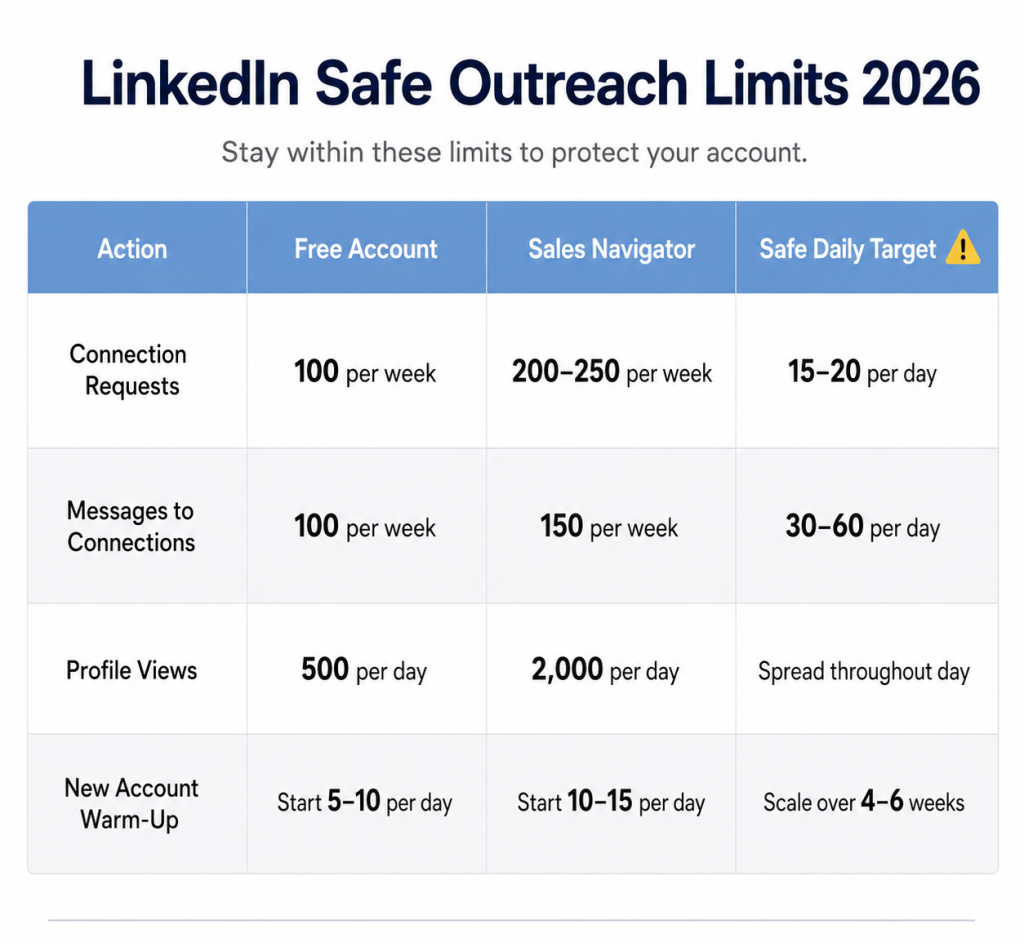
LinkedIn’s Updated Safe Outreach Limits (2026)
These are not official LinkedIn numbers — the platform doesn’t publish hard caps. They reflect the updated 2026 enforcement environment and consensus safe ranges from outreach practitioners.
| Action | Free Account | Sales Navigator | Safe Daily Target |
| Connection requests | ~100/week | 200–250/week (high SSI) | 15–20/day, distributed |
| Messages to connections | ~100/week | ~150/week | 30–60/day |
| Profile views | 500/day | Up to 2,000/day | Spread throughout the day |
| New account warm-up | Start 5–10/day | Start 10–15/day | Scale over 4–6 weeks |
| Total daily actions | Max ~200/day | Max ~200/day | Stay well below cap |
Key 2026 changes to note:
- Connection limits are now reputation-based, not subscription-based. Premium alone doesn’t raise your limit; your SSI score and acceptance rate do.
- The Volume Tax silently suppresses accounts with reply rates below 10–15%, even if no formal restriction is applied.
- Daily pacing matters more than weekly totals. Consistent, distributed activity beats front-loaded bursts every time.
Struggling to stay within limits while keeping outreach personal? SendCopyAI handles the personalization so you never have to choose between scale and account safety. See How It Works →
How to Avoid LinkedIn Account Bans in 2026: Proven Steps
Warm Up New Accounts Properly
Jumping from zero activity to a full outreach load overnight is one of the top 2026 detection signals. Complete your profile first (photo, headline, experience, summary), then start with 5–10 requests per day and scale up gradually over 4–6 weeks. Vary your activity times; real people don’t log in at exactly 9:00 AM every morning and stop at exactly 5:00 PM.
Protect Your Trust Score
In 2026, LinkedIn operates on a Trust Score system that dynamically adjusts your effective limits based on account behavior. The inputs that raise your score: high acceptance rates, genuine replies, profile completeness, SSI score above 70, and government ID verification (which earns you a Verified badge and higher algorithmic trust). Monitor your SSI score regularly; a higher score translates directly to higher connection limits.
Target Tightly, Not Broadly
The single most effective way to protect your account in 2026 is precision targeting. Use filters like industry, job title, company size, and location to narrow your list before sending a single request. Before reaching out cold, engage with your prospect’s content first with a thoughtful comment, a reaction to their post, so your name isn’t unfamiliar when the request arrives.
An acceptance rate above 40–50% tells LinkedIn you’re a valuable, trusted member of the network.
Personalize Every Message
Reference something specific: their recent post, a shared connection, their company’s challenge, a mutual interest. Generic templates sent at volume are both a detection trigger and a reply killer. The 2026 algorithm specifically penalizes repeated identical text, and prospects are increasingly quick to report outreach that feels automated.
For outreach that sounds human and converts better, SendCopyAI helps sales teams and agencies craft personalized messages built around real context — not copy-paste templates.
Mix Outreach with Genuine Engagement
Accounts that only send connection requests with no other activity are the first to get flagged. Engage with content, participate in discussions, and show up as a real professional on the platform. This is both a safety strategy and a pipeline strategy. Prospects who recognize your name from a thoughtful comment are far more likely to accept your request.
Withdraw Pending Requests Regularly
Withdraw unanswered connection requests after 30 days. A high ratio of pending, ignored invites signals low-quality outreach and directly lowers your account’s trust standing. This is one of the simplest account health habits, and one of the most overlooked.
Watch for Early Warning Signs
Don’t wait for a restriction. These signals mean LinkedIn is already throttling you:
- Acceptance rate dropping below 30% – pause and tighten your targeting
- Reply rate falling below 15% – your copy may be triggering the Volume Tax
- Post visibility declining – silent suppression may already be active
- Connection requests cut off mid-session – the system is proactively throttling your account
- Frequent CAPTCHA – LinkedIn’s security layer is watching your activity closely
Catching these early gives you a window to adjust before a formal restriction is applied.
Stay on One Device and Consistent IP
Log in from the same device on the same network where possible. Avoid VPNs unless necessary, and if you use one, keep the location consistent. Unusual IP or device changes trigger identity verification requests, even for legitimate users.
What to Do If Your LinkedIn Account Gets Banned
Already restricted? Here’s how to handle it correctly.
Step 1: Stop all automation immediately. Disconnect every third-party tool before LinkedIn reviews your account. Even if automation wasn’t the direct cause, active automation during a review makes appeals significantly harder.
Step 2: Don’t flood LinkedIn support. One well-written appeal with clear documentation is enough. Multiple emails clog the system and delay your response. Their standard response time is 2–3 business days.
Step 3: Submit your ID if prompted. If LinkedIn requests identity verification, submit an official government ID (passport, driver’s license) through their form. This is mandatory for certain restriction types and speeds up reinstatement.
Step 4: File your appeal honestly. Visit the LinkedIn Help Center and contact support. Clearly explain the situation – especially if you believe the ban was a mistake. If you did violate something unintentionally, acknowledge it and describe what you’ll change. You can also tag @LinkedInHelp on X (formerly Twitter) for faster visibility.
Step 5: Be patient, and ease back in slowly. First-time temporary restrictions typically lift within 3–7 days. Do not create a new account while waiting. Once reinstated, spend at least 1–2 weeks with minimal activity. Then limit yourself to 15–20 requests and messages per day for at least two more weeks before returning to normal usage. Most repeat restrictions happen because people resume full activity too quickly.
Quick Reference: What Gets You Banned vs. What Keeps You Safe in 2026
| What Gets You Banned | What Keeps You Safe |
| Exceeding 100 connection requests per week | 15–20 targeted requests per day, distributed |
| Copy-paste messages sent at volume | Personalized outreach referencing specific context |
| Cloud automation with shared proxy IPs | Dedicated IP architecture or real browser session tools |
| Fake, incomplete, or AI-generated profile | Complete, accurate, verified profile with real photo |
| Multiple IPs, VPNs, and location changes | Consistent device and location |
| Creating a new account when restricted | Contact support, submit ID, and appeal |
| Leaving hundreds of pending requests | Withdraw unanswered requests after 30 days |
| Perfectly linear, robotic activity patterns | Natural rhythm, varied timing, mixed engagement |
| Reply rate below 10–15% at scale | Tight targeting + personalization to drive real replies |
The Right Way to Scale LinkedIn Outreach in 2026
The sales teams and agencies winning on LinkedIn in 2026 aren’t the ones sending the most messages. They’re the ones with the highest Trust Scores, the best acceptance rates, and outreach that makes prospects feel like the message was written specifically for them.
Scaling LinkedIn outreach safely in 2026 means:
- Keeping daily activity within safe thresholds and distributing it naturally
- Protecting your Trust Score with high acceptance and reply rates
- Personalizing messages at scale – intelligently, not manually
- Treating LinkedIn like a relationship channel, not a broadcast channel
That’s exactly what SendCopyAI is built for. Our platform helps sales teams, agencies, and founders across the US, UK, and Australia run LinkedIn outreach that’s personalized, paced, and built to protect your account while filling your pipeline with qualified B2B leads.
No copy-paste templates. No risky bulk blasting. Just smart outreach that gets real responses and protects the account you’ve spent years building.→ Start Your Free Trial of SendCopyAI – credit card required.
Frequently Asked Questions
Can I get permanently banned from LinkedIn for using automation in 2026?
Yes. Q1 2026 data shows roughly 40% of accounts using non-compliant cloud-based tools received some form of restriction between January and March. Permanent bans, reserved for repeated or serious violations, have less than a 15% recovery rate. Most first-time restrictions are temporary if addressed promptly and correctly.
What is LinkedIn’s connection request limit in 2026?
Around 100 per week for most standard accounts. High-SSI accounts (70+) can reach up to 200 per week. Sales Navigator users with strong account history may reach 200–250 per week. Importantly, these limits are now reputation-based, not subscription-based – Premium alone doesn’t raise your limit. The daily safe target is 15–20 requests, distributed throughout business hours.
What is the LinkedIn Volume Tax?
A silent algorithmic penalty was introduced in 2026 for accounts sending high-volume, low-engagement outreach. It doesn’t restrict your login; it quietly suppresses your messages to the “Other” inbox, reduces your profile visibility in search, and limits your content reach. The trigger is a reply rate below 10–15% at scale. Many accounts don’t know it’s been applied.
Does LinkedIn allow any third-party outreach tools?
No third-party outreach automation tool is officially permitted. LinkedIn has an official Marketing Partners program and a Sales Navigator API for enterprise use, but all other tools operate outside LinkedIn’s terms. Enforcement in 2026 is aggressive, 40% restriction rates for cloud-proxy tools in Q1 2026 alone.
How long does a LinkedIn restriction last in 2026?
First-time temporary restrictions typically last several hours to a few days. Repeat violations can extend to a week or longer. Permanent bans have no automatic recovery. Identity verification restrictions are not time-limited and can only be lifted by submitting an official government ID.
I got restricted – should I create a new account?
No. Creating a second account while restricted violates LinkedIn’s terms and typically results in both accounts being permanently banned. LinkedIn links accounts through IP address, device fingerprinting, and network data. Submit an appeal and wait.
Ready to do LinkedIn outreach the smart way in 2026? Try SendCopyAI free today and start generating B2B leads without risking the account you’ve worked hard to build.