Why LinkedIn Prospecting Matters More Than Ever
You’re scrolling through LinkedIn, and you notice something: everyone’s talking about “AI-powered outreach” and “10x your leads overnight.”
Here’s what they’re not saying: LinkedIn’s terms of service are stricter than ever, and the platforms flagging suspicious behavior are smarter than ever.
In 2025-2026, LinkedIn prospecting isn’t about volume anymore. It’s about precision, authenticity, and playing by the rules.
If you’re an SDR, sales manager, or founder handling your own prospecting, you’ve probably experienced one of these frustrations:
- Manually searching for leads takes hours and yields mediocre results
- Your outreach messages get filtered into spam
- You’re worried about account restrictions or LinkedIn bans
- You’re losing deals because your follow-ups fall through the cracks
- You can’t track which outreach actually converts
The good news: LinkedIn prospecting, when done right, is one of the highest-ROI channels for B2B sales. The platform has 900+ million members, and the decision-makers you’re targeting are actively there.
The challenge: most teams are doing it wrong, either manually (slow, inefficient) or aggressively (risky and against LinkedIn’s rules).
This guide walks you through the complete LinkedIn prospecting framework: how to find the right leads, target them effectively, and convert them safely.
The Current State of LinkedIn Prospecting (And Why Volume Tactics Are Dead)
Let’s start with some context.
LinkedIn’s Enforcement Is Real
In 2024-2025, LinkedIn strengthened its enforcement against what it calls “scraping and automated access.” Accounts using aggressive or non-compliant outreach have been flagged, restricted, or permanently banned. According to LinkedIn’s own research, over 25 million spam messages are sent on the platform daily, and the platform is increasingly sophisticated in detecting patterns that look like bots or scrapers.
What does this mean for you?
If you’re using outdated automation tools, sending identical messages to thousands of people, or using scraped email lists, you’re taking a real risk.
The Opportunity: Intent-Driven Prospecting
The flip side: teams that do LinkedIn prospecting right see some of the best conversion rates in B2B sales.
LinkedIn reported in 2025 that decision-makers spend an average of 20 minutes per week on the platform, often actively evaluating solutions. This is different from cold email, where your message lands in an inbox competing with 100+ others. On LinkedIn, your message lands in a more curated space.
The teams winning on LinkedIn prospecting today are:
- Using LinkedIn’s native tools (Sales Navigator, LinkedIn Recruiter Lite) instead of scrapers
- Personalizing outreach based on real profile data (not generic templates)
- Rotating accounts and sequences to mimic human-like behavior
- Following LinkedIn’s guidelines while still prospecting at scale
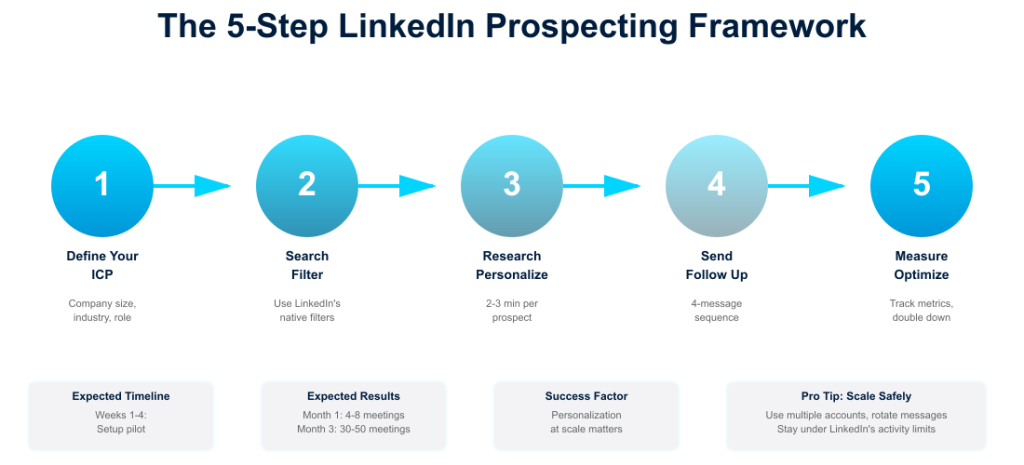
Step 1: Define Your Ideal Customer Profile (ICP)
Before you search for a single lead, you need to know who you’re looking for.
This sounds obvious, but most SDRs and sales managers skip this step and just start searching for “VP of Sales” or “Marketing Manager.”
That’s how you end up with low conversion rates.
Build Your ICP Using These Dimensions:
Company Size & Revenue
- How many employees does your target company have?
- What’s their annual revenue range?
- Why does this matter? A $50M company may have different buying cycles and budgets than a $500M enterprise.
Industry & Vertical
- Which industries does your solution serve best?
- Are there verticals where you’re overrepresented or underrepresented?
Use Case & Pain Point
- What specific problem does your solution solve?
- Example: not just “sales productivity,” but “teams struggling with lead qualification through the sales process” or “companies losing deals because follow-ups slip through the cracks.”
Decision-Maker Role & Seniority
- Who makes or influences the buying decision?
- Is it the VP of Sales, the Sales Ops Manager, or both?
- What’s their title variation? (VP Sales, Sales Director, Head of Sales, Chief Revenue Officer)
Company Stage
- Are you targeting startups (more nimble, smaller budgets), mid-market (process-focused), or enterprise (complex sales cycles)?
Example ICP for a Sales Enablement Tool:
- Companies: 50-500 employees
- Industries: SaaS, Tech, Financial Services
- Revenue: $10M-$100M ARR
- Decision-makers: VP of Sales, Sales Ops Director, Revenue Operations Lead
- Pain point: Sales teams spend >30 hours/month on manual admin vs. selling
- Stage: Growth-stage companies with established sales teams
Once you have this locked in, you’re ready to search.
Step 2: Master LinkedIn’s Native Search Filters
This is where most people get lost – and where your best leads hide.
LinkedIn Sales Navigator (LinkedIn’s tool for sales teams, separate from the standard app) gives you 50+ filters to narrow your search. The standard LinkedIn app gives you fewer, but they’re powerful if you use them right.
The Filters That Actually Matter:
Location
- LinkedIn lets you search by country, region, or city
- Pro tip: Exclude your competitors’ headquarters if you want to avoid selling to them directly
Industry
- LinkedIn categorizes companies into 150+ industries
- Filter to your target verticals only
- Avoid “select all industries” – that kills your specificity
Company Size
- LinkedIn breaks this into buckets: 1-10, 11-50, 51-200, 201-500, 501-1000, 1000-5000, 5000+
- Match this to your ICP
Title & Function
- This is critical. Search for your decision-makers by exact title or title keywords
- Examples: “VP of Sales,” “Sales Manager,” “Revenue Operations”
- LinkedIn’s filter also lets you search by “seniority level” (entry, associate, mid-senior, director, executive)
Years in Current Role
- Newer to the role = more likely to be evaluating new solutions
- Someone 2-3 years into their role is often a better prospect than someone 5+ years in (less entrenched in legacy processes)
Connection Degree
- First-degree connections are warm; second-degree connections are warmer than third-degree connections
- Use this to prioritize your outreach
Example Search: Location: United States Industry: Software, Financial Services Company Size: 51-500 Title: “VP of Sales” OR “Sales Manager” OR “Revenue Operations” Years in Role: 1-3 years Connection Degree: First or Second
This search might yield 500-2,000 results (depending on your market). These are your hot leads.
Step 3: Research & Personalize Before You Outreach
This is the difference between outreach that gets responses and outreach that gets deleted.
After you’ve filtered your lead list, spend 2-3 minutes per prospect researching:
On LinkedIn:
- What’s their background? (Do you have a mutual connection?)
- What have they recently posted or liked? (Shows current priorities)
- What’s their company’s recent news? (Did they just raise funding? Launch a new product?)
On Their Company Website:
- What problem does the company solve?
- What’s their growth status? (Look for funding announcements, job postings, and leadership changes)
On Google:
- Are they mentioned in any press coverage?
- Has their company been in the news recently?
Why This Matters: When you reference something specific in your outreach—”I saw you posted about expanding your sales team, and I work with companies going through that same growth phase”—your open rate skyrockets. Generic messages get filtered into spam.
Step 4: Craft Personalized Outreach Messages
The biggest mistake: thinking your LinkedIn message needs to be a sales pitch.
It doesn’t. Your first message should do one thing: start a conversation.
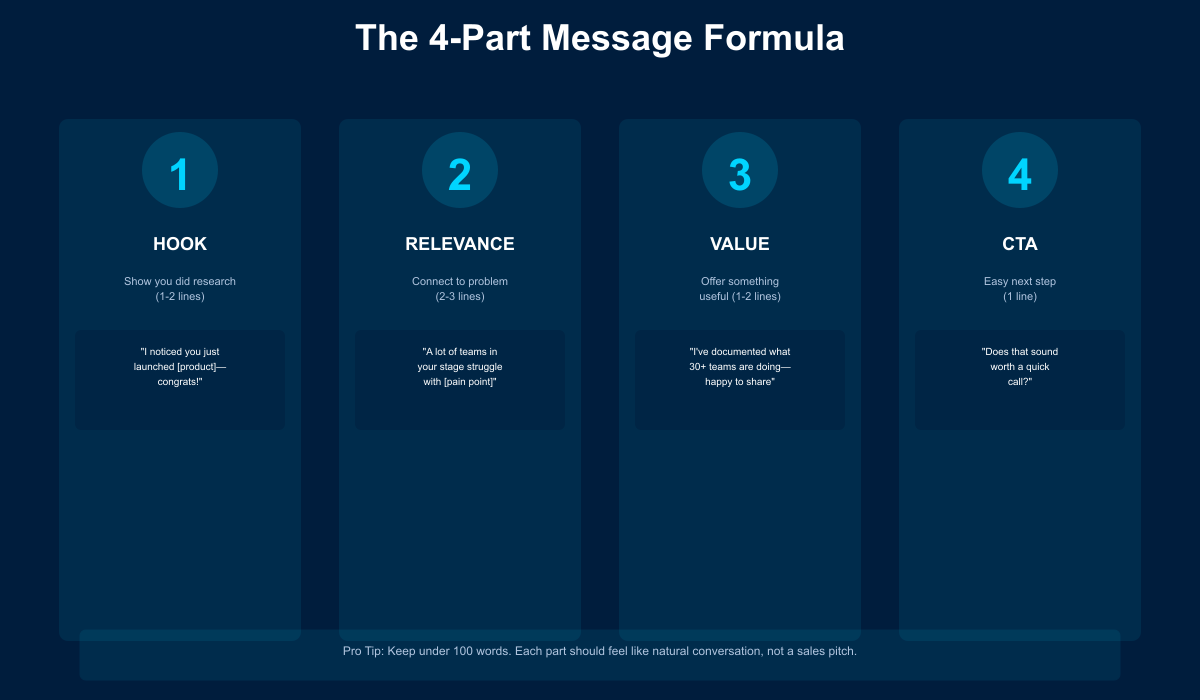
The Formula:
1. Hook (1-2 lines) Show that you’ve done research and understand their situation.
- “I noticed [Company] just closed a Series B funding round. Congrats—that typically means…”
- “Your post about remote sales teams resonated with me. We’ve found that…”
2. Relevance (2-3 lines) Connect their situation to a problem you’ve seen.
- “A lot of VP of Sales we work with tell us the same thing: hiring faster than sales ops can set them up slows growth.”
3. Soften with Value (1-2 lines) Offer something useful, not a pitch.
- “I put together a 2-minute breakdown of how [Company] structure their team during a 3x headcount growth—happy to share if useful.”
4. Call to Action (1 line) Make the next step super easy.
- “Does that sound relevant?”
- “Would a quick call make sense?”
- “Want me to send that over?”
Example Message:
Hi [First Name],
I came across your profile and saw you recently joined [Company] as VP of Sales. Congrats on the role.
I work with B2B sales teams scaling from 5 to 30 reps, and something I keep seeing is that teams often spend their first 90 days fixing lead qualification processes before they can accelerate hiring. It’s a universal friction point.
Given your team is ramping up, figured this might be relevant. I’ve been documenting what’s working for 50+ teams going through this—happy to share the framework if useful.
Does that sound helpful?
[Your name]
This is 75 words, highly personalized, and focused on starting a conversation (not closing a deal).
Need more copy-paste options? We’ve compiled 15 cold outreach message templates for B2B that use this same hook-relevance-CTA structure.
Step 5: Follow Up and Track What Works
One outreach message isn’t enough.
LinkedIn’s data shows that 83% of sales conversations start after the second or third touchpoint.
You need a follow-up sequence.
A Solid Sequence Looks Like:
Message 1 (Day 0): Initial outreach (personalized, conversational)
Message 2 (Day 5-7): Light follow-up: “Hey, didn’t want this to get buried in notifications”
Message 3 (Day 12-14): New angle or value add: “Saw you engaged with [content], thought this might be relevant”
Message 4 (Day 21): Exit attempt: “Might not be the right fit, but here’s a resource that might help anyway”
The Key: Each message should feel like a distinct conversation, not a repeat of the last.
Track What Works:
- Message open rate (did they view your profile?)
- Reply rate (did they respond?)
- Meeting rate (did replies convert to calls?)
- Win rate (did conversations convert to customers?)
Over time, you’ll see which message angles, call-to-action phrasings, and industries convert best. Double down on those.
Step 6: Scale Safely – Account Protection Is Non-Negotiable
Here’s where most teams mess up: they get good results and think, “What if we sent 3x more messages?”
LinkedIn’s enforcement algorithms catch that almost immediately.
LinkedIn’s Red Flags:
- Sending 50+ messages per day from one account
- Sending identical messages to different people
- Using scraped emails or data
- Rapid connection requests without personalization
- Sudden spikes in activity on dormant accounts
For the full breakdown of what LinkedIn’s algorithm flags in 2026 — including the new ‘Volume Tax’ and AI behavioral detection — read: Why LinkedIn Accounts Get Banned.
How to Scale Without Getting Flagged:
Use Multiple Accounts: Instead of sending 100 messages from one account, send 20 from five accounts. This mimics natural behavior and reduces your risk.
Rotate Your Message Angles: Don’t send the same message to everyone. Vary your openers, hooks, and CTAs. Each account should have its own messaging variation.
Mix Activity Types: Don’t just send outreach. Like posts, comment on content, and engage with your network. Make your accounts look naturally active.
Space Out Your Activity: If you’re sending 20 messages per day, spread them across 8 am-6 pm, with breaks. Real people don’t send 20 LinkedIn messages in 10 minutes.
Use LinkedIn’s Native Tools: LinkedIn Sales Navigator is your safest bet because it’s built by LinkedIn and explicitly allowed. Using third-party scrapers? You’re taking an unnecessary risk.
The Role of LinkedIn Automation: When (and How) to Use It
Here’s the honest truth: manual prospecting doesn’t scale beyond 200-300 contacts per month.
If you’re a founder doing your own prospecting, you can manage that manually. If you’re an SDR managing a pipeline of 500+ prospects, or a sales manager trying to help 10 SDRs scale their efforts, you need tools.
What LinkedIn-Specific Automation Can Do:
Lead Rotation & Account Management
- Instead of using one account for all outreach (which risks suspension), you can distribute messages across multiple team accounts
- Each account stays under LinkedIn’s “safe” activity thresholds
Sequence Management
- Automate follow-up timing without losing personalization
- Template messages with dynamic fields (first name, company, role) so they feel personal
Performance Tracking
- See which message templates convert best
- Identify which account is most effective for which persona
- Track conversion rates from first message to meeting
The Safety Factor
- The biggest benefit of using the right tool: it keeps your outreach compliant
- Tools built for LinkedIn (not email scrapers or blast platforms) understand LinkedIn’s rules and enforce them
Want to see how systematized LinkedIn prospecting works in practice? Our team can walk you through how account rotation keeps your LinkedIn presence safe, how message templating works without losing personalization, and real metrics from companies scaling their prospecting. Book a 15-minute demo with a member of our team.
Real Case Study: How a B2B SaaS Company Scaled to 50+ SQLs/Month
Let’s ground this in real results.
The Company: Integrations Platform (B2B SaaS helping SaaS companies manage third-party integrations) Team size: 8-person sales team Revenue stage: $1.5M ARR (growth stage)
The Problem:
SDRs were hitting a wall at 8-12 meetings per month with manual LinkedIn prospecting. Here’s what was happening:
- SDRs spent 8-10 hours per week on manual LinkedIn search and outreach
- Each SDR could send 80-120 personalized messages per month
- This yielded 8-12 qualified calls per month (6-10% reply rate, but low conversion to qualified meetings)
- The ceiling: They couldn’t scale without hiring more SDRs
Secondary problem: One SDR’s account got flagged for “unusual activity” after trying to ramp up to 100+ messages per week. LinkedIn’s warning forced a 2-week pause in prospecting (pipeline stalled). The team became gun-shy about scaling aggressively.
The Approach: Systematic, Compliant LinkedIn Prospecting
Instead of hiring more SDRs, they implemented a framework:
Step 1: Defined Their ICP (Week 1)
- Company profile: 50-500 employee SaaS companies
- Industry: Tech, FinTech, HR Tech, Marketing Tech
- Revenue: $3M-$50M ARR
- Decision-makers: VP of Product, Director of Integrations, VP of Engineering
- Pain point: Managing dozens of third-party integrations without custom development
Step 2: Built LinkedIn Search Strategy (Week 1-2)
- Created 3 saved searches targeting different personas (Product VPs, Engineering Leaders, Integration Leads)
- Used location filters (US, Canada, Europe)
- Each search returned 800-1,200 qualified prospects (not 100K generic results)
- Began with smaller, high-intent segments first
Step 3: Systematized Outreach (Week 2-3)
Created 4 different first-message templates with different angles:
- Angle A: Product integration pain (8-12% reply rate)
- Angle B: Series B/C funding growth (12-15% reply rate)
- Angle C: Recent job change (VP/Director new in role) (14-16% reply rate)
- Angle D: Company scaling challenges (6-8% reply rate)
- Rotated through angles instead of sending the same message
- Built a 4-message follow-up sequence (varied angles on each)
Step 4: Scaled with Multiple Accounts (Week 3-4)
- Instead of one SDR sending 100+ messages per day (risky), used 3 accounts
- Each account sent 25-30 messages per day (safe threshold)
- Account A: Product-focused angle
- Account B: Funding/growth angle
- Account C: Expansion/scaling angle
- Each account had a slightly different messaging DNA
Step 5: Implemented Tracking & Optimization (Ongoing)
- Tracked: Send date, message angle, open rate, reply rate, meeting booked, meeting qualified
- Identified that “Series funding” angle had 15% reply rate vs. 6% for other angles
- Shifted 40% of outreach to that angle
- Found that 2-3 day follow-up window had the best reply rates
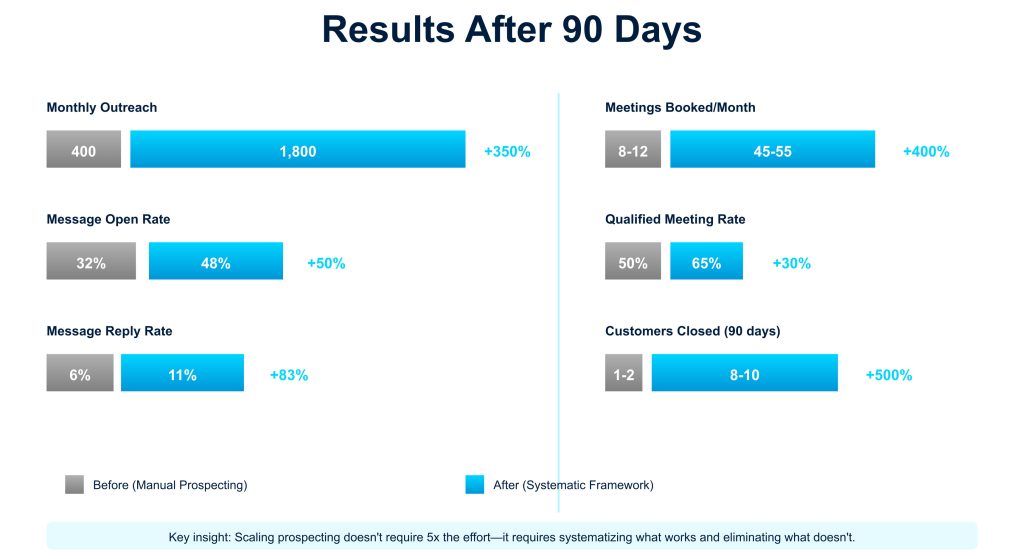
The Results (90 Days)
| Metric | Before | After | Change |
|---|---|---|---|
| Monthly outreach volume | 400 messages/month | 1,800 messages/month | +350% |
| Message open rate | 32% | 48% | +50% |
| Message reply rate | 6% | 11% | +83% |
| Qualified conversations | 24-36/month | 180-200/month | +450% |
| Meetings booked | 8-12/month | 45-55/month | +400% |
| Qualified meeting rate | 50% (4-6 qualified) | 65% (30 qualified) | +30% |
| Sales cycles | 60 days avg | 58 days avg | No change (good!) |
| Closed customers (90 days) | 1-2 | 8-10 | +500% |
| Revenue impact | $0 | ~$250K-300K ARR | — |
Key Success Factors:
1. Account Safety First
- By distributing outreach across 3 accounts instead of 1, they stayed well under LinkedIn’s activity thresholds
- Zero account warnings or flags during the entire test period
- Built a sustainable, compliant system (not a risky growth hack)
2. Personalization at Scale
- Despite 1,800 messages/month, each message referenced something specific
- Used real research (company news, job change, recent activity) not templates
- Reply rate jumped from 6% to 11% because messages didn’t look automated
3. Message Angle Testing
- Instead of guessing, they tested 4 angles and let data speak
- “Series funding” angle (15% reply) became the focus
- “Expansion scaling” angle (6% reply) got deprioritized
- This A/B testing multiplied effectiveness
4. Multi-Touch Sequences
- Single message gets ignored; 4-message sequence gets responses
- Each follow-up was a different angle, not a repeat
- 45-55 meetings booked came from somewhere in the 4-message sequence (not all from first touch)
5. Realistic Expectations
- 400 → 1,800 messages didn’t mean 400 → 1,800 meetings
- Expected conversion rates didn’t increase (6% → 11% is solid, not 20%)
- Took 3 months to refine the system; didn’t blow up overnight
- Most meetings came from follow-ups, not initial touches
The Math Behind the Results
Here’s how it works in practice, month by month:
Monthly:
- 1,800 outreach messages
- 48% open rate = 864 opens
- 11% reply rate = 198 replies
- 65% qualified = 129 qualified conversations
- 35% meeting conversion rate = 45 booked meetings
Revenue Impact:
- 45 meetings/month × 12 months = 540 annual meetings
- 540 meetings × 12% close rate (their benchmark) = 65 customers
- 65 customers × $4,500 avg contract value = $292,500 annual impact
(In their case, they closed 8 customers in 90 days, tracking to 21 in the quarter, which is 84+ annually at $4,500+ ACV = $378K+ potential impact)
Ready to audit your LinkedIn prospecting approach? We’ve created a simple 7-point framework to identify what’s working and what’s holding you back.
🎯 Free Download
Get the LinkedIn Prospecting Audit Checklist
✓ 7-point framework
✓ Identify prospecting gaps
✓ Improve response rates
✓ Takes less than 5 minutes
Enter your email below to receive instant access.
LinkedIn Prospecting Best Practices & Safety Guidelines
Before you launch your prospecting campaign, lock in these practices:
Best Practices:
- Always personalize. Reference something specific about the person or company. Generic messages get filtered.
- Stay compliant. Follow LinkedIn’s Terms of Service. Don’t use email scrapers or bots that falsely mimic human behavior.
- Build relationships, not lists. Your goal is a conversation, not a connection. If someone doesn’t reply in 4 messages, move on gracefully.
- Mix message types. Don’t just send sales-y messages. Engage authentically: like posts, leave comments, share articles.
- Test and iterate. What works for VP of Sales might not work for Sales Operations Manager. Track your metrics and optimize.
- Respect the platform. LinkedIn’s strength is that decision-makers are there voluntarily and engaged. Don’t abuse that by spamming them.
- Rotate your outreach. If you’re scaling, use multiple accounts. This isn’t to deceive—it’s to mimic how a sales team would naturally prospect.
Frequently Asked Questions
How many messages can I safely send per day?
LinkedIn’s threshold is around 50-100 per account per day, but most experts recommend staying under 30-40 to avoid any risk. If you need to send more, use multiple accounts.
Should I connect before I message?
It depends. If you have a mutual connection, connecting first warms the relationship. If you don’t, messaging without connecting (via Sales Navigator) can be effective because it shows you’re not just adding random people.
What’s the best day/time to send messages?
Tuesday-Thursday, 8 am-11 am in the recipient’s timezone. This is when professionals are actively on LinkedIn checking messages.
Can I use email from LinkedIn profiles?
LinkedIn’s Terms of Service prohibit scraping email addresses. If you find someone’s email through other means (their website, a directory), that’s fine. But don’t extract it from LinkedIn.
How long should I wait for a reply before moving on?
Follow up 3-4 times (with different angles) over 4 weeks. After that, if there’s no response, move on. You don’t want to be the person pestering someone.
Should I sell in my first message?
No. First message = start a conversation. Second/third touchpoints = build trust. Only sell if they’re engaging.
Making LinkedIn Prospecting Work for Your Team
Here’s what we’ve covered:
- Define your ICP so you’re targeting the right people
- Use LinkedIn’s native filters to narrow your search efficiently
- Research and personalize before every outreach
- Send conversational, not salesy, messages to start a dialogue
- Follow up strategically with varied angles, not repetitive reminders
- Scale safely by rotating accounts and staying under activity thresholds
- Track what works so you can optimize
The teams winning at LinkedIn prospecting today aren’t the ones sending the most messages. They’re the ones sending the most relevant messages to the most qualified leads.
If you’re managing SDRs or running your own prospecting, one of the biggest time savers is using a tool built specifically for compliant LinkedIn outreach. It handles the sequencing, account rotation, and tracking so you can focus on what matters: writing personalized messages and moving conversations forward.
Tools that understand LinkedIn’s rules let you:
- Manage multiple accounts safely
- Automate sequences without losing personalization
- Track what actually converts
- Stay well within LinkedIn’s guidelines
The result? Teams typically see 2-3x more meetings booked per hour of outreach effort.
Your Next Steps
LinkedIn prospecting is one of the best channels for B2B lead generation – if you do it right.
If you’re managing SDRs or scaling your own prospecting efforts, the account rotation and sequence management we’ve described require the right tooling. SendCopy is designed specifically for LinkedIn prospecting at scale – with built-in account protection, auto-rotate senders, and sequence management. Get started with a 7-day free trial – credit card required.
Start with a single well-defined ICP and a small test group of 50-100 prospects. Build your messaging. Test what works. Then scale methodically.
You don’t need to send thousands of messages to get results. You need to send the right message to the right person at the right time.