If you’re searching for Dripify alternatives, you’re probably not doing it out of curiosity. You’re doing it because a bill renewed at an unexpected price, a campaign got flagged, or you need a feature Dripify simply doesn’t have. Those are the three complaints that show up most often in Dripify’s own G2 and Trustpilot reviews: billing and cancellation friction, no permanent free tier, and gaps in reply handling once a prospect actually responds.
This guide walks through nine Dripify alternatives, what each one is actually good at, which ones have a genuine free option, and how they stack up against Dripify on price, safety, and features. We also break down what Dripify costs once you move past the homepage number, and what LinkedIn’s own policies say about automation risk, so you’re deciding with the same information a longtime user would have.
One thing to plan for regardless of which tool you pick: switching costs are real, not just theoretical. Moving off Dripify usually means exporting your lead lists and sequence templates manually, since automation tools don’t share campaign data, and re-warming your LinkedIn account’s activity pattern on the new platform rather than resuming at full volume on day one.
Table of Contents
What Is Dripify?
Dripify is a cloud-based LinkedIn automation tool built for solo sellers, founders, and small sales teams who want to run connection and messaging sequences without a manual, one-by-one outreach process. According to Dripify’s pricing page, plans range from a Basic tier for one active campaign to an Advanced tier with team management and API access, with an Enterprise tier priced by quote.
The pitch is straightforward: connect your LinkedIn account, build a drip sequence of connection requests and follow-up messages, and let it run in the cloud even when your laptop is closed. Every paid plan includes a shared inbox, basic analytics, and a monthly allotment of email finder credits, and Dripify offers a 7-day free trial with no credit card required, per its pricing page.
Where it tends to fall short, per recurring complaints in Dripify’s G2 and Capterra reviews, is scale and multichannel reach. It’s priced per LinkedIn account rather than per sender pool, so teams running several accounts pay the full per-seat rate for each one rather than getting a volume discount the way sender-rotation tools do. It’s also LinkedIn-first: email exists as an add-on channel, not a core one, and there’s no native reply-triage layer for teams fielding a high volume of responses. For someone running a single, focused campaign, none of that matters much. For a team scaling past one or two accounts, it usually does.
Why People Look for Dripify Alternatives in 2026
Four reasons come up consistently across user reviews and comparison research this year.
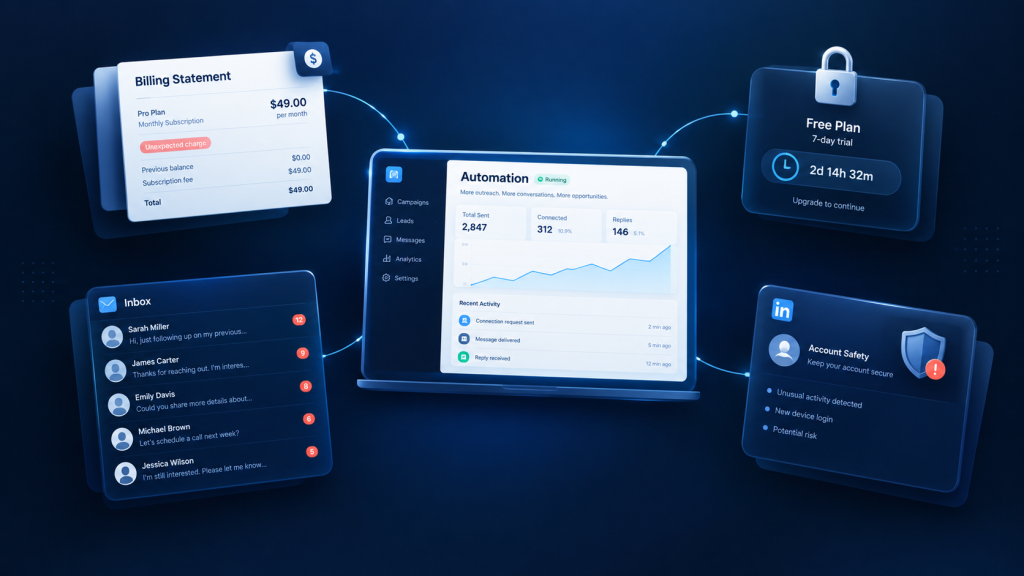
Billing and cancellation friction. A pattern documented across Trustpilot reviews for Dripify describes continued charges after a cancellation attempt. CheckThat.ai’s Dripify pricing breakdown ties this to a bug in the billing module, though we haven’t independently reproduced it. Annual plans also carry a narrow refund window, typically 24 hours from purchase, which raises the stakes of committing before testing thoroughly.
No permanent free tier. Dripify’s only no-cost option is the 7-day trial. For a prospecting motion that people typically want to test slowly, alongside an existing tool, that’s a short runway. This is the single most common reason searches for “Dripify alternative free” spike.
Reply handling gaps once a campaign starts working. Dripify’s shared inbox covers the basics: seeing and replying to messages in one place. It doesn’t offer the sentiment-based triage, auto-categorization, or team routing that busier teams need once response volume climbs past what one person can read manually.
LinkedIn ban-risk concerns. Dripify runs in the cloud rather than as a browser extension, which is a real safety advantage over extension-based tools. But cloud execution doesn’t exempt any tool from LinkedIn’s Prohibited Software policy, which explicitly bars third-party software that automates activity on the platform, according to LinkedIn’s Help Center. That underlying risk is inherent to the category, not specific to Dripify, and it’s the reason “is Dripify safe” is one of the most common searches alongside “Dripify alternatives.”
How We Evaluated These Alternatives
Every price cited below comes from the vendor’s own pricing page, not a third-party listing, because third-party pricing pages are frequently out of date. (See the full Dripify pricing breakdown for tier-by-tier detail on Dripify specifically.) Where a source only offered a range or a cached figure, it’s flagged rather than stated as fact.
We scored each of these Dripify alternatives on four criteria: starting price and what’s actually included at that price (not just the headline number), account safety architecture (cloud versus extension, IP handling, daily action limits), reply and inbox handling, and AI or personalization depth. We did not accept self-displayed review badges as proof of a rating; every G2 or Capterra figure cited below links back to the review platform itself, not a vendor’s marketing page.
Worth noting as a limitation of the category, not just this article: G2 and Capterra ratings skew toward people motivated enough to leave a review, usually because something went unusually well or unusually badly, so treat any single star rating as a signal to investigate rather than a final verdict. Full transparency: SendCopy, the platform behind this article, appears once in the roundup below alongside its actual limitations, not as the default pick.
Best Dripify Alternatives Overall
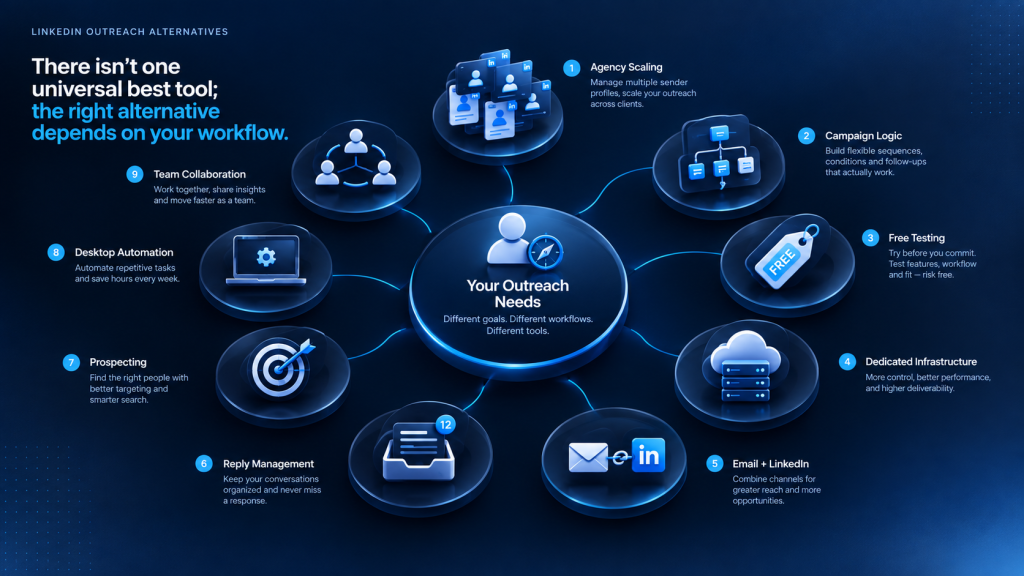
Nine tools worth comparing against Dripify, ranked by overall fit rather than price alone.
1. HeyReach. Best for: agencies and teams running 5+ LinkedIn accounts. Starting price: $79 per sender/month on the Growth plan, according to HeyReach’s own pricing page. Standout feature: flat per-sender pricing with unlimited team seats and sender rotation, so agencies aren’t charged extra for adding client accounts or VAs. Honest limitation: it’s LinkedIn-only, so multichannel teams need a separate email tool and bill for two platforms. Worth flagging for agencies specifically: the Agency and Unlimited tiers require bringing your own residential proxies, an extra $5 to $15 per account per month that doesn’t show up on the pricing page.
2. Expandi. Best for: teams that want deep campaign logic and dedicated per-account IPs. Starting price: $99 per LinkedIn account/month, or roughly $79/month on annual billing, per LaGrowthMachine’s and CheckThat.ai’s independently verified Expandi pricing breakdowns. Standout feature: eleven campaign types with conditional logic and a dedicated country-based IP per seat. Honest limitation: image and video personalization run through separate paid add-ons (Hyperise, Sendspark); Derrick App’s Expandi pricing analysis puts the real per-seat cost at $197 to $220/month once those add-ons are included, well past the $99 advertised price.
3. Waalaxy. Best for: solo founders who want to test LinkedIn automation before paying anything. Starting price: free (limited to roughly 80 invitations/month), with paid tiers from €19/month, per Waalaxy’s pricing page. Standout feature: the only tool on this list with a genuinely permanent free plan, not just a trial. Honest limitation: email outreach and higher invitation volume are locked behind the Business tier, so the free plan is best treated as a trial run, not a long-term solution.
4. We-Connect. Best for: budget-conscious solo SDRs who only need LinkedIn, not multichannel. Starting price: from $49/seat/month on annual billing, per We-Connect’s pricing page. Standout feature: a straightforward per-seat model with dedicated IPs and configurable daily limits on every plan. Honest limitation: email automation costs an additional $10/seat/month, and the platform doesn’t offer volume discounts for larger teams the way sender-based pricing does.
5. Lemlist. Best for: email-first teams that want LinkedIn as a secondary channel. Starting price: from $39/user/month for email-only, rising to roughly $99/month for the Multichannel Expert plan that adds LinkedIn, per Lemlist’s pricing breakdown. Standout feature: strong email personalization and deliverability tooling (lemwarm) bundled with LinkedIn steps in one sequence. Honest limitation: LinkedIn automation runs through a Chrome extension rather than server-side execution; LinkedNav’s Lemlist review flags this as carrying higher detection risk than cloud-native LinkedIn tools, a claim consistent with LinkedIn’s own Prohibited Software guidance on extension-based activity.
6. SendCopy. Best for: teams that want LinkedIn-only automation with account-safety features built around sender rotation. Starting price: comparable to HeyReach’s entry tier, around $79/month. Standout feature: Auto-Rotate Senders and LinkedIn Account Protection built into the core plan, plus Unibox for team-wide reply management and Lead Finger for prospecting, without needing separate add-ons. Honest limitation: like Dripify, HeyReach, Expandi, and We-Connect, it’s LinkedIn-only; teams that need native email or WhatsApp sequencing will need to pair it with another tool for now.
7. Meet Alfred. Best for: teams that want Lead Finder and inbox management bundled at a mid-range price. Starting price: roughly $59/monthly for the basic plan, per Meet Alfred’s published comparisons. Standout feature: bundled lead-finding tools alongside sequence automation. Honest limitation: fewer independent, non-vendor-published reviews are available on its safety architecture compared to Expandi or HeyReach.
8. Linked Helper. Best for: solo operators comfortable running a desktop app instead of a cloud tool. Starting price: among the lowest in the category, with a Pro plan around $45/month cited across several reviews. Standout feature: runs as a local desktop application rather than a Chrome extension; Puzzle Inbox’s comparison notes this is somewhat harder for LinkedIn to fingerprint than a browser extension, though desktop execution is not risk-free and still falls under LinkedIn’s Prohibited Software policy. Honest limitation: no cloud execution, so campaigns stop running when the computer is off, and there’s no built-in team collaboration layer.
9. Octopus CRM. Best for: anyone testing LinkedIn automation for the first time on the smallest possible budget. Starting price: the lowest sticker price in this list, in the roughly $10 to $25/month range cited across Puzzle Inbox’s and PromiseClick’s comparisons. [ Standout feature: simple setup with basic connection and messaging sequences. Honest limitation: it’s a Chrome extension, meaning it only runs while the browser is open and carries the higher extension-based detection profile that cloud tools are specifically built to avoid.
Best FREE Dripify Alternatives
Free is not one thing in this category, and conflating the three versions of “free” is where most Dripify alternatives comparisons go wrong.
Free-forever plans are permanent, no-expiration tiers with real (if limited) usage caps. Waalaxy is the clearest example here: its free plan reportedly caps at around 80 LinkedIn invitations a month, with no time limit on how long you can stay on it. That’s enough to validate whether LinkedIn outreach fits your process, not enough to run a real pipeline on.
Free trials are full-featured but time-boxed, usually 7 to 14 days, after which the account either locks or requires a card. Dripify’s trial and HeyReach’s 14-day trial fall in this bucket: you get the real product, but the clock is running from day one.
Freemium-with-credits models sit in between: technically free, but gated by a usage allowance (leads found, emails verified) rather than a calendar deadline. Lemlist’s free plan is the clearest example, limited to 100 leads found or verified per month with no sending campaigns included, according to Lemlist’s own pricing breakdown.
| Tool | Free type | What’s included | What’s gated |
| Waalaxy | Free-forever | ~80 LinkedIn invites/month | Email steps, higher volume |
| Dripify | Free trial (7 days) | Full feature access | Nothing during trial; card required after |
| HeyReach | Free trial (14 days) | Full platform access | Requires new email; one trial per person |
| Lemlist | Freemium-with-credits | 100 leads found/month | All sending campaigns |
| Linked Helper | Free trial | Core desktop automation | Team features, extended limits |
Waalaxy is the only row in that table without a clock or a hard credit ceiling attached to it. That’s the practical difference between “free” as a marketing word and free as something you can actually build a workflow on.
Dripify Alternatives by Use Case
The right pick among these Dripify alternatives depends heavily on who’s running the campaigns and how many accounts are involved.
Agencies
Agencies managing multiple client LinkedIn accounts should weigh HeyReach first: its flat per-sender pricing with unlimited team seats scales cleanly as client accounts grow, without the per-seat markup that per-account tools like Dripify or We-Connect apply to every new profile added.
Solo SDRs and Founders
For a single account running a focused campaign, Waalaxy’s free tier or SendCopy’s entry plan covers the basics without agency-scale complexity. The deciding factor is usually whether you plan to stay solo (Waalaxy) or expect to add teammates soon (SendCopy or We-Connect, both of which support team seats from the start).
Recruiters
Recruiters sending high volumes of personalized outreach to passive candidates benefit most from tools with strong reply-triage and AI-assisted personalization, since candidate response rates and message relevance matter more than raw send volume. Meet Alfred’s bundled Lead Finder and Lemlist’s personalization tooling are both worth a closer look here.
Cold-Email-First Teams
If LinkedIn is a secondary channel to an existing cold email motion, Lemlist’s Multichannel Expert plan lets you add LinkedIn steps to sequences you’re already running in one tool, rather than managing two separate platforms and two separate bills.
Safety-First Buyers
Anyone whose top priority is minimizing account risk should default to cloud-based tools with dedicated IPs and configurable daily limits, and avoid Chrome-extension tools entirely. Expandi, HeyReach, We-Connect, and SendCopy all run cloud-side rather than through a browser extension; Lemlist’s LinkedIn steps and Octopus CRM both run through an extension, which carries a different risk profile worth weighing before you commit a primary account to either.
Dripify Alternatives Comparison Table
A side-by-side view of how these Dripify alternatives compare, with pricing normalized to a monthly, single-seat rate.
| Tool | Starting price/mo | Free tier | Safety architecture | AI/reply handling |
| SendCopy | ~$79 | 7-day Free trial | Cloud, Auto-Rotate Senders | Unibox, Lead Finger |
| Dripify | $39 (annual) | 7-day trial only | Cloud-based | Shared inbox, basic |
| HeyReach | $79/sender | 14-day trial | Cloud, sender rotation | Unified inbox, API |
| Expandi | $99 ($79 annual) | 7-day trial | Cloud, dedicated IP/seat | Conditional logic, add-on personalization |
| Waalaxy | Free–€69 | Free-forever (~80 invites) | Chrome extension | Basic inbox add-on |
| We-Connect | $49 (annual) | 14-day trial | Cloud, dedicated IP | Standard reporting |
| Lemlist | $39–$99 | Freemium (100 leads) | Extension (LinkedIn steps) | Strong email personalization |
| Meet Alfred | ~$49 | Free trial | Cloud | Lead Finder bundled |
| Linked Helper | ~$45 | Free trial | Desktop app | Basic |
Dripify Pricing & Hidden Costs, In Short
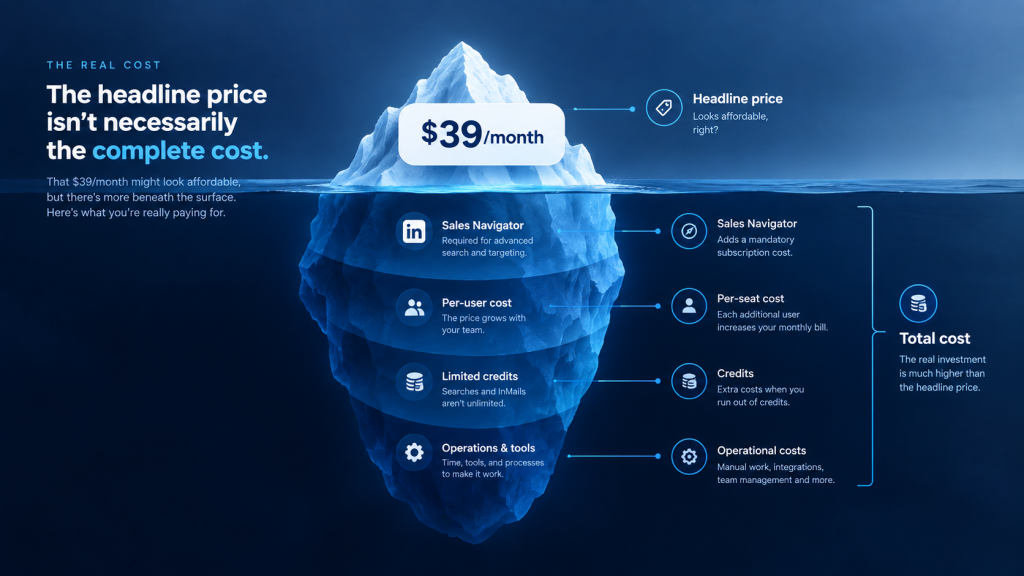
The advertised $39/month figure is the annual, single-seat, entry-tier rate, and it comes with real costs that don’t show up on the homepage: a per-user model with no team discount, email finder credits that run out fast, and a Sales Navigator subscription (~$99/month) that’s effectively required but never included in the sticker price. None of that makes Dripify a bad deal for a single user running one or two campaigns; it just means the number most active users pay isn’t the number on the pricing page.
Read the full Dripify pricing breakdown for the tier-by-tier detail, refund policy, and a look at whether it’s still worth it for a growing team in 2026.
Is Dripify Safe? In Short
Dripify runs in the cloud rather than as a browser extension, which is a genuine safety advantage over extension-based tools like Lemlist’s LinkedIn steps or Octopus CRM. But cloud execution doesn’t exempt any tool from LinkedIn’s Prohibited Software policy, which explicitly bars third-party software that automates activity on the platform, according to LinkedIn’s Help Center. That underlying risk applies to the entire category, Dripify and every alternative in this guide included, and it’s mostly about behavior (daily volume, warm-up pace, account type) rather than which tool you pick.
Read the full breakdown of Dripify’s ban risk for what LinkedIn’s policy actually says, what triggers restrictions, and how to lower your risk regardless of which tool you choose.
Dripify Alternative Review: HeyReach vs. SendCopy Head-to-Head
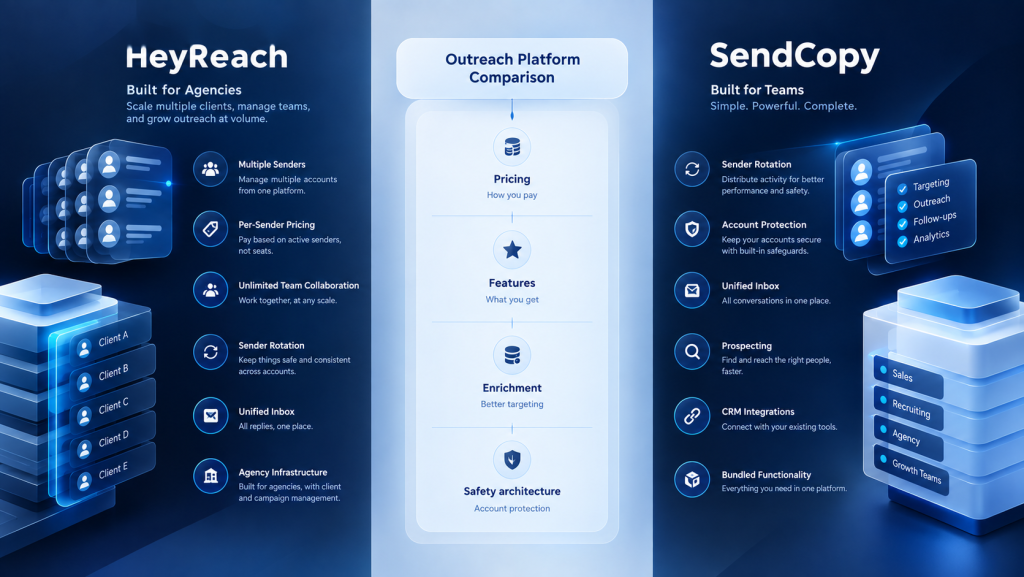
Two of the most-searched Dripify alternatives, HeyReach and SendCopy, compared directly rather than against Dripify itself.
Pricing model. HeyReach charges per connected LinkedIn sender, starting at $79/month for one seat, with unlimited team seats included at no extra cost regardless of tier, per HeyReach’s pricing page. SendCopy prices by tier rather than by seat: Growth starts at $79/month for one seat, HyperGrowth is $399/month for 10 seats (roughly $40/seat), and Agency is $999/month for 50 seats (roughly $20/seat), with a 20% discount on annual billing. [VERIFY CURRENT PRICING]
The practical difference: HeyReach’s per-sender rate stays flat as you add accounts, so cost scales in a straight line with sender count. SendCopy’s per-seat cost drops as you move up a tier, but only in fixed jumps, so a team that outgrows one tier by a single seat has to buy the next tier up rather than add one seat at a time.
Feature set. Both tools center the pitch on account safety through sender rotation. HeyReach’s unified inbox is one of its most consistently praised features in G2 reviews. SendCopy’s equivalent, Unibox, covers the same core job (team-wide reply management in one place) and adds an AI-assisted sequence builder and Lead Finger prospecting bundled into the same plan. Honest tradeoff on integrations: HeyReach connects to Slack, Zapier, and Clay according to G2 reviewer feedback, while SendCopy’s integrations run through Clay, Trigify, ContactOut, and HubSpot specifically- a different set, not a strictly broader one.
Enrichment and hidden costs. HeyReach’s LinkedIn-to-email enrichment isn’t included in base plans; credit packs are billed separately, and high-volume workflows can add $50 to $200/month on top of the sender pricing, per Derrick App’s HeyReach pricing breakdown. HeyReach’s Agency and Unlimited tiers also require bringing your own residential proxies, an added per-account cost not reflected in the sticker price. SendCopy’s Lead Finger prospecting is bundled into plan pricing rather than metered separately, and Auto-Rotate Senders and LinkedIn Account Protection are included at every tier without a separate proxy requirement.
Safety architecture. Both are cloud-based with sender/account rotation as a core feature. Neither publishes independently audited restriction or ban rates, so treat any specific ban-rate claim from either vendor’s own marketing with the same caution regardless of which one makes it.
Honest limitation for SendCopy. It’s a newer entrant than HeyReach, so there’s a thinner base of independent, non-vendor-published reviews to weigh against HeyReach’s more established G2 and Capterra track record. Email and WhatsApp support are on SendCopy’s roadmap but not live yet; teams that need multichannel outreach today should treat that as a real gap, not a “coming soon” footnote.
Honest limitation for HeyReach. The flat per-sender rate that makes it cheap at low sender counts gets less competitive once Sales Navigator (~$99/month per seat, not included) and enrichment credits are added on top, and its Agency-tier features (whitelabel, bring-your-own-proxy) go unused and unpaid-for by in-house teams that don’t need them.
Bottom line. HeyReach is the stronger fit for agencies scaling past 10+ sender accounts, where flat per-sender or flat-agency pricing beats a tiered model. SendCopy is the stronger fit for teams that want prospecting, a unified inbox, and CRM integrations bundled into one plan without separate credit metering, and are comfortable working with a newer platform.
Curious how SendCopy’s sender rotation and Lead Finger prospecting stack up against your current sender count and cost? Start a free SendCopy trial or book a demo to run the numbers on your own team.
Frequently Asked Questions
Is there a free Dripify alternative?
Waalaxy is the closest to a genuinely free option, with a permanent free plan capped at roughly 80 LinkedIn invitations a month. Most other alternatives, including Dripify itself, offer only a time-limited free trial rather than a permanent free tier.
Is Dripify safe to use?
Dripify runs in the cloud, which reduces some of the detection risk associated with browser-extension tools, but it still falls under LinkedIn’s Prohibited Software policy like every third-party automation tool on this list. No LinkedIn automation tool is officially sanctioned by LinkedIn.
Does Dripify have a free trial?
Yes. Dripify offers a 7-day free trial with no credit card required, according to its pricing page.
What is the best Dripify alternative for agencies?
Among Dripify alternatives built for scale, HeyReach is generally the strongest fit for agencies, since its flat per-sender pricing and unlimited team seats scale more predictably than per-account pricing models as client accounts are added.
What is the best Dripify alternative for solo founders?
Waalaxy’s free tier or a lower-cost entry plan like SendCopy’s is typically the best starting point for a single account running a focused campaign, before scaling into a team-oriented tool.
Is Dripify worth the price in 2026?
For a single user running one or two campaigns, Dripify’s entry pricing is competitive. For teams adding multiple seats, the per-user model tends to get expensive faster than flat-fee, per-sender alternatives like HeyReach.
Can I use Dripify and an alternative at the same time?
Running two LinkedIn automation tools on the same account at once is not recommended: overlapping automated activity from two tools increases the behavioral inconsistency that LinkedIn’s detection systems flag. Test one tool at a time, on a single account, before switching entirely.
What’s the difference between a Dripify alternative and a Dripify review?
An alternative comparison looks at other tools that solve the same problem; a review evaluates Dripify itself, its pricing, features, and limitations, in isolation. This guide covers both: a full Dripify pricing breakdown above, plus nine alternatives to compare it against.
Final Verdict: Which Dripify Alternative Should You Choose?
There’s no single best pick among these Dripify alternatives, only the best one for your actual usage pattern. If you’re testing LinkedIn outreach for free before committing budget, start with Waalaxy’s free tier. If you’re an agency scaling past a handful of client accounts, SendCopy’s sender pricing will save real money that Dripify’s per-seat model won’t.
If LinkedIn is secondary to an existing cold email motion, Lemlist lets you add it to a tool you’re already paying for. And if you want LinkedIn-only automation built specifically around sender rotation and account protection without stacking separate personalization add-ons, SendCopy’s free trial is worth the fifteen minutes it takes to set up a first campaign.
Whichever tool you choose, the safety fundamentals stay the same regardless of vendor: warm up new accounts slowly, keep daily activity conservative, and remember that LinkedIn’s Prohibited Software policy applies to the entire category, not just the tool you’re currently using.
Ready to see how sender rotation and account protection work in practice? Start a free SendCopy trial or book a demo to walk through your specific outreach setup.