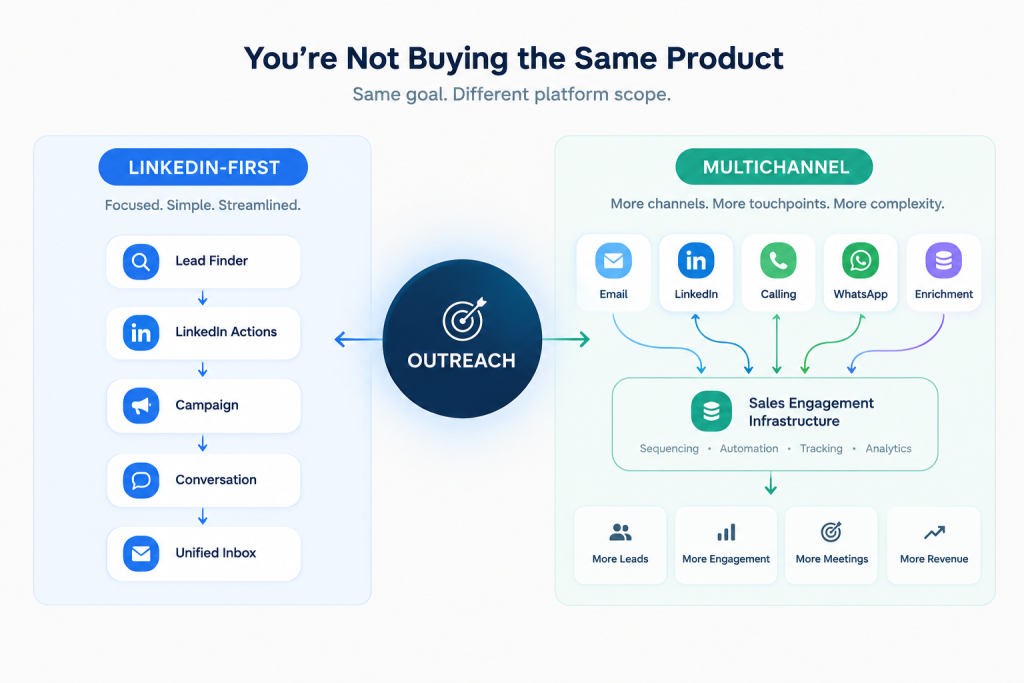
Comparing SendCopy vs Lemlist pricing isn’t a clean apples-to-apples exercise, and pretending otherwise does readers a disservice. SendCopy is built for one channel: LinkedIn outreach, with account safety as its core design constraint. Lemlist is a multichannel sales engagement platform where LinkedIn is one of several channels sitting alongside email, calls, and WhatsApp.
That difference in scope changes the math. If your team runs LinkedIn as the primary channel, you’re paying Lemlist for a full platform to get a feature that’s SendCopy’s entire product. If your team runs email as the primary channel and touches LinkedIn occasionally, the comparison flips, and Lemlist’s unlimited-seat email pricing starts to look like the better deal.
This piece breaks down what SendCopy and Lemlist actually cost at different team sizes, where the numbers hide extra fees, and which one makes financial sense depending on your channel mix. Every price below is pulled directly from SendCopy’s live pricing page and Lemlist’s Help Center documentation, not from a review site’s summary.
Table of Contents
SendCopy Pricing Plans
SendCopy runs three sender-seat tiers, billed monthly or annually with a 20% discount on the annual commitment:
| Plan | Monthly | Annual (per month) | Sender seats | Best for |
| Growth | $79/month | $63/month ($756/year) | 1 | Solo founders, individual SDRs |
| HyperGrowth | $399/month | $319/month ($3,828/year) | 10 | Small to mid-size SDR teams |
| Agency | $999/month | $799/month ($9,588/year) | 50 | Agencies managing multiple client accounts |
All three tiers include LinkedIn Lead Finder import, all LinkedIn actions, campaign automation, the unified inbox, and a dedicated proxy per sender, which is what actually delivers the account-rotation and IP-isolation safety mechanics: each connected sender operates through its own isolated environment rather than sharing infrastructure that could trigger a suspicious-login flag across accounts. AI Tools and Premium Support are added starting on HyperGrowth, and Agency adds unlimited workspaces, white labeling, migration support, and dedicated customer support on top of that. A single Growth seat doesn’t include the AI toolkit at all, not a partial version of it.
Because sendcopy’s pricing plan is flat per tier rather than strictly per seat, the effective cost per seat drops sharply as team size grows: $79 per seat on Growth, $39.90 per seat if you fill all 10 HyperGrowth seats, and $19.98 per seat on a fully staffed Agency plan. A team that only fills half its seat allocation pays a higher effective per-seat rate, so the flat-tier model rewards teams that grow into the full capacity rather than ones that stay well under it.
If your team is deciding what to automate first, SendCopy’s LinkedIn lead generation and campaign automation features are included on every tier above, so the plan choice comes down to seat count and AI access rather than core functionality.
Lemlist Pricing Plans 2026
Lemlist changed its plan structure in 2026, and understanding the new Lemlist pricing plans for 2026 matters more than the sticker prices alone. New customers now choose between a plan priced by sending volume and a plan priced per seat, plus a custom Enterprise tier: a genuine per-seat vs. volume-based outreach pricing split rather than a simple tier upgrade.
Email plan is volume-based and priced per workspace, not per seat. Teams get unlimited users and senders, and the bill scales with how many emails the team sends per month, as confirmed on Lemlist’s Help Center, updated June 29, 2026:
| Monthly email volume | Monthly billing | Yearly billing |
| 50,000 | $69/mo | $55/mo |
| 100,000 | $89/mo | $71/mo |
| 200,000 | $159/mo | $127/mo |
| 500,000 | $359/mo | $287/mo |
| 1,000,000 | $659/mo | $527/mo |
Yearly billing saves 20% off the monthly rate, with a 10% discount available on quarterly billing. The catch for LinkedIn-focused buyers: the Email plan doesn’t include phone numbers, WhatsApp, calling minutes, or LinkedIn actions of any kind. If your outreach touches LinkedIn at all, this plan is off the table.
Multichannel Expert is where Lemlist’s Lemlist Multichannel Expert pricing kicks in for LinkedIn automation, flipping back to per-seat billing at $109 per user per month on monthly billing, with the same quarterly and yearly discounts applied. Each account connects up to five sending emails per user and includes 400 free enrichment credits and 400 calling minutes per user, per month. WhatsApp is available only as a paid add-on on top of the base seat price.
Enterprise requires annual billing with a five-seat minimum, and adds SSO, a dedicated account manager, and double the calling minutes at 800 per user per month. Lemlist doesn’t publish Enterprise per-seat rates, so budgeting past five seats means a sales call.
One important caveat: the Email and Multichannel Expert plans can’t run on the same team account, so switching between an email-only motion and a LinkedIn-inclusive one means migrating to a new team, not flipping a toggle.
SendCopy vs Lemlist Pricing by Team Size
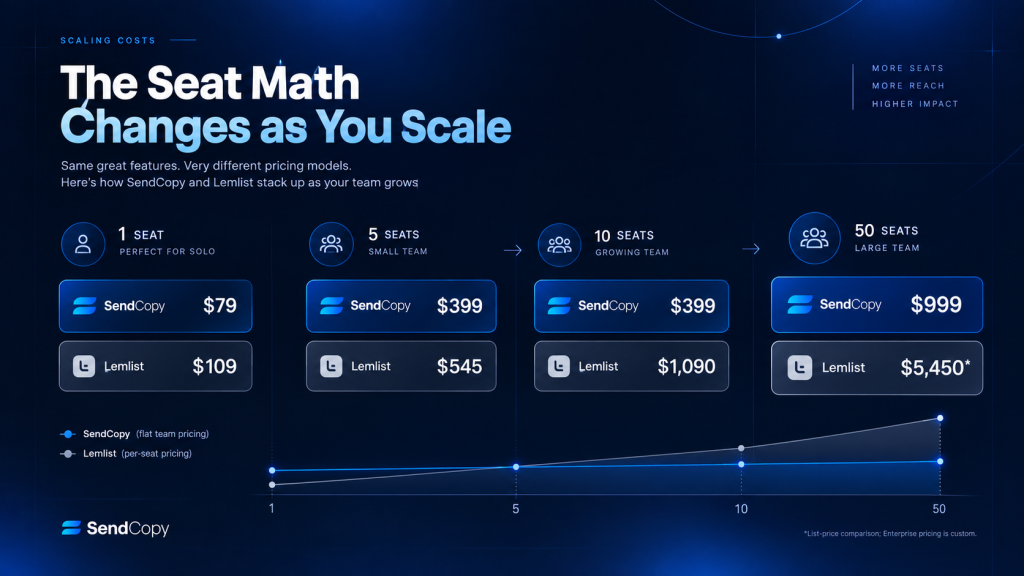
Since SendCopy is LinkedIn-only, the fair SendCopy vs Lemlist pricing comparison is against Lemlist’s Multichannel Expert plan, the only tier that includes LinkedIn actions at all.
| Scenario | SendCopy | Lemlist Multichannel Expert |
| Solo user (1 seat) | $79/mo (Growth) | $109/mo |
| 5-person team | $399/mo (HyperGrowth, up to 10 seats) | $545/mo (5 × $109) |
| 50-seat agency | $999/mo (Agency) | $5,450/mo (50 × $109), or custom Enterprise quote |
At every team size in this table, SendCopy’s flat per-tier pricing comes out lower than Lemlist’s per-seat Multichannel Expert rate, and the gap widens as headcount grows because SendCopy doesn’t charge per additional user within a tier’s seat cap.
There’s a useful breakeven point here for anyone weighing the HyperGrowth tier: $399 divided by Lemlist’s $109 per-seat rate works out to roughly 3.7 seats. Once a LinkedIn-focused team crosses about four people, HyperGrowth’s flat rate beats adding seats on Multichannel Expert, and that gap only grows as the team fills out toward HyperGrowth’s 10-seat ceiling.
UK and Australia buyers should confirm whether either vendor’s listed price includes VAT or GST. Both companies typically list USD pricing and add regional tax at checkout, so the number on the pricing page isn’t always the final invoice total.
These figures also assume list price. Lemlist’s yearly discount is 20% off the monthly rate, applied the same way across the Email and Multichannel Expert plans, so a 5-person Multichannel Expert team paying $545/month on monthly billing drops to roughly $436/month on an annual commitment. SendCopy’s annual pricing works the same way: HyperGrowth drops from $399 to $319/month annualized, confirmed on the pricing page rather than calculated. Neither discount changes which tool wins the comparison at a given team size, but both are worth factoring in before signing an annual contract.
The 50-seat agency row also understates what a real Lemlist Enterprise deal would cost, in the other direction. Lemlist doesn’t publish Enterprise per-seat rates, but Enterprise exists specifically to move large teams off Multichannel Expert’s per-seat list price through a negotiated annual contract. A 50-seat team is very unlikely to actually pay $5,450/month; that number is a ceiling based on list price, not a realistic quote. Treat it as the number to negotiate down from, not the number to budget against.
Where Each Tool Actually Wins
A fair cold email and LinkedIn automation cost comparison splits cleanly along channel lines. Lemlist wins clearly for email-first teams running high-volume cold outreach. The unlimited-seat Email plan means a 10-person SDR team sending 200,000 emails a month pays $127 to $159 total, regardless of headcount, which no per-seat tool can match for large email teams.
SendCopy wins for teams where LinkedIn is the primary or only channel, and it’s the more direct Lemlist alternative for LinkedIn automation specifically. Paying $109 per seat for a platform that also bundles email, calling, and WhatsApp features you won’t use is a worse deal than paying for a tool built specifically around LinkedIn account safety. This gap gets more pronounced for agencies: a 50-seat agency on SendCopy pays $999 flat, while the same headcount on Lemlist Multichannel Expert lists at $5,450 before any Enterprise negotiation, a gap of over $4,400 a month at list price.
See the seat math for your team. Compare your exact headcount against both pricing structures before committing to either platform.
What Neither Tool Changes: LinkedIn’s Own Rules
Every automation feature in this comparison, from SendCopy’s sender rotation to Lemlist’s Multichannel Expert LinkedIn actions, operates on top of LinkedIn’s own terms of service, which prohibit third-party automation of LinkedIn activity. Account safety features on either platform (isolated proxies, human-pattern delays, sending caps) reduce the odds of detection and reduce the damage of a flag when it happens. They don’t make automated LinkedIn activity compliant with LinkedIn’s user agreement, and neither vendor claims otherwise. That’s a real cost of doing business on either platform, not a defect specific to one of them, and it’s worth weighing against the account itself, not just the monthly bill.
There’s also a switching cost the pricing tables don’t capture. Moving a team from Lemlist to SendCopy, or the other way, means rebuilding sequences in a new builder, re-importing and de-duplicating lead lists, and retraining reps on a different inbox and reporting layer. None of that shows up on either vendor’s pricing page, but it’s real-time and carries a real risk of dropped follow-ups during the transition, and it should factor into any decision to switch platforms mid-quarter rather than at a natural contract renewal.
Hidden Costs to Watch
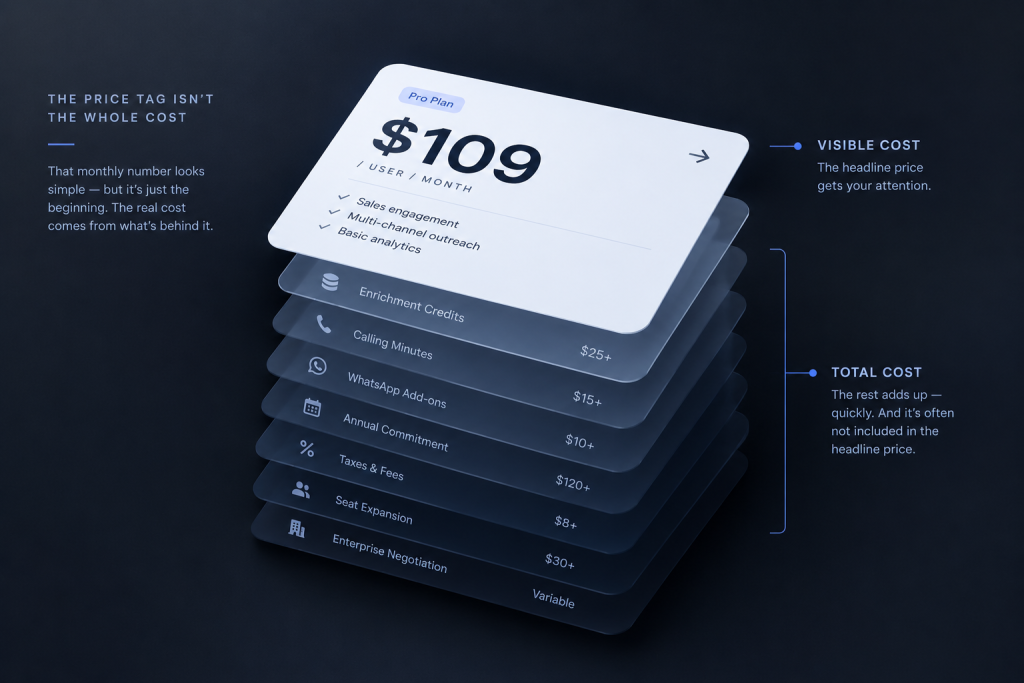
Lemlist’s credit system is the highest variable cost outside the sticker price. Enrichment, verification, and calling minutes all draw from monthly credit pools, and once those run out, the plan doesn’t include a rollover, so unused credits reset each cycle. A pattern to flag here: a review analysis of G2 feedback found user complaints about credits being consumed on enrichment lookups that failed to return a result, per DealsFlow’s Lemlist review.
DealsFlow also publishes affiliate comparison content promoting alternative tools, so treat its conclusions as directional rather than neutral. Even with that bias in mind, the specific complaint about failed lookups still consuming credits is a concrete, checkable claim rather than a vague grievance, and it turns a fixed monthly cost into a variable one tied to data quality the user can’t control.
SendCopy’s main gating decision is different in kind. AI Tools sit above the Growth tier entirely, so a solo user on the $79 plan gets full LinkedIn automation and account protection but no access to the AI toolkit at all, not a limited version of it. That’s a feature-access tradeoff rather than a consumption-based cost, which makes it easier to budget around since it doesn’t fluctuate month to month the way Lemlist’s credit pools do.
Reputation Snapshot
Lemlist holds a 4.6 out of 5 rating on G2 from 1,279 reviews, a substantial sample that reflects years of market presence. A review roundup summarizing that G2 and Capterra feedback points to recurring complaints in personalization-heavy but pricier plans, CRM integration bugs, and Chrome extension reliability, per Cleverly’s Lemlist review. Cleverly sells a competing done-for-you outreach service, so its framing has a commercial incentive to make Lemlist’s friction points sound larger than a neutral source might; the specific complaint categories (CRM sync, extension stability) are still corroborated independently on G2’s own review page, which is why they’re included here.
SendCopy doesn’t yet have a product-specific G2 rating page: a G2 search for SendCopy.ai in August 2026 surfaces only an auto-generated “alternatives” listing comparing it to unrelated email marketing tools, with no reviews or star rating of its own. That’s a straightforward function of being newer to the market rather than a reflection of product quality, and it means review volume isn’t yet a data point buyers can use for SendCopy the way they can for Lemlist. A trial run and direct reference checks carry more weight here than they would for an established, heavily reviewed competitor.
Decision Framework
If email is your primary channel and LinkedIn is occasional or nonexistent, Lemlist’s unlimited-seat Email plan is hard to beat on a per-user basis, especially for teams above five people.
If LinkedIn carries most or all of your outreach, run the SendCopy vs Lemlist pricing math against your actual team size before choosing, since this is really a LinkedIn automation vs multichannel outreach pricing decision more than a brand preference. A solo user or small team under four seats sees a smaller gap between the two tools. Past that threshold, SendCopy’s flat-tier pricing and purpose-built account protection start to pull ahead on both cost and channel fit.
Agencies managing outreach across multiple client accounts should weigh SendCopy’s Agency tier closely against a negotiated Lemlist Enterprise quote, since Lemlist doesn’t publish per-seat Enterprise rates and the real number depends on contract terms you won’t see until you talk to sales.
Frequently Asked Questions
Is SendCopy cheaper than Lemlist?
For LinkedIn-focused teams, yes, at every team size compared above. SendCopy’s flat per-tier pricing (Growth at $79/month, HyperGrowth at $399/month for up to 10 seats, Agency at $999/month for up to 50 seats) comes in below Lemlist’s Multichannel Expert plan at $109 per seat per month, starting from a single seat.
Does Lemlist’s Email plan include LinkedIn automation?
No. Lemlist’s volume-based Email plan covers cold email only and excludes LinkedIn actions, calling, and WhatsApp entirely. LinkedIn automation requires the per-seat Multichannel Expert plan or Enterprise.
What happens if a SendCopy team outgrows its seat cap?
HyperGrowth caps at 10 sender seats and Agency at 50. A team that needs more seats than a tier includes moves up to the next tier rather than paying an incremental per-seat add-on, which is why running close to a tier’s full seat count gets the best effective per-seat rate.
Is there a free trial for SendCopy or Lemlist?
Both offer trials. Lemlist’s 14-day free trial is available only on the Multichannel Expert plan, not the Email plan. SendCopy offers a free trial across its plans; check current terms on the SendCopy pricing page.
Does Lemlist charge extra for LinkedIn credits or calling minutes?
Multichannel Expert includes 400 enrichment credits and 400 calling minutes per user each month. Going over those allowances requires purchasing additional credits, and a G2 review analysis has reported credits being charged even when enrichment lookups fail to return data (see the Hidden Costs section above for the source and its bias disclosure).
Try SendCopy for LinkedIn-First Outreach
If your team’s outreach lives on LinkedIn, paying for a multichannel platform to get LinkedIn access at a per-seat markup rarely makes financial sense. For teams weighing SendCopy vs. Lemlist pricing specifically, or evaluating what the best LinkedIn automation tool in 2026 has to offer more broadly, the seat math above is the place to start. Start a free SendCopy trial and compare the seat cost directly against what you’re paying today, or book a demo to walk through pricing for your specific team size.