
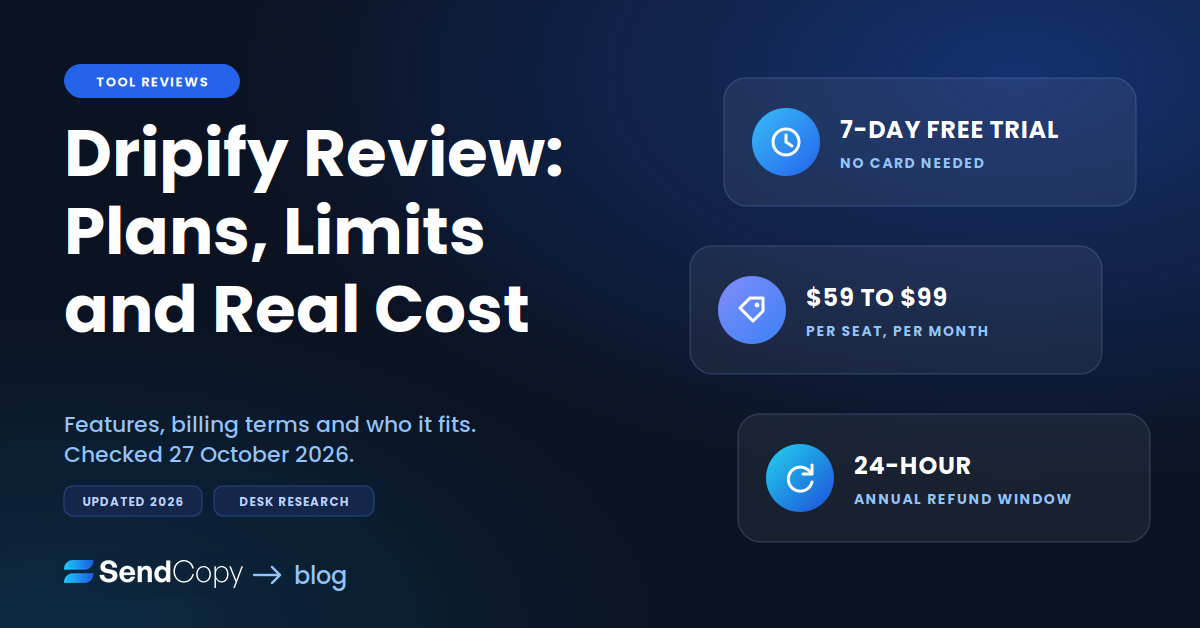
This Dripify review covers what the tool does, what each plan includes, how billing and cancellation work, and who should skip it. It is written for a solo seller or a team of two to five. Dripify pricing and safety get short sections because we cover both in depth in separate posts.
Table of Contents
Dripify Review Verdict in 60 Seconds
Dripify is a cloud-based LinkedIn and email outreach tool that is quick to set up and priced per seat. For one seller running LinkedIn-first campaigns, it does the job. Weigh the per-seat cost against four Advanced-only features: A/B testing, step analytics, activity control, and team management.
- Best for: solo sellers, founders, and small teams who want LinkedIn sequences with some email, live in an afternoon.
- Worst for: agencies running many sender accounts on one budget, email-first teams, and anyone who wants flexible refunds.
- Price range: $59 to $99 per user per month depending on plan and billing cycle. One seat connects one LinkedIn account.
- One honest weakness: the free trial runs on Advanced, but Pro, the cheaper plan, has no A/B testing, step analytics, activity control, or team management. Test with that gap in mind.
What Dripify Is and Who Uses It
Dripify automates LinkedIn outreach from the cloud. You build a drip sequence out of actions such as profile views, connection requests, messages, and InMails, add delays and conditions, then feed it a lead list. Email steps sit in the same sequence on every paid plan, and a dedicated inbox lets you reply inside the app.
It works with free LinkedIn, Premium, Sales Navigator, and Recruiter Lite accounts. You do not need Sales Navigator to start, though it gives you better search filters.
Dripify says more than 40,000 businesses use it. That is a vendor claim, and we could not verify it. The pricing model is per seat with one LinkedIn account per seat, so a solo seller pays for one seat and a five-person team pays for five. Sales Navigator is a separate LinkedIn subscription, so its cost sits on top of Dripify’s price.
Dripify Pricing and What Each Plan Includes
This section is the short version. For hidden costs and the full math, read Dripify Pricing Explained.
The Dripify pricing page we checked on 27 October 2026 lists three plans: Pro, Advanced, and Enterprise. Older help pages and some reviews still mention a Basic plan, and a Capterra reviewer called it heavily limited. It is gone from the current pricing page. If a review quotes $39 or $59 for Basic, treat it as out of date.
| Plan | Monthly, per user | Annual, per month | Annual prepaid, per user |
| Pro | $79 | $59 | $708 |
| Advanced | $99 | $79 | $948 |
| Enterprise | Custom | Custom | Custom |
The page advertises “up to 35% off” for annual billing. By its own numbers, the savings are 25% on Pro and 20% on Advanced.
What each plan includes
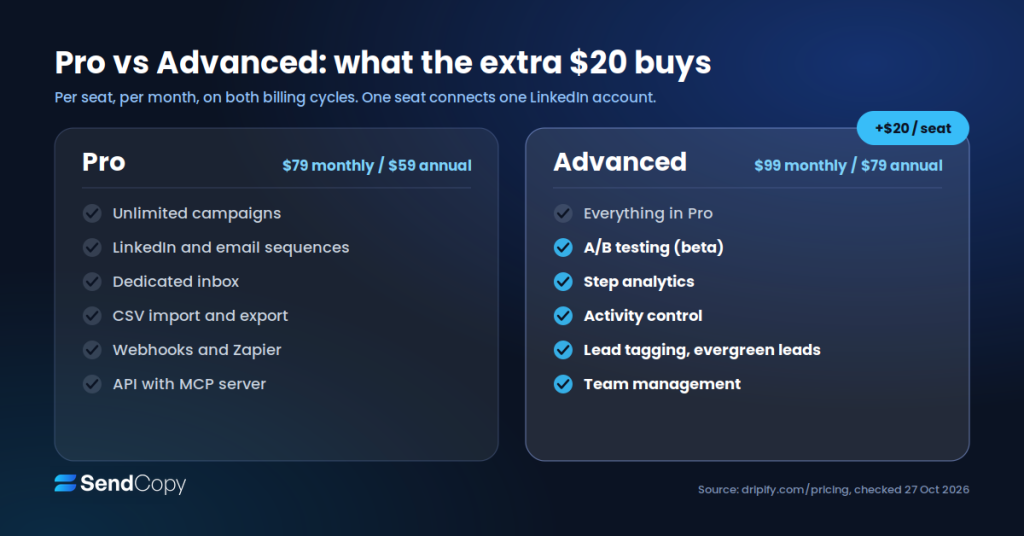
- Pro is the practical entry point. It includes unlimited campaigns, LinkedIn and email sequences, a dedicated inbox, CSV import and export, webhooks and Zapier, HubSpot, an open API with an MCP server, analytics, and 24/7 live support.
- Advanced adds team management, advanced LinkedIn protection with activity control, lead tagging, step analytics, A/B testing, and evergreen leads.
- Enterprise adds premium onboarding, dedicated technical support, and a customer success manager, with custom pricing.
Dripify Pro versus Advanced features, with A/B testing and team tools on Advanced
What 1, 3, and 5 seats cost
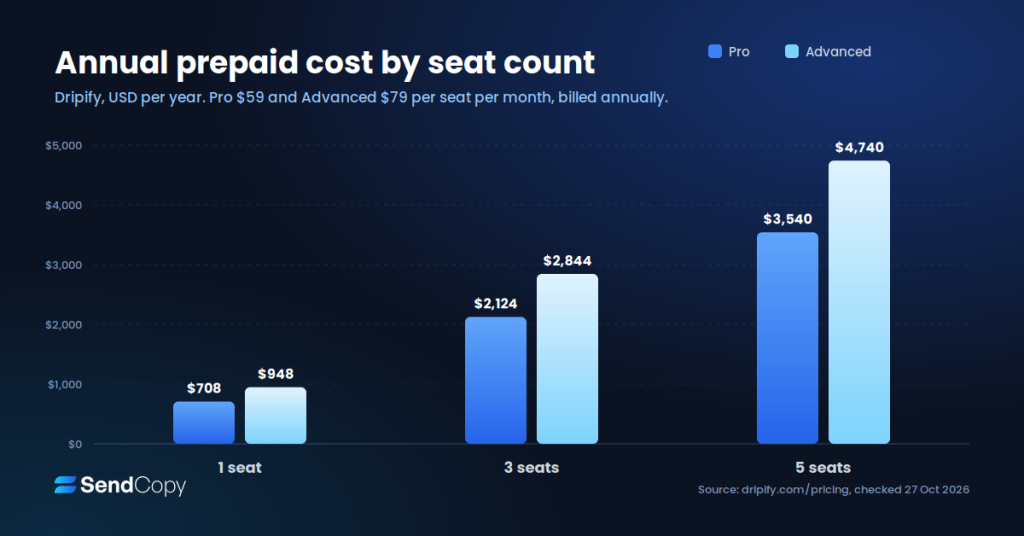
| Seats | Pro monthly | Pro annual prepaid | Advanced monthly | Advanced annual prepaid |
| 1 | $79 | $708 | $99 | $948 |
| 3 | $237 | $2,124 | $297 | $2,844 |
| 5 | $395 | $3,540 | $495 | $4,740 |
A team of three or more will want team management and duplicate-outreach protection, and both sit on Advanced. For Dripify pricing at team scale, budget from the Advanced columns. Advanced costs $20 more per seat per month on both billing cycles, or $240 a year per seat. That buys A/B testing, step analytics, activity control, lead tagging, and team management. If you will not use at least one of them, stay on Pro. Email finder credits are separate and covered below.
Dripify annual prepaid cost for 1, 3, and 5 seats on Pro and Advanced
Dripify Features That Matter, and Where They Stop
Drip sequences and conditions. Actions include connection requests, messages, InMails, profile views, likes, follows, endorsements and email steps. Conditions branch the flow, and Dripify’s guide to customizing drip campaigns lists examples such as “If connected” and “If email available.” The limit: it covers LinkedIn and email only, and email sends through Gmail or Outlook. Dripify’s email providers article lists no others. Email goes out from your own connected mailbox, so domain reputation, SPF, DKIM, and warm-up stay your job. We found no warm-up tool in the help pages we read.
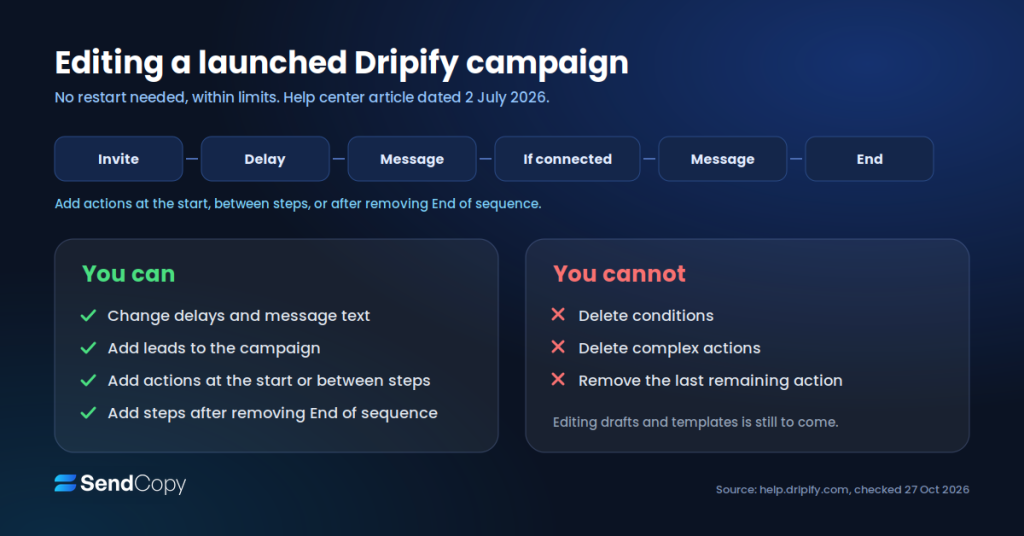
Editing a launched campaign. Older reviews, some from competing vendors, say a live campaign cannot be changed without a restart. That is out of date. A Dripify help article dated 2 July 2026 describes in-place editing. You can change delays and message text, add leads, add actions at the start or between steps, and add steps after removing the End of sequence block. Leads who finished the sequence return to it and continue.
The limit: only simple actions that do not branch can be deleted; conditions and complex actions cannot, and at least one action must remain. Dripify says editing for drafts, templates, and all sequence types is still coming.
What can be edited in a live Dripify campaign and what cannot
A/B testing. Advanced only, and still labeled beta. It covers Message, Send Invite, Email, and Sales Navigator InMail, with up to three variants per action. The limits: you cannot save a sequence as a template while a test is on, and Send Invite tests need a LinkedIn Premium account, because free accounts get only five personalized connection requests a month.
Inbox. Both plans list a dedicated inbox. The limit: a post on Dripify’s product announcement board says email replies do not appear in it, so you answer those from Gmail or Outlook.
Analytics. Both plans show daily usage, campaign performance, account performance, and lead collection reports. Advanced adds step analytics, with metrics for each connection request, message, and InMail on the sequence timeline, shown only after launch.
Integrations. Zapier, Make, webhooks, HubSpot, Google Sheets, and an API are listed, and the pricing table shows webhooks, Zapier, and CSV export on both plans. For other CRMs, plan on Zapier, Make, or the API.
Email finder credits. Every paid plan includes 100 credits a month. A credit is charged only when Dripify finds and verifies an address. Credits last 30 days and do not roll over. Extra packs cost $29 for 1,000, $49 for 2,000, $69 for 5,000, and $99 for 10,000. The limit: 100 credits is about five lookups per working day.
Team tools. Advanced adds team management, roles, shared templates, duplicate-outreach prevention, and team analytics. Each seat still connects one LinkedIn account. Dripify points teams of ten or more seats to its sales team.
How Dripify Runs, and Is Dripify Safe?
This is also the short version. The full risk discussion is in Is Dripify Safe?, and the wider picture is in why LinkedIn accounts get banned.
Dripify runs campaigns on its own servers, so nothing depends on your browser or computer. Its pricing FAQ lists four protections: a dedicated IP in your region, cloud sending, randomized timing inside working hours you set, and adaptive activity control. The comparison table lists activity control on Advanced only.
Daily limits are where the sources disagree. The pricing page shows 75 connection requests, 100+ messages, 30 InMails, and 200+ profile views a day. The help center article on daily limits, dated December 2025, gives 75 requests, 150 messages, 25 InMails, and 400 profile views for Sales Navigator and Recruiter Lite accounts, and lower figures for free and Premium accounts. Older Dripify pages quoted 100 requests and 150 messages. What we confirmed: 75 connection requests a day across current pages.
You can set your own volumes with a range setting from 1 to 10, so a target of 60 with range 5 sends between 55 and 65.
Treat the daily numbers as ceilings. LinkedIn does not publish its weekly invitation cap, according to Hublead’s guide (Hublead sells a competing tool), and vendor guides estimate roughly 100 to 200 a week depending on the account. Seventy-five a day over five days is 375, well above that range. InMail steps also draw on the credits your LinkedIn plan includes, whatever Dripify’s quota says.
LinkedIn’s User Agreement prohibits third-party automation, and LinkedIn’s help page on prohibited software says members using such tools risk restriction. Dripify’s own terms say it is not endorsed or certified by LinkedIn. Cloud sending and a dedicated IP reduce friction. They do not make the activity permitted. We publish no ban-rate numbers, because we found no reliable ones.
What Users Say on G2 and Capterra
G2 shows Dripify at 4.5 out of 5 from 354 reviews (profile data modified 8 October 2026). Capterra shows 4.7 from 476 reviews, with sub-scores of 4.68 for ease of use, 4.62 for customer service, 4.42 for features and 4.29 for value for money.
Dripify G2 and Capterra ratings with review counts and Capterra sub-scores
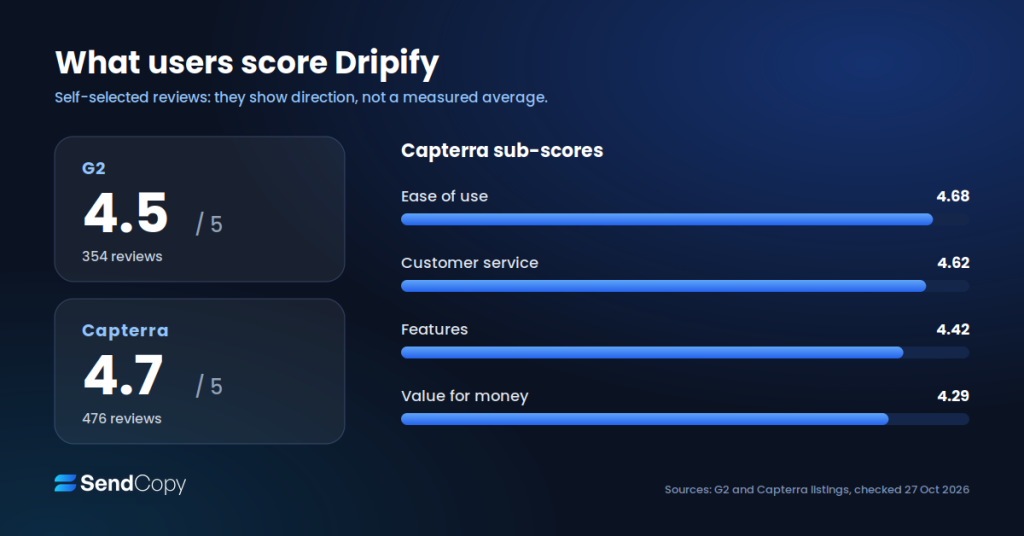
What the ratings praise. Ease of use. It is Capterra’s highest sub-score at 4.68, ahead of customer service at 4.62, features at 4.42, and value for money at 4.29.
What people complain about.
- Cost per seat. Capterra’s own summary flags the pricing structure as high and confusing, and G2 themes include “expensive.”
- Billing. One G2 reviewer titled a review about being charged for a full year and a separate monthly package. It is a single account of a problem, not a pattern we can size.
- Refunds. In our reading of the terms (next section), a billing mistake is hard to reverse once the 24-hour annual window or the monthly purchase has passed.
- Rigid campaigns and support. One G2 reviewer listed limited campaign flexibility and support issues together. Capterra’s 4.62 customer service score points the other way, so treat support as mixed. The July 2026 editing update addresses part of the flexibility complaint.
- The old Basic plan. A Capterra reviewer called it too limited after early success.
Ratings in this Dripify review come from people who chose to review. They show direction, not a measured average of every customer.
Dripify Free Trial, Refund and Cancellation Terms
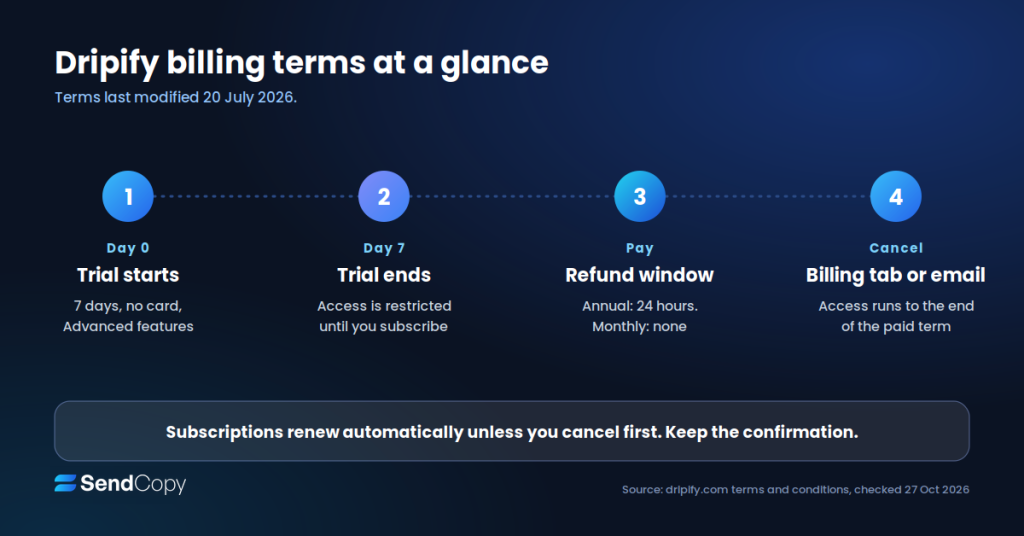
Free trial. There is a 7-day trial with no credit card. It includes Advanced features and real campaigns, not a demo. When it ends, access is restricted until you subscribe, and Dripify says nothing is charged automatically. There is no free plan.
Renewal. Subscriptions renew automatically unless you cancel before the term ends. Dripify’s terms also say it may change prices at any time.
Refunds. Under the terms, last modified 20 July 2026:
- Monthly purchases are non-refundable.
- Annual plans are refundable if requested within 24 hours of Dripify receiving payment.
- Add-on services, including the LinkedIn profile makeover, are non-refundable.
- Unhappy customers are told to email [email protected].
How to cancel. Open your control panel, go to the Billing tab and press Cancel Subscription, or email [email protected]. Cancellation takes effect at the end of the current paid term, so you keep access until then. You can change plans or seats in Billing. Upgrades apply immediately, and downgrades start on the next cycle.
Dripify billing terms timeline: 7-day trial, 24-hour annual refund window, cancellation at end of term
What to document. Billing complaints appear in G2 reviews, and Dripify’s terms limit refunds, so keep a paper trail:
- Screenshot your plan, seat count, and billing cycle at purchase.
- Save every invoice email.
- Screenshot the cancellation confirmation with its timestamp.
- Put the renewal date in your calendar a week early.
Our advice: decide during the trial, not after paying. Before day 7, rebuild one sequence without Advanced-only features, so you judge Pro the way you would buy it. A 24-hour annual refund window leaves almost no room for second thoughts, so start on monthly billing and move to annual later.
Dripify Pros and Cons
These Dripify pros and cons come from the sources above, not hands-on testing.
Pros
- Ease of use: Capterra’s highest sub-score at 4.68.
- Cloud sending with a dedicated regional IP, so nothing depends on your laptop.
- LinkedIn and email steps in one sequence on every paid plan.
- Pro includes unlimited campaigns, an inbox, CSV export and webhooks.
- Launched campaigns can now be edited in place, within limits.
Cons
- Per-seat pricing, with one LinkedIn account per seat.
- A/B testing is beta, and step analytics, activity control and team tools are Advanced only.
- Email runs through Gmail or Outlook only, and replies do not appear in the Dripify inbox.
- Refund terms are narrow: monthly is non-refundable, annual has a 24-hour window.
- Dripify’s own pages conflict on limits and still reference a retired Basic plan.
Is Dripify Worth It? Who Should Choose It and Who Should Skip It
Choose Dripify if:
- You sell from one or two LinkedIn accounts and want to launch fast.
- You want light email follow-up in the same sequence as your LinkedIn steps.
- You can live with per-seat pricing and will test on the trial first.
- You would use at least one Advanced extra. If not, the $240 a year per seat is wasted.
- You plan to run a small team on Advanced and want duplicate-outreach protection.
Skip Dripify if:
- You run many client or rep accounts and need pricing that falls with volume.
- Your outreach is mostly cold email. In our view, Gmail and Outlook only is a real ceiling.
- You want the cheapest possible entry, since Pro at $79 monthly is not low for one seat.
- You cannot accept automation that LinkedIn’s terms prohibit.
If you are weighing alternatives, our Dripify alternatives guide lays out the options.
Dripify Alternatives Compared
| Tool | Billing unit | Channels | Entry price note |
| Dripify | Per user, one LinkedIn account | LinkedIn and email (Gmail, Outlook) | $79 monthly or $59 annual (Pro) |
| Waalaxy | Per user | LinkedIn, with email on higher tiers | €19 to €69 |
| We-Connect | Per seat | LinkedIn-first | Growth from $69 per seat per month; Agency from 10 seats on request |
| Expandi | Per seat | LinkedIn plus email | Business plan from $99 monthly, $79 per month |
| HeyReach | Per LinkedIn sender | LinkedIn focus | Growth from $79 per sender monthly; lower on annual or volume |
| SendCopy | Sender Seat | LinkedIn focus | Growth $79 per month, one seat; HyperGrowth $399 per month, 10 seats. 20% annual discount |
Dripify alternatives, head-to-head: Dripify vs Waalaxy, Dripify vs Expandi, our Waalaxy review and our We-Connect review.
Where SendCopy Fits
SendCopy is our product, so weigh this section accordingly. It is an AI-powered LinkedIn outreach and cold email platform, and it also bills per seat, so at one seat the price gap with Dripify Pro is small. Our cost comparison is between SendCopy vs. Dripify pricing. The limit is the same one Dripify carries: LinkedIn’s User Agreement prohibits third-party automation, so SendCopy cannot remove that account risk either.
FAQ
How much does Dripify cost?
Dripify lists Pro at $79 per user per month, or $59 when billed annually, and Advanced at $99 monthly or $79 annually. Enterprise is custom. Annual prepay works out to $708 for Pro and $948 for Advanced per user. Each seat connects to one LinkedIn account. Prices were checked on dripify.com on 27 October 2026.
Is Dripify worth it?
It is worth it if you run LinkedIn-first outreach from one or a few accounts and want quick setup. It is harder to justify if you need heavy email, many senders on one budget, or flexible refunds. Test it inside the 7-day trial, because the annual refund window is only 24 hours.
Does Dripify have a free plan or trial?
There is no free plan. New users get a 7-day free trial with no credit card required, and it includes Advanced plan features. When the trial ends, access is restricted until you subscribe, and Dripify says nothing is charged automatically. Pricing and terms were checked on 27 October 2026.
Is Dripify cloud-based?
Yes. Dripify says campaigns run on its servers, so nothing depends on your browser being open or your computer being on. Each account gets a dedicated IP address in your region, according to Dripify. Cloud sending does not make automation permitted by LinkedIn, whose User Agreement prohibits third-party automation tools.
Does Dripify offer refunds?
Monthly purchases are non-refundable under Dripify’s terms. Annual plans are refundable if you ask within 24 hours of Dripify receiving your payment. Extra services such as the profile makeover are non-refundable. Dripify tells unhappy customers to email [email protected]. Terms were last updated on 20 July 2026, so recheck before you pay.
Does Dripify work with Sales Navigator?
Yes. Dripify works with free LinkedIn, Premium, Sales Navigator and Recruiter Lite accounts, and you do not need Sales Navigator to use it. Sales Navigator gives better search filters and higher daily limits for views and messages, and Dripify’s InMail action covers Sales Navigator InMails. Free accounts get lower limits.
Can I edit a Dripify campaign after launch?
Yes, within limits. Dripify’s help center, dated 2 July 2026, says you can change delays and message text, add leads, and add actions at the start, between steps or after removing End of sequence, all without a restart. Only simple actions can be deleted, and conditions cannot be.
Final Verdict
Is Dripify worth it? Our Dripify review lands here: it is a fast, cloud-based way to run LinkedIn and light email sequences, and it suits a solo seller or small team that tests the trial first. Watch the $240 a year per seat that Advanced adds and the 24-hour annual refund window. Pro at $79 monthly is a fair entry only if you do not need A/B testing, step analytics, or team tools.
If you would rather compare before you commit, try SendCopy or book a demo.