LinkedIn follow-up messages are the difference between a connection that goes nowhere and a meeting on the calendar. Only 2% of deals close after the first contact, according to Skylead’s analysis of LinkedIn outreach data. Most first-touch LinkedIn messages get ignored, not because the offer is bad, but because there’s no second message behind it.
This guide covers how to follow up on LinkedIn without being ignored: exactly when to send each message, how many LinkedIn follow-up messages to send, what to say at each stage, and how to build a cadence that scales without tripping LinkedIn’s safety limits.
Table of Contents
Why Most LinkedIn Follow-Ups Get Ignored
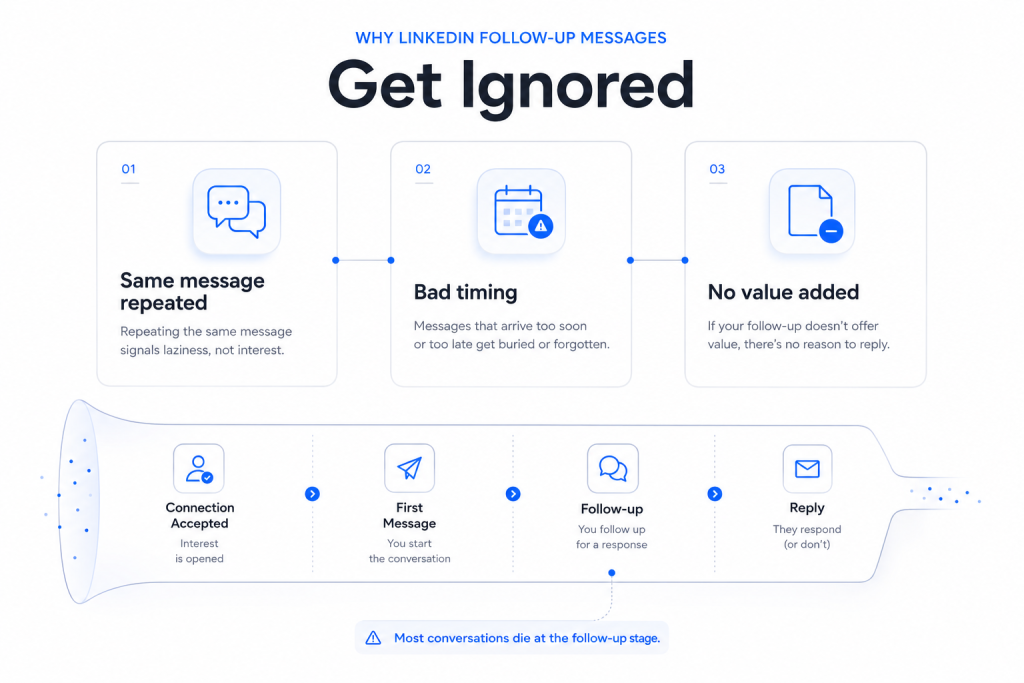
A follow-up gets ignored for one of three reasons: it repeats the first message word for word, it arrives too soon or too late to matter, or it reads as a nudge instead of a reason to reply.
Cclarity, a LinkedIn-focused lead generation agency, tracked outreach across its B2B client base in 2026 and found immediate pitch messages sent right after a connection is accepted convert at 2-5%. Messages sent after even a short period of genuine engagement, such as commenting on a post or two, land in the 15-25% range instead. The gap isn’t better writing. It’s whether the recipient has any context for who’s messaging them.
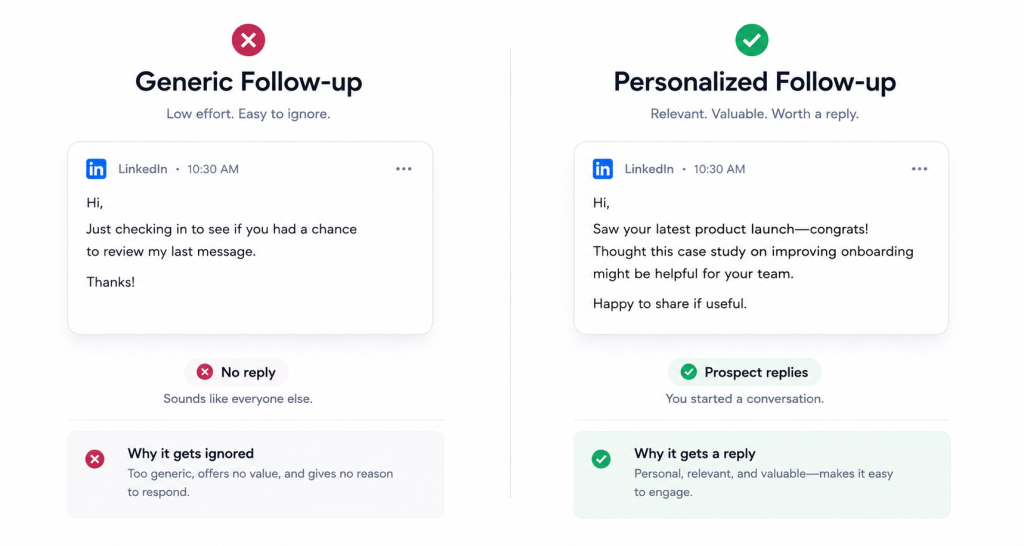
That context problem compounds with every LinkedIn follow-up message you send. A second message that says “just checking in” gives the reader nothing new to respond to. It’s a bump, not a reason.
The funnel above the message itself matters too. LeadSpark AI‘s 2026 research on connection request performance found personalized connection notes achieve roughly 45% acceptance, compared to about 15% for generic, unpersonalized requests, a three-times gap before a single follow-up is even sent. Once accepted, that same research puts follow-up reply rates in the 25-35% range for personalized outreach, well above the 10-25% typical of cold InMail sent without a prior connection. In other words, a weak follow-up sequence is often just inheriting a weak connection request. Fixing the note at the top of the funnel usually does more for reply rates than rewriting the third follow-up.
One nuance worth flagging before you start chasing any of these numbers: a reply rate measures whether someone responded, not whether the response was positive. A high reply rate paired with poor targeting often just means people are annoyed enough to say “not interested” or “please stop messaging me.” Track meetings booked and qualified conversations alongside raw reply rate, or the wrong sequence can look like it’s working when it isn’t.
How Many LinkedIn Follow-Up Messages Should You Send?
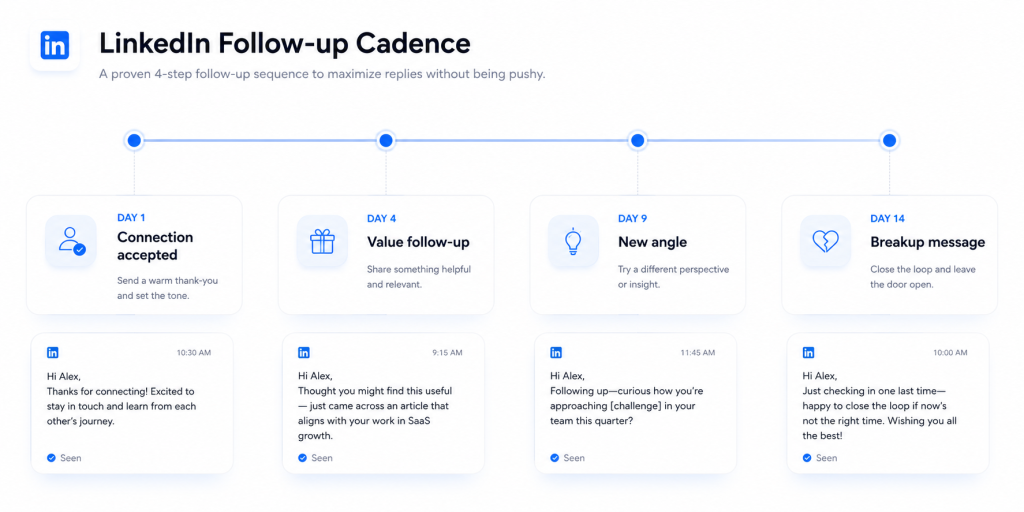
Skylead’s and PhantomBuster’s outreach data both point to a narrower range than most sales teams assume: two to three follow-up messages, spread over one to two weeks, and then move on.
Skylead’s 2026 analysis of follow-up performance recommends waiting three to five business days after an unanswered first message before sending a second one, and capping the sequence at two or three attempts total. Beyond that point, reply rates flatten out, and the messages start to read as pressure rather than persistence. The second message LinkedIn sellers send tends to matter more than any message that comes after it, since it’s the one still landing while the original context is fresh.
PhantomBuster’s 2026 research, based on more than 15,000 connection sequences across 200-plus sellers, points to a similar shape: four short messages spread across a 14-day window (days 1, 4, 9, and 14), each one under 300 characters and each one giving the recipient an easy way to opt out.
The number that matters less than people think is the total count. What matters is that each message adds something the last one didn’t: a new piece of value, a different question, or a graceful exit.
LinkedIn Follow-Up Timing: The Best Days and Triggers
Day of the week has a measurable, if modest, effect on reply rates. A 2026 outreach benchmarking study by Belkins, drawing on a large sample of B2B LinkedIn campaigns, found Tuesday produced the highest average reply rate at 6.90%, with Monday close behind at 6.85%. Reply rates hold roughly steady through Wednesday and Thursday before dropping off on Friday and falling further over the weekend, bottoming out around 6.40% on Saturday.
The same research found that pairing a message with an additional touchpoint, such as a profile visit, lifted reply rates as high as 11.87%, compared to single-action sends.
None of this means Tuesday morning is a magic window. It means the difference between a good send time and a bad one is small next to the difference between a relevant message and an irrelevant one. Use the day-of-week data as a tiebreaker, not a strategy.
The more reliable timing signal is behavioral: if a prospect views your profile, reacts to a post, or gets promoted between sends, that’s a better trigger for your next message than any fixed calendar rule.
Industry and role also shift the baseline more than day of week does. The same Belkins study found legal and professional services reply at 10.42% on average, HR and talent acquisition at 12.08%, and software and SaaS at just 4.77%, the lowest of the sectors tracked. If your target reader sits in a SaaS or software org, that lower baseline isn’t a sign your messaging is broken; it’s the category norm, and it’s worth setting expectations with anyone on your team benchmarking against a generic industry average.
One caveat worth flagging: reply-rate benchmarks like these are aggregated across thousands of campaigns with wildly different targeting quality, so treat them as a rough floor and ceiling, not a target to hit on every send. A tightly targeted list of 50 will usually outperform the benchmark; a loosely targeted list of 5,000 usually won’t.
Not sure your first message is even landing? See how InMail and connection requests compare for reply rates in LinkedIn InMail vs Connection Request: Which Gets More Replies in 2026?
LinkedIn Follow-Up Message Templates
Below are five follow-up scenarios sales teams run into most often, with a template for each. Treat every bracketed placeholder as a required edit, not a suggestion: the structure is one sentence of context, one sentence of value, one low-commitment question, and it holds even when every word in it changes.
Template 1: After a Connection Request Is Accepted
Send this within one to two days of acceptance. It’s not a pitch. Its only job is to confirm you’re a real person and open a door.
Thanks for connecting, [First Name]. I saw your post on [specific topic] and had a similar experience at [your context]. Curious how you’re approaching [related challenge] these days.
Template 2: First Follow-Up After No Response
Wait three to five business days. Add one new piece of value instead of repeating the ask.
Hi [First Name], following up in case this got buried. I put together a short breakdown on [relevant topic] that a few [their role] folks found useful. Want me to send it over?
Template 3: Second Follow-Up (Value-Based, Not “Just Checking In”)
If message two goes unanswered, wait another five to seven days and change the angle entirely.
[First Name], noticed [company] recently [trigger: funding, hire, launch, post]. Wondering if that shifts how you’re thinking about [problem your product solves]. Happy to share what we’re seeing from similar teams if useful.
Template 4: The Breakup Message
This is the last message in the sequence. It works because it removes pressure instead of adding it: giving someone an easy, guilt-free way to say “not now” is often what finally gets a response, even a short one.
Totally understand if now isn’t the right time, [First Name]. I’ll stop following up here. If [problem] becomes a priority down the line, feel free to reach out. Wishing you a good rest of the year.
Template 5: Post-Meeting or Post-Webinar Follow-Up
For warmer touches where the prospect already knows who you are, reference the specific interaction and keep the ask small.
Great chatting at [event/webinar name], [First Name]. You mentioned [specific detail they shared], so I wanted to send over [resource] that speaks to that directly. Worth a 15-minute call to see if it fits?
Building and sequencing these by hand across dozens of prospects doesn’t scale. SendCopy’s AI-assisted sequence builder drafts and times each follow-up automatically, so nothing sits unanswered. Start Your Free Trial
How LinkedIn’s Character and Messaging Limits Shape Your Follow-Up
LinkedIn’s own Help Center confirms that a personalized note can be added to a limited number of connection requests each month for free accounts, capped at 200 characters per note, with no such cap for Premium members. That 200-character ceiling is exactly why the first touch has to be short and specific rather than a full pitch: there’s no room for one.
Once a connection is accepted, messages move to LinkedIn’s standard direct-message thread, which allows far more room, though shorter messages still consistently outperform longer ones. InMail, available to Premium and Sales Navigator users, splits into a 200-character subject line and a body that can run up to roughly 1,900 characters, but sales teams who track results tend to keep InMail bodies well under that ceiling.
Two practical takeaways follow from these limits:
- Front-load relevance. With 200 characters or less to work with on a connection note, lead with the specific reason you’re reaching out, not a greeting.
- Don’t confuse “allowed” with “effective.” LinkedIn permits messages up to 8,000 characters between connections, but that’s a ceiling, not a target. Follow-ups that stay under a few hundred characters read as a real message, not a script.
There’s also a volume side to these limits that follow-up sequences run into once a team scales past a handful of prospects. LinkedIn doesn’t publish a fixed weekly message cap, but it does monitor invitation acceptance rates and flags accounts that send high volumes with low acceptance as a spam signal. A follow-up cadence built around two or three well-timed, personalized messages per prospect stays well inside that safety margin. A cadence built around blasting the same message to hundreds of prospects on the same day does not, regardless of how the message itself is worded.
Common Mistakes That Make Follow-Ups Feel Annoying
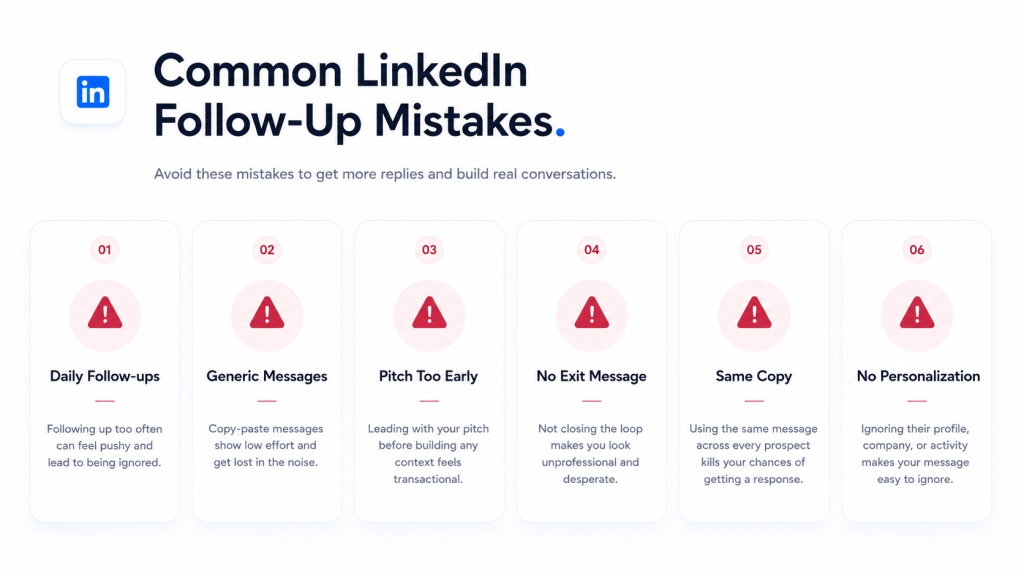
Repeating the same message with “just following up” pasted on top. Every follow-up needs new content, not a bump. A repeated message with no new information gives the reader nothing they didn’t already ignore once.
Following up daily. Compressing a sequence that should span two weeks into two or three days reads as desperation, not persistence. It also risks the account-level consequence LeadLoft’s research documents directly: LinkedIn treats a dropping acceptance and engagement rate as a spam signal, and accounts with acceptance rates below roughly 30% get their sending limits tightened.
Pitching in message one. Whether it’s a connection note or the first DM after acceptance, opening with a product pitch before establishing any context is the fastest way to get ignored or reported. It’s the same 2-5% versus 15-25% gap Cclarity’s data showed above, just applied to the very first message instead of the follow-up.
No exit ramp. A sequence that never ends puts the entire burden on the prospect to opt out. A breakup message does that work for them, and often gets a reply precisely because it removes pressure.
Following up on autopilot with zero new signal. A trigger, such as a job change, a company announcement, or a recent post, gives a follow-up a reason to exist. Without one, it’s just noise with a name attached.
Treating every prospect the same regardless of seniority. A director or VP-level prospect responds to a different cadence than an individual contributor. Senior buyers get more inbound outreach and less time to sort through it, so the bar for relevance in each message is higher, and the tolerance for a generic sequence is lower.
When to Leave LinkedIn and Try Another Channel
If two or three follow-ups on LinkedIn haven’t produced a reply, the next move usually isn’t a fourth LinkedIn message. It’s a channel switch.
LaGrowthMachine’s outreach data shows multichannel sequences that combine LinkedIn with email convert better than either channel alone, mainly because a prospect who’s easy to miss on LinkedIn (buried inbox, infrequent logins) may check email daily, and vice versa. A simple rule that works for most B2B teams: if the LinkedIn sequence ends without a reply, send one email that references the LinkedIn conversation directly rather than starting over as if it never happened. That continuity is what makes the multichannel touch feel like persistence rather than a second, unrelated campaign.
This doesn’t mean every prospect needs four channels running in parallel. For most B2B sequences, LinkedIn plus one well-timed email follow-up covers the reasonable end of persistence. Beyond that, the returns drop fast, and the risk of feeling like harassment goes up.
Building a Follow-Up Cadence That Scales
The templates above work at the scale of a single rep managing a few dozen active conversations. The moment a team is running outreach across multiple senders, multiple markets, or multiple client accounts, manually tracking who’s due for message two versus message four stops being realistic.
This is where the mechanics of follow-up (the timing, the personalization, the exit points) need a system behind them rather than a spreadsheet. A sequence builder that automatically spaces messages according to the cadence above, swaps in new value at each stage, and stops the sequence the moment someone replies removes the two failure modes that break most manual follow-up efforts: forgetting to send, and sending too much.
Worth being honest about where AI helps and where it doesn’t. Belkins’ 2026 benchmarking data found AI-assisted first messages outperform non-AI ones (4.19% vs. 2.60% reply rate), but the pattern flips slightly for follow-ups, where non-AI messages edged out AI-assisted ones (3.91% vs. 3.48%). The practical read: let AI handle drafting, timing, and volume, since that’s where it measurably helps, but keep a human reviewing the follow-up copy itself rather than assuming automation improves every touch in the sequence equally.
Account safety matters just as much as timing, since teams running outreach across several senders or client accounts need sending patterns that mirror natural LinkedIn behavior, not a burst of identical messages fired from one account at the same time every day. That’s a different problem than writing good copy, and it’s usually where scaled follow-up campaigns run into trouble first.
Agencies managing outreach for multiple clients face a version of this problem that solo reps don’t: each client account needs its own cadence, its own personalization variables, and its own sender rotation, run in parallel without any one account’s activity spiking in a way that looks automated. A single missed follow-up on one client’s campaign is a minor miss. The same mistake repeated across twenty client accounts, on a fixed schedule, is what gets accounts flagged.
See how SendCopy’s Auto-Rotate Senders and Smart Sequences keep multi-touch follow-up campaigns running safely at scale. Book a Demo
Frequently Asked Questions
How long should I wait before following up on LinkedIn?
Three to five business days after an unanswered first message is the range most outreach data supports. Waiting less can read as pressure; waiting much longer means the original context has gone cold.
How many follow-up messages is too many on LinkedIn?
Two to three is the range that shows up consistently across outreach studies. A fourth message is sometimes worthwhile if it carries a genuinely new trigger, but a fifth or sixth rarely earns its place.
What should I say in a LinkedIn follow-up after no response?
Add something the first message didn’t have: a resource, a new angle, or a reason tied to something that changed on their end (a promotion, a company update, a recent post). Repeating the same ask in different words isn’t a follow-up, it’s a reminder.
Is it rude to follow up twice on LinkedIn? No.
Two follow-ups, spaced several days apart and each carrying new value, is standard outreach practice and generally improve reply rates rather than hurting them. What reads as rude is frequency (daily nudges) and repetition (the same message twice), not the number two itself.
Should I follow up on LinkedIn if my connection request already had a note?
Yes. A connection note establishes the relationship; it doesn’t guarantee the recipient remembers why you reached out days or weeks later. A short follow-up after acceptance re-establishes context, especially since the note itself is capped at 200 characters and has no room for a full pitch.