Gartner surveyed 632 B2B buyers in August and September 2024: 73% avoid suppliers who send irrelevant outreach, and 61% would rather buy without a rep at all. That sounds like bad news for LinkedIn outreach for SaaS. It isn’t, because the same research found buyers still want seller input on one thing: help figuring out fit for their company. A working B2B SaaS outreach strategy on LinkedIn starts from that finding, not from volume. This guide covers the buying committee problem, the platform rules that govern what you can send, and a sequence designed to reach technical buyers without triggering LinkedIn’s restrictions.

Table of Contents
Why LinkedIn Outreach for SaaS Still Works When Buyers Don’t Want Sellers
Gartner’s 2025 sales survey is blunt about buyer preference: most B2B buyers would rather complete a purchase without talking to a rep at all. Software and technology also have the lowest LinkedIn reply rate of any industry tracked in Belkin’s 2026 outreach study, 4.77%, against 10.42% for professional services. Put those two facts together, and the conclusion is obvious: a message that reads like “here’s my product, want a demo” is training your market to ignore you.
The opening Gartner leaves you is narrower but real. Buyers still want a point of view on whether a tool fits their specific situation, their stack, their team size, and their constraints. That’s the job LinkedIn outreach should do: offer a short diagnosis or a “here’s how teams like yours handle this” observation, not a product tour.
LinkedIn’s own B2B Marketing Playbook backs this up with concrete results. When ServiceMax and its agency Metric Theory focused a campaign on relevance and audience fit rather than volume, the campaign generated 189 leads at a 16% lower cost per lead than the benchmark. That was a paid campaign, not cold outreach, but the underlying lesson holds for both: show up where your buyer already behaves like a buyer, with something specific to say, instead of blasting a generic pitch at a job title.
The Buying Committee Problem
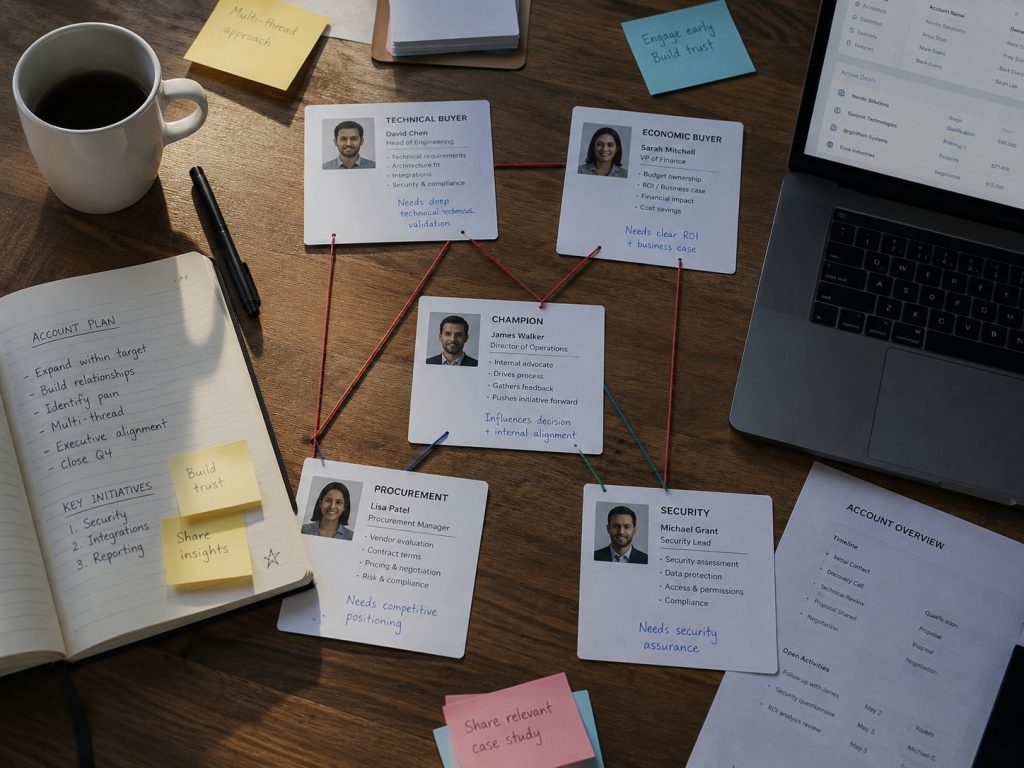
A single-threaded LinkedIn sequence, one champion, one cadence, breaks down fast in SaaS sales, because deals are rarely decided by one person. Multi-stakeholder SaaS deals are the norm past a few thousand dollars a year. Estimates vary: Forrester’s 2026 report puts the average B2B purchase at 22 people, LinkedIn’s own B2B Marketing Playbook (citing Gartner) says 6 to 10, and 6sense’s 2025 survey averages 10.1. The number moves by source, but the direction doesn’t: committees are bigger than five years ago, and most members never take a sales call.
Belkins and Influ2’s 2026 studies both describe the same four roles: a technical buyer (the engineer who’ll use or integrate the tool), an economic buyer (budget), a champion (found you), and a procurement or security reviewer who joins late and can stall everything. Belkins found 58.2% of enterprise B2B accounts (1,000+ employees) name four or more decision-maker titles, rising with deal size.
Ignore that structure and here’s what happens: the champion accepts, gets one pitch, then forwards it to two colleagues who each get their own generic cold message weeks later. The champion now looks like they invited spam into their team’s inbox, a worse outcome than silence. Identify every role up front, and send messages built for each one.
💡 Pro Tip: Contacting multiple stakeholders from the same company too quickly can appear unnatural to LinkedIn’s spam detection systems. Before scaling your outreach, read Why LinkedIn Accounts Get Banned to learn the behaviors that commonly trigger account restrictions.
What LinkedIn Actually Limits, According to LinkedIn
Most articles on LinkedIn limit their citations to outreach-tool vendors measuring their own customers, which is a conflict of interest baked into the number. That matters more for LinkedIn lead generation for software companies than most verticals, since SaaS reply rates already run below average, and a wrong assumption about platform limits compounds the problem. LinkedIn publishes its own rules in its Help Center, and they’re more specific than most vendor benchmarks, if less dramatic.
The Commercial Use Limit (CUL) governs search and profile-view volume on a standard account. Per LinkedIn’s Help Center, your free monthly usage resets at midnight PST on the 1st of each calendar month, LinkedIn will not display your exact remaining searches or views, and it cannot lift the limit on request. Activities that count toward it include searching for profiles, browsing via “People Also Viewed,” and viewing profiles on a Page’s People tab. In practice, this is why most SaaS teams doing any real volume move to Sales Navigator, which relies on saved searches and alerts rather than open-ended browsing.
Invitation restrictions work differently from what most vendor blogs imply. LinkedIn doesn’t publish a flat weekly connection-request cap; instead, it documents how restrictions behave once triggered: a restriction typically lasts about a week, withdrawing pending invitations doesn’t lift it, and Support can’t disclose why a specific account was restricted. What LinkedIn does specify is the personalized-note allowance: free accounts can add a note to a limited number of connection requests each month, with a 200-character limit, and Premium removes the cap entirely.
LinkedIn’s own help pages currently cite five personalized notes per month for free accounts, though outreach platforms have documented LinkedIn testing 3-, 5-, and 10-per-month variants on different accounts over time. Don’t build a workflow around a specific number without checking what your own account’s UI shows that month.
InMail has a hard, LinkedIn-confirmed structure: up to 200 characters in the subject line and up to 1,900 in the body, tracked by a live counter as you type. If you’re sending through Sales Navigator specifically, LinkedIn’s help documentation states InMail can’t be sent in bulk to multiple leads and that InMail templates aren’t available there, which is LinkedIn’s own definition of what “good” looks like: one message, written for one person, not a batch send.
Open Profile is the underused middle path. It’s a Premium feature that lets other members message you for free without spending an InMail credit, and LinkedIn treats a message to a 1st-degree connection or an Open Profile member as a “Free InMail.” For SaaS teams targeting a specific slice of their market, this skips connection-request friction entirely for anyone with the feature enabled.
The throughline across all of it: LinkedIn’s stated policy target is relevance and authentic behavior, not raw volume. Building a sequence around what the platform actually documents, rather than a vendor’s dramatized cap, is a more durable strategy than optimizing for whatever number is currently circulating.
Building a Sequence That Reaches the Whole Committee
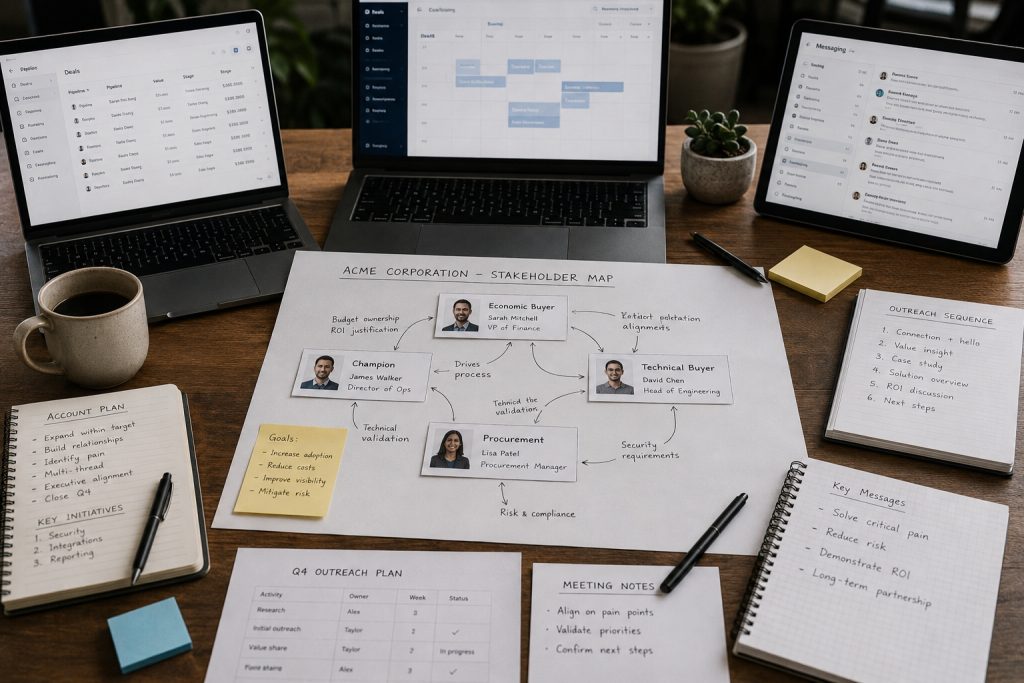
A SaaS-specific LinkedIn sequence needs to do three things a generic template doesn’t: identify the right roles at the account, personalize per role rather than per contact, and pace itself so a security reviewer showing up in week three doesn’t reset the clock.
Step 1: Map the committee before you send anything
Use Sales Navigator to build an account-first list, then add leads inside those accounts, rather than collecting one-off profiles. This is where SaaS ICP LinkedIn targeting actually happens: filtering by industry, headcount, and tech stack before a single message goes out, so SaaS LinkedIn prospecting starts from a defined account list instead of open-ended searching.
Belkin’s 2026 study puts enterprise B2B committees at four or more decision-maker titles, climbing toward the 6-to-10 range. LinkedIn’s own playbook cites Gartner for complex deals. Save the search: LinkedIn’s Sales Navigator Help documents a limit of 50 saved lead searches and 50 saved account searches, with up to 15 active email alerts on saved lead activity, so new matches (a recent hire, a role change, a job posting spike) surface without you rebuilding the list weekly.
Mapping a buying committee by hand across dozens of target accounts doesn’t scale. SendCopy builds the account and role list for you. Start free.
Step 2: Write a different opening line for each role, and treat the technical buyer as a two-message job
Technical buyer outreach fails when it opens with a pitch instead of a question. The technical buyer wants to know what breaks if they adopt the tool: integration effort, data handling, and uptime. A useful structure here is confirming scope first (“Are you the person who owns data access reviews for tools like this?”) and only then offering a short security overview or integration doc, rather than pitching a meeting in message one.
The economic buyer wants payback period and total cost of ownership, not feature lists. The champion, who is usually the first person you reach, wants to look good for finding you. One message template rewritten with a first-name swap doesn’t hold up when three colleagues at the same company compare notes.
Step 3: Space the sequence for the full sales cycle, not a single week
LinkedIn’s own B2B Marketing Playbook cites Forrester’s finding that B2B buyers average 17 meaningful interactions before completing a purchase. If the buyer already needs that many touches, the job isn’t to out-message competitors inside a tight window; it’s to show up at the moments they’re actually paying attention. Build in 5 to 7-day gaps between touches, and plan a second wave of outreach to newly identified stakeholders (legal, security, procurement) as the deal moves forward, rather than treating the sequence as finished after four messages.
Step 4: Multi-thread deliberately, not accidentally
Per Martal’s 2026 B2B SaaS sales analysis, deals with three or more stakeholders in meetings close at meaningfully higher rates than single-threaded ones, and a single-threaded deal is exposed every time a champion changes roles or loses budget authority. Multi-threading on LinkedIn means reaching out to the technical buyer directly once the champion has warmed the account, not waiting for an internal introduction that may never come. A counterintuitive point worth flagging: reaching the technical buyer early, even when your champion relationship is already strong, tends to speed deals up rather than crowd them, because it heads off a late-stage security objection instead of leaving it to surface during procurement.
Learn how in LinkedIn Prospecting: How to Find and Target the Right B2B Leads – link from the Step 1 committee-mapping section
The Account Safety Problem Nobody Budgets For
Multi-threading a buying committee means sending more messages, from more angles, to more people at one account, in the same window. LinkedIn’s Help Center prohibits bots, scrapers, and browser extensions that automate messaging or engagement. Fixed-interval connection requests, maxed-out daily caps, or several sender accounts on one IP read as exactly this pattern, no matter how personalized the copy is.
We built SendCopy after watching this happen to our own outreach: a well-targeted campaign still gets restricted if the sending pattern looks mechanical. LinkedIn’s March 2026 Transparency Report disclosed 23.5 million flagged automated sessions in one quarter; its enforcement targets session behavior (login pattern, timing, IP consistency), not message content or volume alone.
A committee-based SaaS sequence hits this risk directly: touching a technical buyer, an economic buyer, and a champion at one account inside one or two weeks concentrates activity the way flagged sessions do. Splitting that volume across sender seats, with independently randomized timing per seat, keeps the pattern looking like several people reaching out, not one campaign.
See how sender rotation and account protection work inside SendCopy. Start your free trial.
Measuring LinkedIn Outreach ROI for a SaaS Pipeline
Measuring LinkedIn like a paid ad channel (impressions, clicks) will leave you confused about whether it’s working. It behaves more like outbound email: track per-rep activity alongside CRM outcomes, at two separate layers.
Execution health, reviewed weekly:
- New leads saved per rep
- New conversations started (not messages sent, conversations that got a reply)
- Acceptance rate on connection requests
- Reply rate, counting only replies that move the thread forward
Pipeline outcomes, reviewed monthly:
- Meetings held, sourced from LinkedIn (this is your real SaaS demo booking LinkedIn number, not connection count or messages sent)
- Sales-accepted opportunities sourced from LinkedIn
- Pipeline dollars sourced from LinkedIn
- Win rate and cycle time for LinkedIn-sourced opportunities against your baseline
Tie this back to the Gartner data from the opening section: 73% of buyers avoid suppliers who send irrelevant outreach. If your reply rate at the weekly layer is low, the fix is rarely “send more messages.” It’s ICP, timing, and relevance, the same three variables that show up in every section of this guide.
Tools That Make Multi-Threaded Outreach Manageable
Mapping a committee, personalizing per role, and pacing sends across weeks is a lot to run manually, especially once you’re doing it for a full pipeline of accounts rather than one deal. This is also where product-led outreach and traditional sales-led sequencing tend to blur for SaaS teams: a rep might follow up a free-trial signup with the same committee-mapping process described above, just triggered by product usage instead of a cold list.
Sales Navigator is where committee mapping starts: build an account list first, add leads inside those accounts, then layer in saved searches and alerts so new matches (a job change, a hiring spike, a promotion) surface without rebuilding the list. More on Sales Navigator for SaaS teams here.
Clay and HubSpot integrations matter because committee-based outreach only works if the data connects back to your CRM. When a technical buyer replies on LinkedIn, that reply needs to land against the same deal record as the champion’s earlier response, not sit in a separate account’s inbox waiting for someone to notice it and enter it manually.
Sequence building per role means writing the technical buyer, economic buyer, and champion variants of a message once and mapping them to the right contact type, instead of a rep manually rewriting the same message five times per account.
Sender rotation is what keeps multi-threaded outreach from concentrating too much activity on one sender profile. SendCopy assigns each new contact at an account to a different connected sender seat and randomizes send timing per seat independently, so five touches to one company over two weeks look like five separate people reaching out rather than one account running a campaign.
A unified inbox solves the coordination side of the same problem. Once outreach runs across multiple sender seats, replies scatter across separate logins unless something pulls them into one view. SendCopy’s Unibox does this by replying as the original sender rather than a generic admin account, so from the prospect’s side, the conversation looks the same as it always did, while the rep working a multi-threaded deal sees every contact at that account without switching tabs.
Common Mistakes SaaS Teams Make on LinkedIn
Reusing the champion’s message for the technical buyer. The Step 2 opening lines in this guide aren’t interchangeable: a technical buyer wants to know what breaks on integration, not the payback-period pitch built for an economic buyer. Sending the champion’s exact message to the second contact at the account is the fastest way to make the champion look like they forwarded spam.
Running the whole sequence inside one sender seat. This is the account-safety issue from earlier in this guide showing up in practice: three or four messages to different roles at one account, all from one sender, in one week, is the concentrated pattern LinkedIn’s own Prohibited Software policy and Transparency Report describe flagging, regardless of how good the copy is.
Compressing the Step 3 timeline to close a deal faster. If buyers average 17 meaningful interactions before a purchase, as LinkedIn’s own playbook cites from Forrester, a sequence built for a 10-day close and then abandoned misses every stakeholder, like a late-arriving security reviewer, who joins the evaluation later.
Waiting for an introduction to the technical buyer instead of multi-threading. Step 4 covers this directly: reaching the technical buyer once the champion has warmed the account beats waiting on an internal referral that may never happen.
Building a whole workflow around a single vendor-reported limit. LinkedIn’s own note limits, restriction durations, and InMail rules shift and get A/B tested account to account. This matters even more for LinkedIn for SaaS startups running lean, since a small team can’t absorb a restricted account the way a larger org with several seats can. Check your own account’s UI for the current number rather than treating a blog post’s figure, including this one, as permanent.
Want to see a committee-based LinkedIn sequence built for your ICP? Book a demo with our team.
Frequently Asked Questions
Does LinkedIn outreach work for SaaS without Sales Navigator?
Yes, but you’ll run into the Commercial Use Limit faster since standard search and profile views count toward it, and you lose saved searches, alerts, and account-first list building. It’s workable for low volume; most SaaS teams running a real pipeline move to Sales Navigator within a few months.
What should I write in a LinkedIn connection request for SaaS sales?
Name the trigger you noticed (a hire, a role change, a public initiative), state the reason to connect, and skip the demo ask entirely. SaaS sales LinkedIn connection requests work best as a permission step, not a pitch. The connection request isn’t where the pipeline gets made; it’s where you earn permission to talk. If you’re out of personalized notes for the month, a blank request to a well-targeted prospect works fine; do the context in the first DM after acceptance.
Should SaaS SDRs use InMail or connect-first outreach?
Connect first when you can wait for acceptance and want to build a real relationship. InMail, when you have a specific trigger and can’t wait, or when the persona has Open Profile disabled, and you want a direct shot. Keep InMail short: LinkedIn’s own character counter and stated guidance push toward shorter messages, getting more responses.
How many people should I contact at one account for an enterprise SaaS deal?
Enough to cover the champion, technical buyer, and economic buyer at a minimum, three to five people for most deals, more for enterprise accounts, where Forrester and 6sense both report double-digit stakeholder counts. Space the outreach across sender seats and across days rather than hitting all of them the same week.
Can LinkedIn restrict my account for automation or too many invites?
Yes. LinkedIn’s Help Center states plainly that it prohibits bots, scrapers, and browser extensions that automate activity, and that invitation restrictions typically last about a week, with no disclosed reason from Support. The safer path is sender rotation across real, human-operated seats with varied timing, not volume through a single automated account.