For this HeyReach review, we pulled ratings and complaint patterns directly from HeyReach’s official pricing page, its G2 profile (71 reviews, 4.6/5 as of August 2026), and its Trustpilot page (roughly 50 reviews, 4 out of 5 stars). Reddit discussion is referenced later in this review, but treated as anecdotal context rather than data, since there’s no single thread or subreddit that represents HeyReach sentiment as a whole. This is not a sponsored placement. HeyReach is not our product, and we’ll link to the sources so you can check the numbers yourself.
HeyReach is a cloud-based LinkedIn automation platform built for agencies and sales teams running outreach across multiple LinkedIn accounts. Below, you’ll find the pricing math, what reviewers say, and who the tool fits. If you’re earlier in the process and want the fundamentals first, our LinkedIn prospecting guide covers the workflow this kind of tool automates.
Table of Contents
What Is HeyReach?
HeyReach launched in 2023 and is built around one core idea: instead of paying per seat like most LinkedIn tools, you pay per LinkedIn “sender” (an account you connect to the platform). Every plan includes the same core toolset, including sender rotation, all standard LinkedIn actions (connection requests, messages, follows, profile views), and a unified inbox called Unibox that pulls every conversation from every connected account into one screen.
The platform runs campaigns in the cloud, so outreach continues without a browser tab staying open. It integrates natively with Clay, HubSpot, Instantly, Smartlead, Make, and Zapier, and it ships an MCP server for teams building AI-driven workflows on top of their outreach data.
HeyReach does not send email or WhatsApp messages on its own. Multichannel outreach happens through its integrations with Instantly and Smartlead, not inside HeyReach itself.
The platform is positioned squarely at agencies managing outreach for multiple clients and sales teams running LinkedIn across several team members’ accounts at once, rather than at individual users sending outreach from a single profile. That positioning is why the Agency plan’s per-sender price undercuts Growth once you pass roughly a dozen accounts, and why solo users and 1-2 seat teams show up disproportionately in the lowest-rated reviews later in this HeyReach review.
One workflow detail that shows up repeatedly in G2 reviews: several users specifically credit HeyReach’s Clay integration for pushing enriched lead data straight into a running campaign, which cuts out a manual CSV export-import step that competing tools still require.
Pricing Breakdown
HeyReach publishes three self-serve tiers on its pricing page, plus a custom “Done for You” option. Pricing is per sender, not per user, so teammates, clients, and VAs can be added to an account at no extra charge.
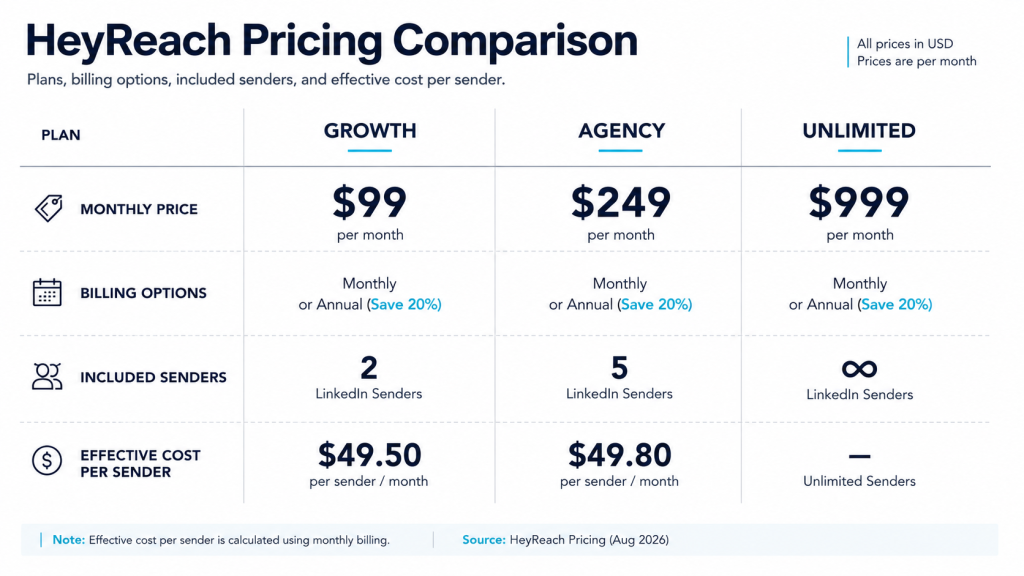
| Plan | Monthly | Quarterly (per mo) | Annual (per mo) | Senders included |
| Growth | $79/sender | $71/sender | $63/sender | Pay per sender you add |
| Agency | $999/mo | $899/mo | $799/mo | 25 senders (scales toward 50) |
| Unlimited | $2,999/mo | $2,699/mo | $2,399/mo | Unlimited, subject to fair use |
Source: HeyReach’s official pricing page.
Cost-per-sender math. On Growth, three connected accounts cost 3 × $79 = $237/month. That’s straightforward, but it also means Growth gets expensive fast: 10 senders on Growth runs $790/month, which already exceeds the Agency plan’s $999 flat rate for 25 senders. The break-even point sits somewhere between 12 and 13 senders, depending on the billing cycle. Below that, Growth is cheaper. Above it, Agency wins on a per-sender basis.
At the Agency tier, $999 for 25 senders works out to roughly $40 per sender, less than half the Growth rate. But Agency and Unlimited plans require you to bring your own proxies (HeyReach’s Growth plan includes a dedicated residential proxy per sender; the higher tiers do not). LaGrowthMachine’s published HeyReach pricing breakdown (LaGrowthMachine is itself a competing outreach platform, so treat the framing with that in mind, though the underlying proxy-cost figure is independently checkable) estimates residential proxies at $5 to $15 per account per month, so that a 25-sender Agency setup could add another $125 to $375 a month on top of the listed price.
Two more costs worth budgeting for that HeyReach’s pricing page doesn’t foreground: Sales Navigator, required for the advanced lead filtering many agency workflows depend on, runs separately at roughly $99/month per seat and isn’t included at any HeyReach tier (our Sales Navigator guide covers whether it’s worth adding to your stack). And the enrichment credits bundled into each plan (100 per sender on Growth, 1,000 on Agency, 3,000 on Unlimited) are a one-time allocation, not a recurring refill; HeyReach doesn’t publish what a credit top-up costs once you run out.
HeyReach also offers an early-stage discount for companies under $250,000 in annual revenue with fewer than five employees, and a 14-day free trial on Growth with no credit card required, capped at three LinkedIn accounts.
Comparing per-sender pricing models before you commit? See how SendCopy.ai structures its plans, including what’s bundled versus billed separately, on the pricing page.
What Users Like
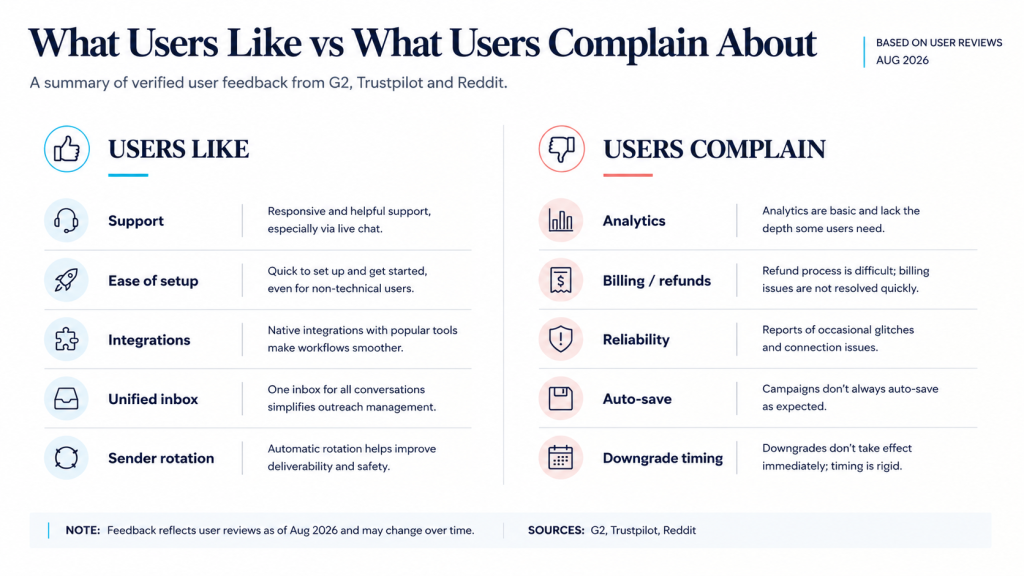
Pulling from HeyReach’s G2 page, three themes come up consistently. Reviewers highlight the platform’s ease of setup and its native integrations with tools like Clay, RB2B, HubSpot, and Smartlead as reasons they chose it over competing tools. Customer support gets singled out repeatedly, with reviewers describing fast, personal responses rather than scripted replies. And the unified inbox is a recurring favorite: several reviewers say managing every LinkedIn conversation from one screen, instead of logging in and out of separate accounts, is the single biggest time-saver.
Account safety also shows up often in the G2 pros. Reviewers running outreach for a year or more without restrictions credit the platform’s per-sender proxy assignment and built-in daily action limits. Worth flagging: this pattern is self-reported by reviewers still using the platform, so it likely understates account bans, since a user whose LinkedIn account got restricted and who churned as a result is less likely to be the one writing a G2 review.
A second caveat on the 4.6/5 G2 average itself: a portion of HeyReach’s G2 reviews are marked as incentivized, meaning the reviewer received a small gift card for completing the review, or came from a G2 invite campaign. That’s standard practice on G2 and doesn’t necessarily mean the reviews are inaccurate, but it’s a factor worth knowing when weighing how much the aggregate score should drive a purchase decision.
Full review set: HeyReach on G2.
What Users Complain About
Limited Analytics
More than one reviewer flagged reporting as a weak spot. Complaints center on sender-level analytics that don’t go deep enough for teams trying to improve acceptance and reply rates across dozens of accounts, and a lack of flexible controls for daily and weekly limits. HeyReach’s own website currently banners an “Analytics 2.0” update as forthcoming, though no public release date is attached to it, so it’s still the most consistent knock against the platform as of this review.
Billing, Refund, and Downgrade Timing Issues
A smaller but recurring complaint pattern involves billing mechanics. Salesforge’s HeyReach vs. Expandi analysis (Salesforge sells a competing LinkedIn-and-email outreach platform, so its comparison content has a commercial interest in the outcome, though the specific Trustpilot figures it cites are independently checkable) describes a no-refund policy applying even during periods when a customer says the platform wasn’t usable, plus confusion around when a downgrade takes effect relative to the billing cycle. This isn’t the dominant theme across G2 and Trustpilot combined, but it appears often enough that it’s worth confirming HeyReach’s current refund and downgrade policy directly with sales before signing an annual contract.
Reliability
The most specific complaints in this category are concrete: campaigns that stop mid-run, sessions that log users out every day or two, and progress that isn’t saved automatically when editing a sequence. One G2 reviewer described losing up to two hours of edits because the platform doesn’t auto-save, in a review posted in late 2025. These aren’t universal experiences, and they don’t appear to be limited to one period: similar reports show up in both 2025 and 2026 reviews, and many other reviewers across that same window report zero disruptions over months of daily use. That spread suggests an inconsistent experience rather than a fixed, resolved bug or a universal one.
The HeyReach Review Data, Unfiltered
Here’s how the three platforms compare side by side, based on what each shows publicly as of this writing.
| Platform | Rating | Review count | What stands out |
| G2 | 4.6/5 | 71~50 | Praise clusters around support and ease of use; low-star reviews cite bugs and poor onboarding |
| Trustpilot | ~4/5 | ~50 | Similar praise pattern; a notable share of 1-star reviews on billing and reliability |
| No aggregate score | N/A | Threads skew toward account-safety questions and comparisons against Expandi, Waalaxy, and Dripify rather than star ratings |
One pattern worth flagging: HeyReach’s ratings look strong on the surface but may be more polarized underneath. Salesforge’s analysis of HeyReach’s Trustpilot reviews reported an average of 3.9/5 with roughly 22% of reviews landing at 1 star [VERIFY exact figures against HeyReach’s Trustpilot page directly before publishing] rather than clustering in the 2-to-3-star middle. If that split holds up, it suggests HeyReach tends to either work very well for a customer or fail them outright, with fewer lukewarm, in-between experiences than a smooth rating curve would imply.
On Reddit, there’s no built-in rating system and no single subreddit dedicated to HeyReach, so sentiment can’t be summarized the way a G2 or Trustpilot score can. We didn’t find a consistent, verifiable pattern strong enough to characterize with confidence, so we’re not going to claim one here. What we can say is that when HeyReach comes up in agency and outbound-sales communities, it’s typically named alongside Expandi, Waalaxy, and Dripify as an established option rather than treated as unknown or fringe. Search “heyreach reddit” and expect scattered individual threads rather than a centralized discussion, and treat any single post you find as one person’s anecdote, not representative data.
Separately, HeyReach’s own LinkedIn company page and a co-founder’s profile were removed by LinkedIn in March 2026. HeyReach CEO Nikola Velkovski publicly addressed the removal, describing it as part of a broader pattern of LinkedIn taking action against major automation-tool company pages rather than a customer-account safety incident. That distinction matters, but it’s still a data point worth knowing if account safety is your top priority when evaluating the company itself, separate from your own account risk.
Who Should NOT Buy HeyReach
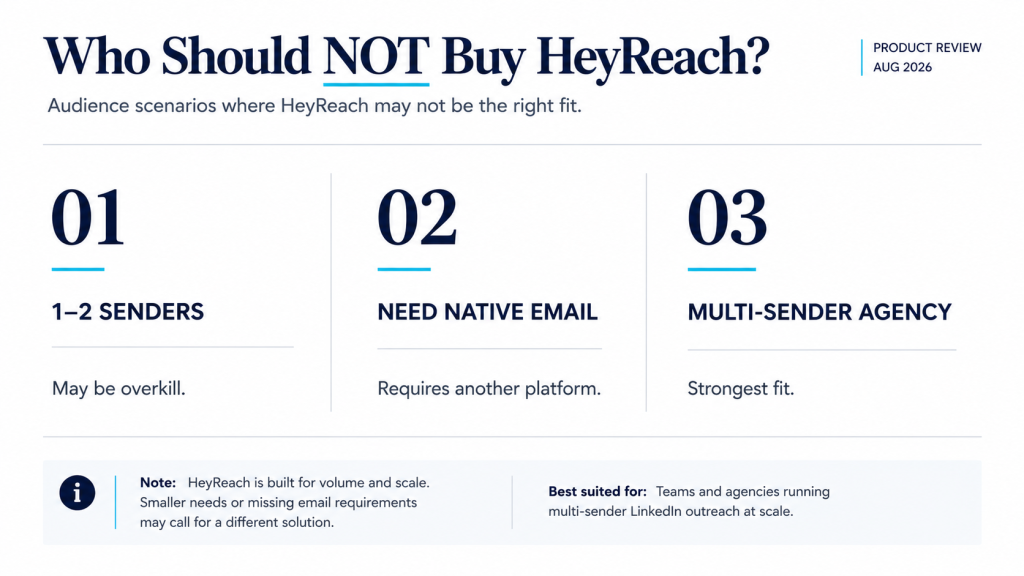
- Solo founders running one or two LinkedIn accounts. At $79 per sender, HeyReach is priced for teams managing volume across multiple accounts. A single G2 reviewer put it plainly: the pricing isn’t favorable for one or two seats. Cheaper single-account tools will cover the same core workflow for less.
- Teams running fewer accounts than the pricing math favors. Based on the per-sender breakeven shown earlier, Growth only starts looking efficient once you’re running enough accounts to spread the automation overhead and the $79/sender rate across real volume. Below roughly three senders, most reviewers describe manual outreach or a lighter single-account tool as the more practical starting point, though this is a judgment call rather than a figure HeyReach or its reviewers state outright.
- Teams that need native email in the same platform. HeyReach is built for LinkedIn and nothing else. Multichannel outreach requires pairing it with Instantly or Smartlead, which means a second subscription, a second login, and a second place for data to get out of sync.
HeyReach Alternatives Worth Considering
Before comparing tools, it helps to understand what puts a LinkedIn account at risk in the first place, since that risk exists regardless of which platform you choose. Why LinkedIn Accounts Get Banned, and How to Avoid It covers the mechanics.
For teams specifically weighing account-safety features against HeyReach’s, SendCopy.ai takes a similar LinkedIn-dedicated approach, with Auto-Rotate Senders and built-in LinkedIn Account Protection alongside its own unified inbox. It’s LinkedIn-focused rather than multichannel, so the comparison to HeyReach comes down to how each handles sender rotation, pricing structure, and support responsiveness rather than a broader platform difference. SendCopy.ai vs HeyReach comparison breaks that down in more detail.
Final Thought
The clearest signal in this HeyReach review isn’t the 4.6/5 average, it’s the split underneath it: a platform that reviewers either rely on for months without issue or churn from quickly overbilling and reliability friction, with comparatively few lukewarm accounts in between. The complaint pattern around reliability, auto-save, and billing mechanics is specific enough, and repeated enough across independent review platforms, that it’s worth taking seriously rather than dismissing as routine software-review noise.
If you’re running five or more LinkedIn senders and multichannel isn’t a requirement, HeyReach is worth a serious look, ideally started through the 14-day trial before you commit to an annual plan. If you’re a solo operator, need native email in the same tool, or you’ve been burned by billing surprises before, it’s worth reading the 1-star reviews on G2 and Trustpilot directly before you decide. That’s the honest takeaway of this HeyReach review: a capable tool for the right team size, with a specific, verifiable set of complaints that’s easy to check for yourself before you buy.
FAQ
Is HeyReach safe to use?
HeyReach assigns dedicated proxies to Growth-tier senders and enforces daily action limits designed to mirror human behavior, and many long-term reviewers report no LinkedIn restrictions after months of use, though that pattern likely undercounts churned users who stopped writing reviews after a ban. Separately, any tool that automates connection requests and messages operates outside LinkedIn’s User Agreement and Prohibited Software and Extensions policy, both of which prohibit third-party automation. Using HeyReach, or any similar tool, carries some inherent account risk regardless of the safety features built in.
Is HeyReach worth it?
For teams running outreach across five or more LinkedIn accounts, the Agency plan’s flat per-sender cost is competitive against per-seat alternatives, and reviewers consistently point to support quality and ease of use as reasons the price is justified. For solo users or teams with one to two accounts, the pricing is harder to justify against lighter, cheaper tools built for individual use.
Does HeyReach have a free trial?
Yes. HeyReach offers a 14-day free trial on the Growth plan with no credit card required, capped at three LinkedIn accounts. HeyReach also states it will consider 30-day trials for the Agency and Unlimited plans on request.
What do people say about HeyReach on Reddit?
Reddit discussion tends to focus less on star ratings and more on account safety, trust, and side-by-side comparisons against tools like Expandi, Waalaxy, and Dripify. There isn’t a centralized HeyReach subreddit or aggregate score, so sentiment has to be read thread by thread rather than summarized in a single number.
How does HeyReach pricing compare to per-seat tools?
HeyReach charges per LinkedIn sender rather than per user, so teammates, clients, and VAs can be added at no extra cost. That model favors agencies managing many accounts through few logins. For a concrete comparison: Expandi, a per-seat competitor, lists pricing around $99/seat/month, which runs more expensive than HeyReach’s $79/sender Growth rate at low volume but doesn’t include HeyReach’s flat-rate Agency and Unlimited tiers once you scale past a handful of accounts.
Ready to compare LinkedIn automation platforms hands-on? Start a free trial of SendCopy.ai, or book a demo to see Auto-Rotate Senders and the unified inbox on a live account.