
Disclosure and method: This Expandi review comes from SendCopy, which sells a competing LinkedIn outreach tool, so weigh it accordingly. Prices, limits, and features come from expandi.io/pricing and Expandi’s help pages, and ratings come from live G2 and Capterra pages, all checked on October 24, 2026.
Expandi review verdict in 60 seconds
- Best for: teams and agencies running two or more LinkedIn accounts that want branching sequences, a dedicated IP per account and email follow-ups in one tool.
- Worst for: solo users on a tight budget, and anyone who needs image, GIF or video personalization at a visible price.
- Price range: $79 to $99 per seat per month at list on expandi.io/pricing, one seat per LinkedIn account. Add-ons cost extra and are unpriced. Agency is custom at 10+ seats.
- One honest weakness: Expandi’s own pages disagree on campaign counts, Mobile Connector volume, and which plan gets custom roles. Get answers in writing before you buy for a team.
Is Expandi worth it? In this Expandi review, the answer is yes on paper for a multi-account team that will use the sequence builder and Workspaces. The price sits above the Dripify and Waalaxy entry plans below, and G2 and Capterra reviewers report support delays.
Table of Contents
What Expandi is and who uses it
Expandi is a cloud-based LinkedIn outreach tool from ProfitSoft BV in Eindhoven, the Netherlands, according to its site footer. Its Agency page FAQ says it runs in the cloud, not as a Chrome extension, so campaigns do not depend on your laptop. You build a sequence of connection requests, messages, and follow-up actions, and Expandi sends them within limits you set.
Expandi’s homepage names three audiences: sales teams, lead generation agencies and recruiters. The Agency tier adds white-labeling, client reports, and roles, and Workspaces support multiple accounts. Expandi’s Smart Campaigns page says email follow-ups can sit in the same sequence.
Expandi pricing in 2026
We read the live pricing page on October 24, 2026. Expandi publishes one price and one talk-to-sales tier.
| Plan | Monthly | Annual, paid upfront | What the page lists |
| Business | $99 per seat | $79 per seat per month ($948 per seat per year) | Dedicated country-based IP, auto warm-up, smart limit ranges, unlimited campaigns, if/action sequence builder |
| Agency | Custom, 10+ seats | Custom | Everything in Business, plus roles and permissions, client reports, template sharing, a customer success manager, own branding |
One seat is one LinkedIn account, so five accounts means five seats. Inviting teammates to a Workspace adds no seats, per Expandi’s Workspaces guide.
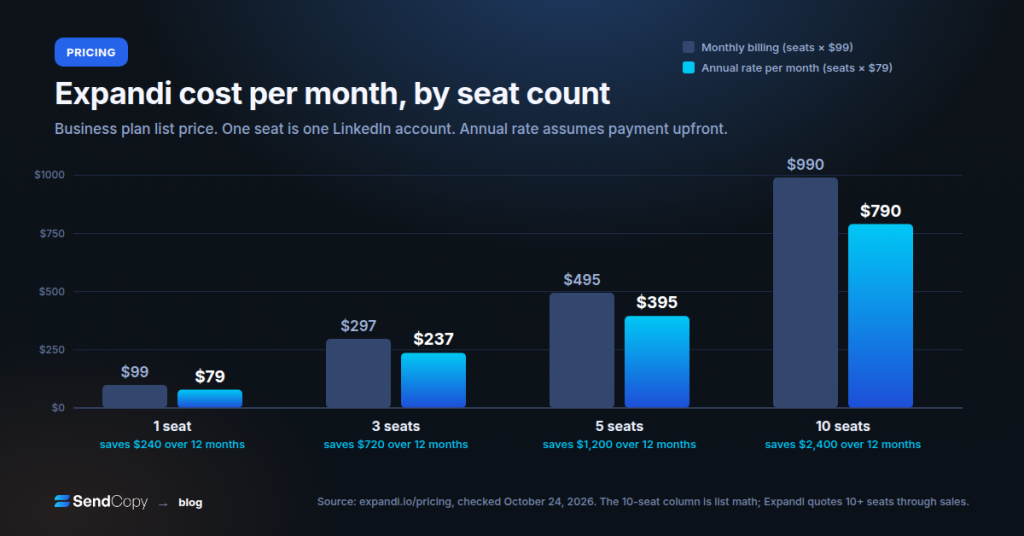
Expandi cost at 1, 3, 5, and 10 seats
| Seats | Monthly billing (seats × $99) | Annual rate per month (seats × $79) | Annual upfront (seats × $79 × 12) | Saved over 12 months |
| 1 | $99 | $79 | $948 | $240 |
| 3 | $279 | $237 | $2844 | $720 |
| 5 | $495 | $395 | $4740 | $1200 |
| 10 | $990 | $790 | $9480 | $2400 |
Savings are twelve months at the monthly rate minus the annual upfront total. The 10-seat row is list math only, since Expandi routes 10+ seats to sales.
What costs extra
Image and GIF personalization costs extra, and video runs through a Sendspark integration that Expandi labels a paid add-on. The pricing page publishes no amounts for either.
Sales Navigator is optional, but Expandi’s FAQ says it can widen your limit ranges, and lists built from Sales Navigator or Recruiter URLs need that LinkedIn subscription plus two-factor authentication connected to Expandi. LinkedIn bills for it, not Expandi, so each Sales Navigator account adds a second subscription to the seat.
Expandi free trial. The 7-day trial includes every feature and campaign type, and Expandi says it charges you only after you decide to continue. The pricing page does not say whether a card is needed at signup, and one G2 reviewer says theirs was. Seven-day tests set up and the inbox, not how an account holds up over weeks of sustained sending.
For a seat-by-seat view, see our Expandi vs SendCopy pricing breakdown. SendCopy Growth is $79 per month for one seat, so one Expandi seat on annual billing matches one SendCopy seat on monthly, though Expandi adds email steps and a dedicated IP that SendCopy does not.
Expandi Agency plan and the conflict log
Expandi’s pricing page puts Agency at custom pricing for 10+ seats and says the more accounts you take, the more you save. The pricing page FAQ repeats that larger seat counts earn bigger discounts and sends white-label buyers to a sales call. We found no published tiers or prices there.
The Agency page lists custom roles, client reports, campaign priority management, and a customer success manager, with no prices or volume table. The white-label page describes your own logo, colors, domain, menus, and SMTP, also unpriced.
| Item | One Expandi page says | Another says | What we could confirm |
| Agency volume pricing | Pricing page: custom, more accounts means more savings | Agency page: no figures | No published tiers. Get a written quote |
| Campaign types | Homepage: 11 Mobile | Connector announcement: ten | The help center names the types, so we print no count |
| Mobile Connector volume | Pricing page: 100 extra requests per week | Announcement: 10 to 15 extra per day, 70 to 105 per week advised | Both are Expandi’s. Ask which applies |
| Sequence builder size | Smart Campaigns page: 9 conditions, 11 actions | Homepage: three different pairs of counts | No count printed. Check in the trial |
| Custom roles | Pricing page: an Agency feature | Workspaces page and guide: every plan | Confirm roles on Business |
| Add-on prices | Image, GIF and Sendspark video cost extra | No amounts anywhere we read | Unpublished |
For agency math at five, ten, and twenty-five accounts, see our We-Connect alternatives for agencies guide.
Expandi features that matter
Sequences and conditions
What it does. If-then logic reacts to prospect behavior. Expandi’s Smart Campaigns page lists conditions such as whether they connected, whether you follow them, whether they visited your profile, whether an email was opened, and whether a post was liked.
Where it stops. G2’s cons summary flags campaign creation as complicated, and 2023 Capterra reviews describe flows that lost work or left leads stuck at a condition. Those reviews are old, so check whether the problems persist. Shared campaigns drop some builder actions, including tags, integrations, and event invites.
Campaign types
Expandi’s help center lists Connector, Messenger, Builder, Open InMail, Group, Event Invite, Inbound, Mobile Connector, Company Follow Invite, and Recovery campaigns. We print no count because Expandi’s pages give two totals.
Where it stops. Mobile Connector cannot carry a personalized note, and, per Expandi’s Shared Campaigns help article, Shared Campaigns support only Connector, Messenger, Builder and Open InMail.
Personalization
What it does. Expandi lists personalization variables, unlimited templates and A/B testing, with images and GIFs through Hyperise and video through Sendspark.
Where it stops. The visuals cost extra and carry no published price.
Inbox and Workspaces
What it does. Per the Workspaces guide, Workspaces groups accounts, teammates, campaigns, and integrations. The Global Inbox shows every conversation across accounts. Shared Campaigns run one sequence across several accounts and avoid messaging the same person twice within a company group.
Where it stops. The Global Inbox needs two or more connected accounts. Shared campaigns feed leads to each account in 24-hour batches, and only the creator and the Workspace owner can switch them on or off.
Integrations
What it does. Native syncs cover HubSpot, Salesforce, and Pipedrive. Webhooks, API credentials, and Zapier cover the rest, and Smartlead links LinkedIn with cold email.
Where it stops. G2’s cons summary lists integration errors, and one G2 reviewer says the HubSpot link pulls in every LinkedIn contact, even those without contact details. A 2023 Capterra review says CRM sync needed Zapier, but Expandi’s integrations page now lists native syncs.
Is Expandi safe? How the IP, warm-up, and limits work
Expandi’s pricing page lists three safety features.
- Dedicated IP: each account gets a dedicated country-based IP address.
- Auto warm-up: new automation starts small, and you adjust how fast it grows.
- Smart limit ranges: you set daily ranges for connections, messages, InMails, and event invites, and Expandi will not send past them.
Expandi says these reduce detection risk, and we found no independent test data. A dedicated IP changes where requests come from, not how many you send or how alike your messages are.
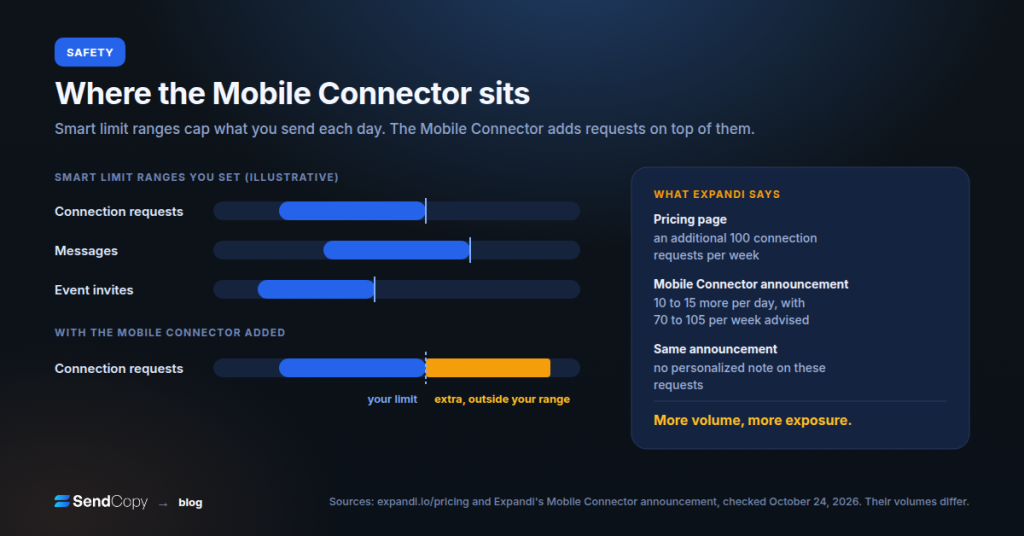
The Mobile Connector, plainly. It sends connection requests that simulate the LinkedIn mobile app, on top of the ranges you set elsewhere. Expandi’s pricing page says it adds 100 requests per week, while its Mobile Connector announcement says 10 to 15 extra per day and advises 70 to 105 weekly. More volume means more exposure, so treat it as a risk you choose, not free capacity.
What LinkedIn says. Section 8.2 of the User Agreement bars “bots or other unauthorized automated methods,” and LinkedIn’s help center lists automation software among prohibited tools. Expandi’s own footer puts the risk on you, so “safe” means lower detection risk, never permission.
All members, Basic and Premium, face invitation limits and restrictions. Expandi’s help center tells new accounts to start with a Connector campaign at conservative settings.
One G2 reviewer says they cancelled after two LinkedIn messages about automation use. That is one report, not a rate, and we publish no ban statistics because we found none from a source we trust. For more, read why LinkedIn accounts get banned and our LinkedIn safety guide.
Expandi review: what users say on G2 and Capterra
| Site | Rating | Reviews | Date checked |
| G2 | 4.3 out of 5 | 170 | October 24, 2026 |
| Capterra | 4.4 out of 5 | 31 | October 24, 2026 |
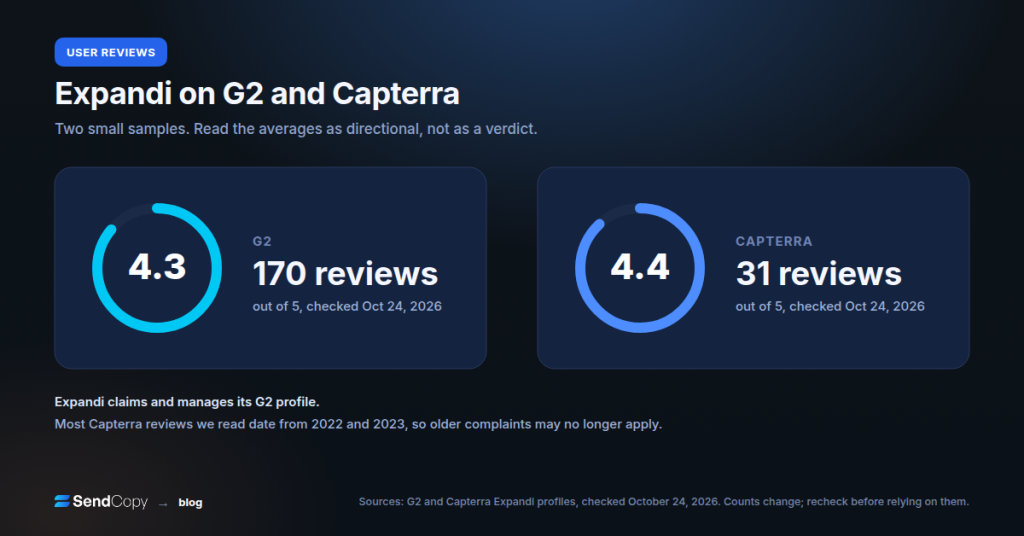
Expandi claims and manages its G2 profile, and review-site averages skew toward customers a vendor invites, so treat any Expandi review average as directional.
Praise. Support comes up most, ahead of ease of use and automation in G2’s own summary. A few Capterra reviewers credit Expandi with keeping accounts inside limits.
Complaints. G2’s cons summary lists integration errors, support delays, and complicated campaign creation. A 2023 Capterra reviewer says Expandi billed seven seats for four users, and a G2 reviewer describes a refund dispute. These are individual accounts, not rates.
Expandi pros and cons
Pros
- Teammates are free. Inviting teammates to a Workspace adds no seats.
- Safety tooling per seat. Dedicated IP, auto warm-up and limit ranges, with no separate proxy line on the pricing page.
- Branching sequences. If-then conditions plus email follow-ups in one flow.
- Multi-account tools included. Workspaces, Global Inbox and Shared Campaigns, per Expandi’s guide.
- Native CRM syncs. HubSpot, Salesforce and Pipedrive, plus webhooks and Zapier.
Cons
- Price scales with accounts. $99 per seat monthly, and each added LinkedIn account adds a seat.
- Unpriced add-ons. Image, GIF, and Sendspark video costs are not on the pricing page.
- Mobile Connector trade-offs. Extra volume means extra exposure, and no personalized note.
- Inconsistent documentation. Pages disagree on campaign counts, Mobile Connector volume, and custom roles.
- Support and setup complaints. G2 and Capterra reviewers cite integration errors and slow responses, though many reviews are dated.
Expandi review: who should choose it and who should skip it
Choose Expandi if:
- You run two to nine LinkedIn accounts (Agency pricing starts at 10) and want one flat per-seat price with Workspaces included.
- You need LinkedIn and email follow-ups in one sequence.
- You want a dedicated IP handled for you instead of buying proxies.
- You will use conditions, not just a connect-and-message drip.
Skip Expandi if:
- You are a solo user on a small budget, since several tools below list lower entry prices.
- You need image, GIF or video personalization at a known cost.
- You need fixed pricing or white label at 10+ seats without a sales call.
- You want zero automation risk. LinkedIn prohibits third-party automation, so no tool removes it.
Expandi alternatives compared
Billing units differ, so entry prices are not like-for-like. Check each vendor’s pricing page before you buy.
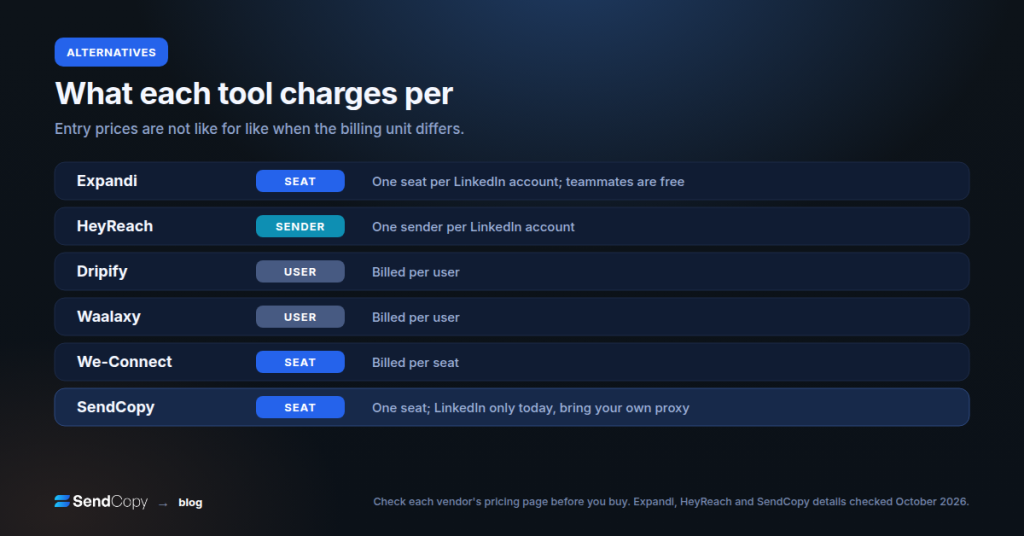
| Tool | Billing unit | Entry price | Best for |
| Expandi | Per seat (one LinkedIn account) | Business plan from $99 monthly, $79 per month annual upfront | Branching sequences, dedicated IP, LinkedIn plus email |
| HeyReach | Per sender (one LinkedIn account) | Growth plan from $79 per sender per month, lower on annual or volume, per its help center | Agencies rotating many sender accounts |
| Dripify | Per user | Pro plan from $79 monthly, $59 per user per month annually | Solo users and small teams watching cost |
| Waalaxy | Per user | Pro plan from about €19 per user per month, billing basis unclear. | Budget entry, email on a higher tier |
| We-Connect | Per seat | Growth from $69 per seat per month; Agency from 10 seats on request | Seat-based teams and agencies |
| SendCopy | Per seat | $79 per month for one seat, 20% off annual | LinkedIn-only teams wanting rotating senders and one inbox |
Read our HeyReach review, We-Connect review, Waalaxy review, and Dripify alternatives for details on each. Head-to-heads: Expandi vs HeyReach and Expandi vs Dripify.
Where SendCopy fits
SendCopy is our product, so discount this section, and most Expandi review pages online come from competitors, us included. SendCopy is LinkedIn-only today; email and WhatsApp are announced but not shipped, and you bring your own proxy. Third-party review volume is thin, so you will find far fewer G2 or Capterra opinions than Expandi has.
Growth costs $79 per month for one seat, with 20% off annually, and the free trial runs for 7 days with a card. It includes Auto-Rotate Senders, LinkedIn Account Protection, an AI-assisted sequence builder, and a unified inbox. If you need email steps in the same sequence today, Expandi does that, and we do not.
FAQ
How much does Expandi cost?
Expandi Business costs $99 per seat per month, or $79 per seat per month with annual upfront payment. One seat is one LinkedIn account, so three accounts cost $297 monthly or $237 on annual billing. Agency is custom at 10+ seats, and image, GIF and video add-ons carry no published price.
Is Expandi worth it?
In this Expandi review, it is worth it if you run several LinkedIn accounts and will use the branching sequences, Workspaces and dedicated IP. It is harder to justify for a solo user on a small budget. Use the 7-day trial to test add-on costs and support.
Is Expandi safe?
Expandi says it lowers detection risk with a dedicated country-based IP, automatic warm-up and daily limit ranges you set. It does not make automation allowed, because LinkedIn’s User Agreement prohibits third-party automation. The Mobile Connector adds exposure, and no tool can promise a ban-proof account.
Does Expandi have a free trial?
Yes, Expandi offers a 7-day free trial with access to all features and says it charges you only after you decide to continue. The pricing page does not say whether a card is required at signup, and one G2 reviewer says theirs was, so check the signup screen first.
What is the Expandi Mobile Connector?
The Mobile Connector is a campaign type that sends connection requests simulating the LinkedIn mobile app, adding volume outside your limit ranges. It cannot carry a personalized note. The pricing page says 100 extra requests per week, while Expandi’s announcement says 10 to 15 more per day.
What campaign types does Expandi have?
Expandi’s help center lists Connector, Messenger, Builder, Open InMail, Group, Event Invite, Inbound, Mobile Connector, Company Follow Invite and Recovery campaigns. Connector targets people outside your network, and Messenger targets existing connections. Expandi’s own pages disagree on the total, so we list names instead of a number.
What is the Expandi Agency plan?
Agency is Expandi’s custom-priced tier for 10+ seats. The pricing page lists roles and permissions, client reports, template sharing, a customer success manager, specialized support and use under your own brand. We found no published volume tiers, so request a written quote.
Does Expandi offer white label?
Yes, on the Agency tier. Expandi’s white-label page describes your own logo, colors, domain, menus and SMTP, plus your own chat widget and affiliate setup. Expandi describes it as your own version of the platform, and no price is published, so buyers are sent to a sales call.
What costs extra with Expandi?
Image and GIF personalization costs extra, and video runs through Sendspark as a paid add-on. Neither has a published price. You may also pay LinkedIn for Sales Navigator or Recruiter if you use those list URLs, and every extra LinkedIn account is another seat.
Is Expandi better than HeyReach or Dripify?
It depends on how you buy. Expandi bills per seat (one LinkedIn account), HeyReach bills per sender, and Dripify bills per user. Expandi bundles a dedicated IP and Workspaces, so compare total cost for your account count, not entry prices.
Final verdict
This Expandi review comes down to fit. Expandi fits teams that run several LinkedIn accounts and want branching sequences and Workspaces in the seat price. At $79 to $99 per seat per month plus unpriced add-ons, it costs more than the Dripify and Waalaxy entry plans, and G2 and Capterra reviewers cite support delays and integration errors.
Our advice: take the 7-day trial, run one campaign at conservative limits, and get Mobile Connector volume and add-on prices in writing before you add seats. For a LinkedIn-only option to test next to it, start a SendCopy trial or book a demo.